







Question: Create an application that converts American dollars to the three currencies indicated in Figure 4-47. Use the following names for the solution and project, respectively:
Create an application that converts American dollars to the three currencies indicated in Figure 4-47. Use the following names for the solution and project, respectively: Converter Solution and Converter Project. Save the application in the VB2015\Chap04 folder. Make the Convert button the default button. Use the Internet to determine the current conversion rates. Display the output with two decimal places. Clear the output when a change is made to the number of American dollars. Use a selection structure to verify that the American dollar box is not empty. If the box is empty, use the MessageBox.Show method to display an appropriate message. Test the application appropriately.
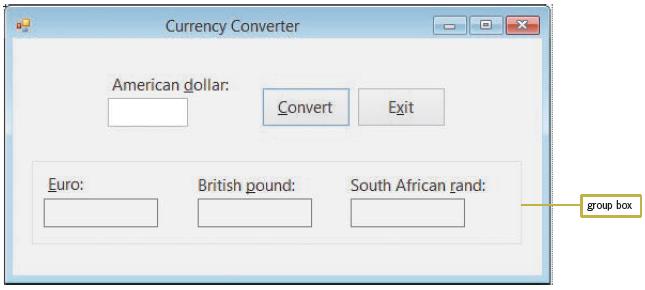
Currency Converter American dollar: Convert Exit Euro: British pound: South African rand: group box
Step by Step Solution
3.45 Rating (174 Votes )
There are 3 Steps involved in it
Microsoft Visual Studio Solution File Format Version 1200 Visual Studio 2012 ProjectF184B08FC81C45F6A57F5ABD9991F28F Converter Project Converter ProjectConverter Projectvbproj 36321000FA9B4DE1A6376210... View full answer

Get step-by-step solutions from verified subject matter experts
 Study Help