







Question: In this exercise, you modify one of the Gross Pay Calculator applications from the lesson. Use Windows to make a copy of the Gross Solution-Dual
In this exercise, you modify one of the Gross Pay Calculator applications from the lesson. Use Windows to make a copy of the Gross Solution-Dual folder. Rename the copy Modified Gross Solution-Dual. Open the Gross Solution (Gross Solution.sln) file contained in the Modified Gross Solution-Dual folder. Locate the btnCalc_Click procedure in the Code Editor window. Change the selection structure as indicated in Figure 4-29. You will need to provide the overtime calculation. Save the solution, and then start and test the application.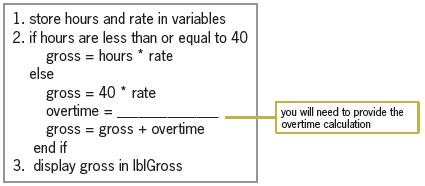
1. store hours and rate in variables 2. if hours are less than or equal to 40 gross = hours * rate else gross = 40 * rate overtime = . gross = gross + overtime end if you will need to provide the overtime calculation 3. display gross in IblGross
Step by Step Solution
3.55 Rating (155 Votes )
There are 3 Steps involved in it
Microsoft Visual Studio Solution File Format Version 1200 Visual Studio 14 VisualStudioVersion 140220131 MinimumVisualStudioVersion 100402191 ProjectF184B08FC81C45F6A57F5ABD9991F28F Gross Project Gros... View full answer

Get step-by-step solutions from verified subject matter experts
 Study Help