







Question: Open the VB2015Chap11Palace SolutionPalace Solution (Palace Solution.sln) file. Create a Rectangle class similar to the one shown earlier in Figure 11-23; however, use Double variables
Open the VB2015\Chap11\Palace Solution\Palace Solution (Palace Solution.sln) file. Create a Rectangle class similar to the one shown earlier in Figure 11-23; however, use Double variables rather than Integer variables. The application should calculate and display the number of square yards of carpeting needed to carpet a rectangular floor. Code and then test the application appropriately.
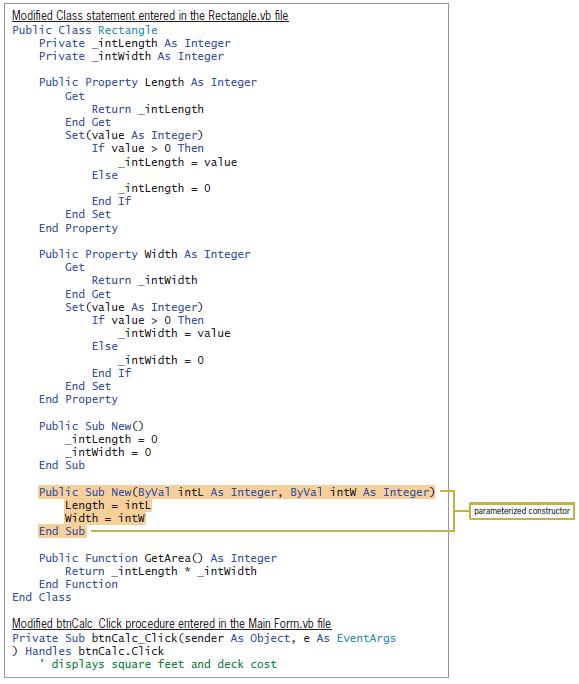
Modified Class statement entered in the Rectangle.vb file Public Class Rectangle Private intLength As Integer Private intwidth As Integer Public Property Length As Integer Get Return _intlength End Get Set(value As Integer) If value > 0 Then _intlength = value Else intlength = 0 End If End Set End Property Public Property Width As Integer Get Return _intwidth End Get Set (value As Integer) If value > 0 Then _intwidth = value Else _intwidth = 0 End If End Set End Property Public Sub New() _intlength = 0 _intwidth = 0 End Sub Public Sub New(ByVal intl As Integer, ByVal intw As Integer) Length = intl Width = intw End Sub parameterized constructor Public Function GetArea() As Integer Return _intlength * _intwidth End Function End Class Modified btnCalc Click procedure entered in the Main Form.vb file Private Sub btnCalc Click(sender As Object, e As EventArgs ) Handles btnCalc.Click displays square feet and deck cost
Step by Step Solution
3.55 Rating (159 Votes )
There are 3 Steps involved in it
Microsoft Visual Studio Solution File Format Version 1200 Visual Studio 14 VisualStudioVersion 140225120 MinimumVisualStudioVersion 100402191 ProjectF184B08FC81C45F6A57F5ABD9991F28F Palace Project Pal... View full answer

Get step-by-step solutions from verified subject matter experts
 Study Help