







Question: Using the Car class from Figure 11-28, write a Dim statement that uses the parameterized constructor to instantiate a Car object. Pass the string Fusion
Using the Car class from Figure 11-28, write a Dim statement that uses the parameterized constructor to instantiate a Car object. Pass the string “Fusion” and the number 22560.99 to the parameterized constructor. The Dim statement should assign the object to a variable named rentalCar.
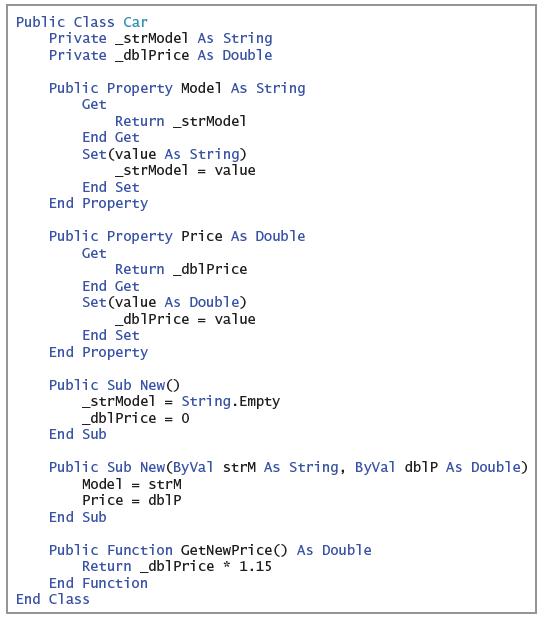
Public Class Car Private strModel As String Private _db1Price As Double Public Property Model As String Get Return _strModel End Get Set (value As String) _strModel = value End Set End Property Public Property Price As Double Get Return _db1Price End Get Set (value As Double) _db1Price = value End Set End Property Public Sub New() _strModel = String.Empty _db1Price = 0 End Sub Public Sub New(ByVal strM As String, ByVal dblP As Double) Model = strM Price = db1P End Sub Public Function GetNewPrice() As Double Return _db1Price * 1.15 End Function End Class
Step by Step Solution
3.46 Rating (162 Votes )
There are 3 Steps involved in it
Dim ren... View full answer

Get step-by-step solutions from verified subject matter experts
 Study Help