







Question: - 0 4 2 2 6 4 6 2 Start Excel. Download and open the workbook named: Chapter_0_Budget_Start 2 In cell L4, enter 2,387.12. Format
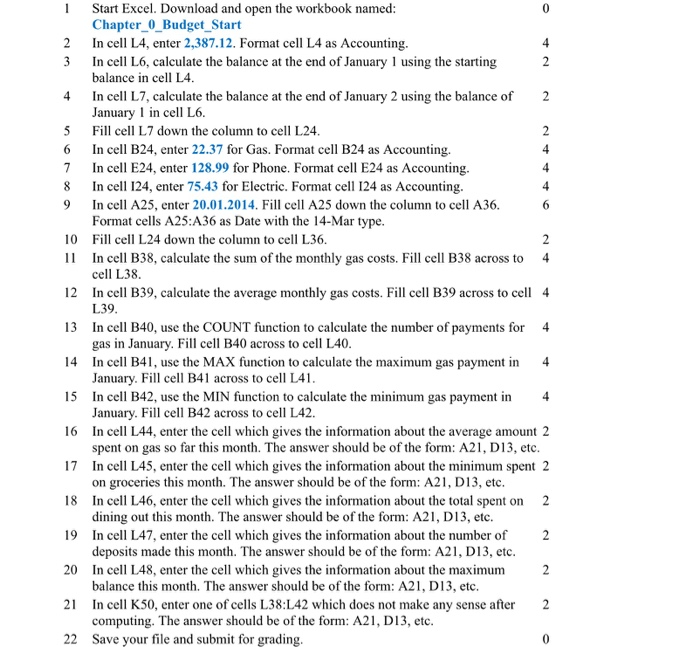
- 0 4 2 2 6 4 6 2 Start Excel. Download and open the workbook named: Chapter_0_Budget_Start 2 In cell L4, enter 2,387.12. Format cell L4 as Accounting. 4 3 In cell L6, calculate the balance at the end of January 1 using the starting 2 balance in cell L4. In cell L7, calculate the balance at the end of January 2 using the balance of January 1 in cell L6. 5 Fill cell L7 down the column to cell L24. In cell B24, enter 22.37 for Gas. Format cell B24 as Accounting. 4 7 In cell E24, enter 128.99 for Phone. Format cell E24 as Accounting. 8 In cell 124, enter 75.43 for Electric. Format cell 124 as Accounting. 9 In cell A25, enter 20.01.2014. Fill cell A25 down the column to cell A36. Format cells A25:A36 as Date with the 14-Mar type. 10 Fill cell L24 down the column to cell L36. 11 In cell B38, calculate the sum of the monthly gas costs. Fill cell B38 across to 4 cell L38. 12 In cell B39, calculate the average monthly gas costs. Fill cell B39 across to cell 4 L39. 13 In cell B40, use the COUNT function to calculate the number of payments for 4 gas in January. Fill cell B40 across to cell L40. 14 In cell B41, use the MAX function to calculate the maximum gas payment in 4 January. Fill cell B41 across to cell L41. 15 In cell B42, use the MIN function to calculate the minimum gas payment in 4 January. Fill cell B42 across to cell L42. 16 In cell L44, enter the cell which gives the information about the average amount 2 spent on gas so far this month. The answer should be of the form: A21, D13, etc. 17 In cell L45, enter the cell which gives the information about the minimum spent 2 on groceries this month. The answer should be of the form: A21, D13, etc. 18 In cell L46, enter the cell which gives the information about the total spent on 2 dining out this month. The answer should be of the form: A21, D13, etc. 19 In cell L47, enter the cell which gives the information about the number of deposits made this month. The answer should be of the form: A21, D13, etc. 20 In cell L48, enter the cell which gives the information about the maximum 2 balance this month. The answer should be of the form: A21, D13, etc. 21 In cell K50, enter one of cells L38:L42 which does not make any sense after computing. The answer should be of the form: A21, D13, etc. 22 Save your file and submit for grading. 2 0 - 0 4 2 2 6 4 6 2 Start Excel. Download and open the workbook named: Chapter_0_Budget_Start 2 In cell L4, enter 2,387.12. Format cell L4 as Accounting. 4 3 In cell L6, calculate the balance at the end of January 1 using the starting 2 balance in cell L4. In cell L7, calculate the balance at the end of January 2 using the balance of January 1 in cell L6. 5 Fill cell L7 down the column to cell L24. In cell B24, enter 22.37 for Gas. Format cell B24 as Accounting. 4 7 In cell E24, enter 128.99 for Phone. Format cell E24 as Accounting. 8 In cell 124, enter 75.43 for Electric. Format cell 124 as Accounting. 9 In cell A25, enter 20.01.2014. Fill cell A25 down the column to cell A36. Format cells A25:A36 as Date with the 14-Mar type. 10 Fill cell L24 down the column to cell L36. 11 In cell B38, calculate the sum of the monthly gas costs. Fill cell B38 across to 4 cell L38. 12 In cell B39, calculate the average monthly gas costs. Fill cell B39 across to cell 4 L39. 13 In cell B40, use the COUNT function to calculate the number of payments for 4 gas in January. Fill cell B40 across to cell L40. 14 In cell B41, use the MAX function to calculate the maximum gas payment in 4 January. Fill cell B41 across to cell L41. 15 In cell B42, use the MIN function to calculate the minimum gas payment in 4 January. Fill cell B42 across to cell L42. 16 In cell L44, enter the cell which gives the information about the average amount 2 spent on gas so far this month. The answer should be of the form: A21, D13, etc. 17 In cell L45, enter the cell which gives the information about the minimum spent 2 on groceries this month. The answer should be of the form: A21, D13, etc. 18 In cell L46, enter the cell which gives the information about the total spent on 2 dining out this month. The answer should be of the form: A21, D13, etc. 19 In cell L47, enter the cell which gives the information about the number of deposits made this month. The answer should be of the form: A21, D13, etc. 20 In cell L48, enter the cell which gives the information about the maximum 2 balance this month. The answer should be of the form: A21, D13, etc. 21 In cell K50, enter one of cells L38:L42 which does not make any sense after computing. The answer should be of the form: A21, D13, etc. 22 Save your file and submit for grading. 2 0
Step by Step Solution
There are 3 Steps involved in it

Get step-by-step solutions from verified subject matter experts
 Study Help