







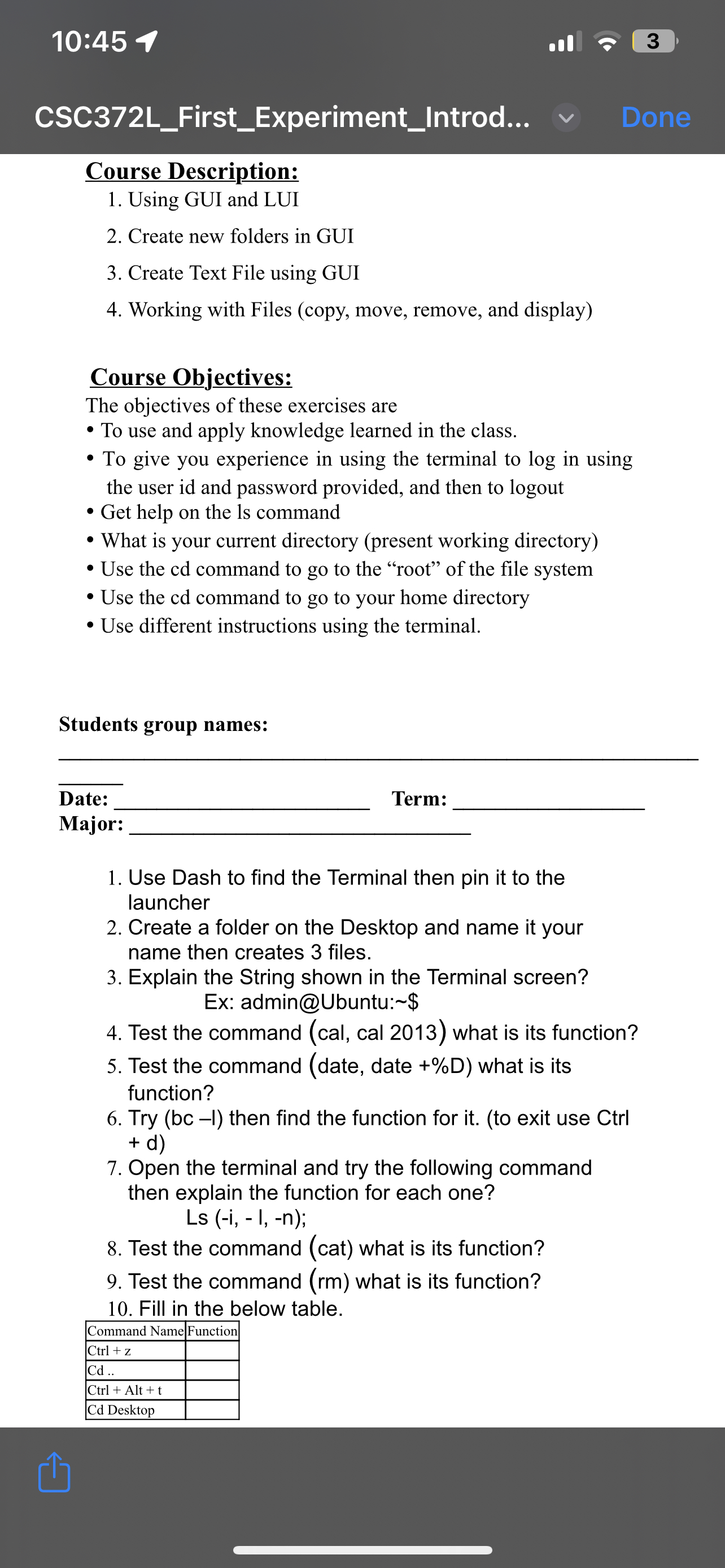
Question: 1 0 : 4 5 3 CSC 3 7 2 L _ First _ Experiment _ Introd... Done Course Description: Using GUI and LUI Create
:
CSCLFirstExperimentIntrod...
Done
Course Description:
Using GUI and LUI
Create new folders in GUI
Create Text File using GUI
Working with Files copy move, remove, and display
Course Objectives:
The objectives of these exercises are
To use and apply knowledge learned in the class.
To give you experience in using the terminal to in using the user id and password provided, and then to logout
Get help on the ls command
What is your current directory present working directory
Use the cd command to go to the "root" of the file system
Use the cd command to go to your home directory
Use different instructions using the terminal.
Students group names:
Date:
Term:
Major:
Use Dash to find the Terminal then pin it to the launcher
Create a folder on the Desktop and name it your name then creates files.
Explain the String shown in the Terminal screen?
Ex: admin@Ubuntu: $
Test the command cal cal what is its function?
Test the command date date what is its function?
Try then find the function for itto exit use Ctrl
Open the terminal and try the following command then explain the function for each one?
Ls i I, n;
Test the command cat what is its function?
Test the command what is its function?
Fill in the below table.
tableCommand Name,Function Alt Desktop,
Step by Step Solution
There are 3 Steps involved in it
1 Expert Approved Answer
Step: 1 Unlock

Question Has Been Solved by an Expert!
Get step-by-step solutions from verified subject matter experts
Step: 2 Unlock
Step: 3 Unlock
 Study Help