







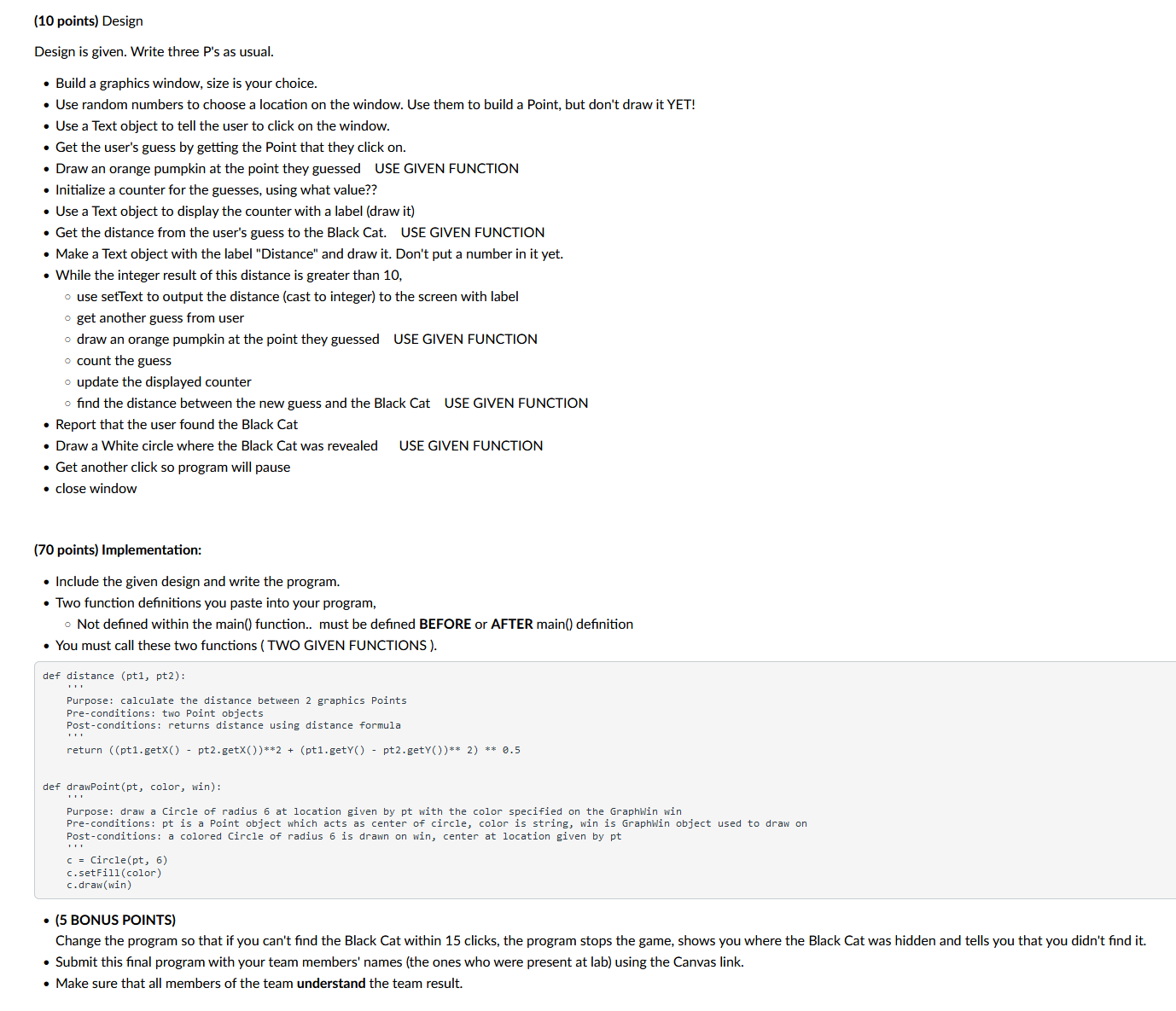
Question: ( 1 0 points ) Design in Python Design is given. Write three P ' s as usual. - Build a graphics window, size is
points Design in Python
Design is given. Write three Ps as usual.
Build a graphics window, size is your choice.
Use random numbers to choose a location on the window. Use them to build a Point, but don't draw it YET!
Use a Text object to tell the user to click on the window.
Get the user's guess by getting the Point that they click on
Draw an orange pumpkin at the point they guessed USE GIVEN FUNCTION
Initialize a counter for the guesses, using what value??
Use a Text object to display the counter with a label draw it
Get the distance from the user's guess to the Black Cat. USE GIVEN FUNCTION
Make a Text object with the label "Distance" and draw it Don't put a number in it yet.
While the integer result of this distance is greater than
use setText to output the distance cast to integer to the screen with label
get another guess from user
draw an orange pumpkin at the point they guessed USE GIVEN FUNCTION
count the guess
update the displayed counter
find the distance between the new guess and the Black Cat USE GIVEN FUNCTION
Report that the user found the Black Cat
Draw a White circle where the Black Cat was revealed USE GIVEN FUNCTION
Get another click so program will pause
close window
points Implementation:
Include the given design and write the program.
Two function definitions you paste into your program,
Not defined within the main function.. must be defined BEFORE or AFTER main definition
You must call these two functions TWO GIVEN FUNCTIONS
def distance pt pt:
Purpose: calculate the distance between graphics Points
Preconditions: two Point objects
Postconditions: returns distance using distance formula
return ptgetX ptgetXptgetY ptgetY
def drawPointpt color, win:
Purpose: draw a Circle of radius at location given by pt with the color specified on the GraphWin win
Preconditions: pt is a Point object which acts as center of circle, color is string, win is GraphWin object used to draw on
Postconditions: a colored Circle of radius is drawn on win, center at location given by pt
c Circlept
csetFillcolor
cdrawwin
BONUS POINTS
Change the program so that if you can't find the Black Cat within clicks, the program stops the game, shows you where the Black Cat was hidden and tells you that you didn't find it
Submit this final program with your team members' names the ones who were present at lab using the Canvas link.
Make sure that all members of the team understand the team result.
Sample screens while playing the game:
Halloween Hunt Find the black cat
Click to find the black cat
distance
guesses
Halloween Hunt Find the black cat
Click to find the black cat
Distance
Guesses:
THE BLACK CAT IS CLEVER!!
The trick is practice, try again
Click to Close
distance
Guesses:
Halloween Hunt Find the black cat
YOU FOUND THE BLACK CAT!!
What a treat!
Click to Close
Step by Step Solution
There are 3 Steps involved in it
1 Expert Approved Answer
Step: 1 Unlock

Question Has Been Solved by an Expert!
Get step-by-step solutions from verified subject matter experts
Step: 2 Unlock
Step: 3 Unlock
 Study Help