







Question: 1 1 . Answer these questions about or modify our class code ( look on Blackboard. a . Which statement does a toggle? b .
Answer these questions about or modify our class codelook on Blackboard.
a Which statement does a toggle?
b Write code that changes the timer start button text Stop timer. Then when pressed again the button stops the Timer and changes the text back to Start Timer. So the timer button toggles on and off.
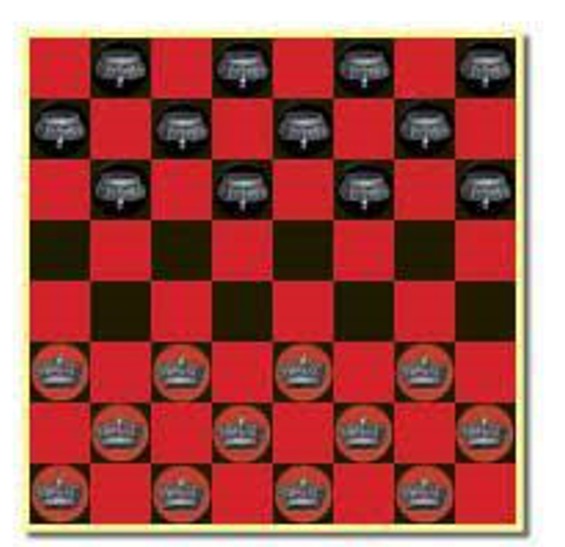
c Add the checkers to the board as below:
To place an image use this syntax:
Graphics.DrawImageRedChecker xywidth,height
Use BlackChecker for the black checkers.
Make annotations in the code.
public partial class Form : Form
int numseconds ;
public Form
InitializeComponent;
private void FormPaintobject sender PaintEventArgs e
Random r new Random;
Graphics ourgraphics;
ourgraphics eGraphics;
SolidBrush backbrush new SolidBrushColorSilver;
ourgraphics.FillRectanglebackbrush;
SolidBrush boardbrush new SolidBrushColorRed;
int xcoord,ycoord;
Boolean redflag false;
int squaresize ;
for int j ; j ;j
xcoord ;
for int i ; i ; i
ycoord j squaresize;
if redflag
boardbrush new SolidBrushColorRed;
else
boardbrush new SolidBrushColorBlack;
ourgraphics.FillRectangleboardbrush xcoord, ycoord, squaresize, squaresize;
xcoord xcoord squaresize;
redflag redflag;
redflag redflag;
factor factor factor factor
int percentages;
Color colors Color.Orange,Color.Bisque, Color.Navy, Color.Aquamarine ;
rewrite the code to generate the pie chart
int startangle ;
int alpha ;
for int j ; j ; j
startangle ;
SolidBrush piebrush;
int currentangle startangle;
for int i ; i percentages.Length; i
piebrush new SolidBrushcolorsi;
int red piebrush.Color.R ;
int green piebrush.Color.G ;
int blue piebrush.Color.B;
if red red ;
if green green ;
if blue blue ;
if alpha alpha ;
int red rNext;
int green rNext;
int blue rNext;
piebrush new SolidBrushColorFromArgbalphared, green, blue;
colorsi piebrush.Color;
double sweepangle doublepercentagesi;
ourgraphics.FillPiepiebrush currentangle, intsweepangle;
currentangle intsweepangle;
Thread.Sleep;
SolidBrush factor new SolidBrushColorOrange;
SolidBrush factor new SolidBrushColorBisque;
SolidBrush factor new SolidBrushColorNavy;
SolidBrush factor new SolidBrushColorAquamarine;
ourgraphicsFillPiefactor;
ourgraphicsFillPiefactor;
ourgraphicsFillPiefactor;
ourgraphicsFillPiefactor;
private void timerTickobject sender EventArgs e
numseconds numseconds ;
buttonText numseconds.ToString;
private void FormLoadobject sender EventArgs e
private void buttonClickobject sender EventArgs e
timerStart;
Step by Step Solution
There are 3 Steps involved in it
1 Expert Approved Answer
Step: 1 Unlock

Question Has Been Solved by an Expert!
Get step-by-step solutions from verified subject matter experts
Step: 2 Unlock
Step: 3 Unlock
 Study Help