







Question: 1: (10 Points) Use the customers table, and write a query statement to show CustFirstName, CustLastName, and CustCity columns. 2: (10 Points) Use the employees
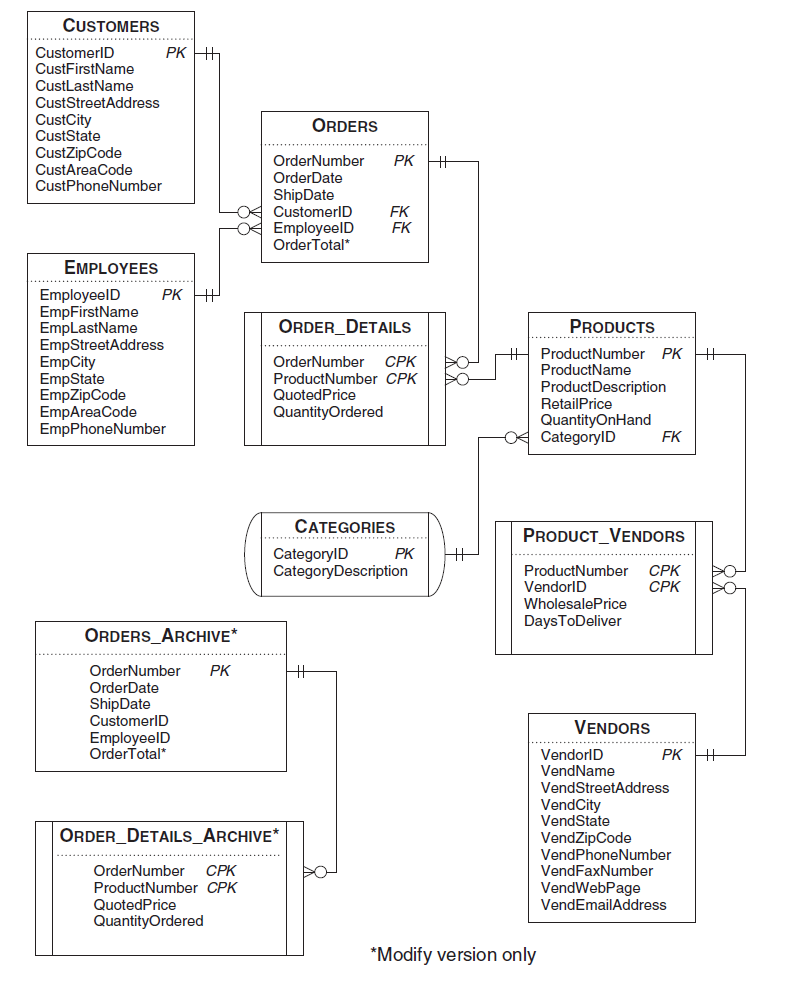
1: (10 Points) Use the customers table, and write a query statement to show CustFirstName, CustLastName, and CustCity columns.
2: (10 Points) Use the employees table, and write a query statement to show the employees EmployeeID, EmpFirstName, EmpLastName, and EmpPhoneNumber, if the employee is living in the 98413 zip code.
3. (20 Points) Use INNER JOIN to create a query result. In this query result, list each vendors name and the name of each product the vendor has supplied to our company. You should use the Vendors, Product_Vendors, and the Products tables in the database to complete this task.
4. (15 Points) Use subquery and find the detail of the most expensive product in the table of products.
5. (15 Points) Use the orders table and find the total order values per customer. Hint: Use group by clause and an aggregation function.
6. (10 Points) Use subquery and show details of the customers that have not placed any orders. If a customer (i.e, its CustomerID) is not in the table of orders, that means the customer has not placed any orders.
7. (10 Points) Use Delete statement to remove products that have not been ordered by any customers. Hint: A product that is not in the table of order_details means the product has not been ordered, find (without duplicate) of those products.
8. (10 Points) Use Update and Case Statements to increase the retail price (under column RetailPrice) of products that are from CategoryID 1 and 2 by 10% and the rest of the products by 5%.
Please answer in text format to make it readable.
CUSTOMERS CustomerID PK Hth CustFirstName CustLastName CustStreetAddress CustCity CustState CustZipCode CustAreaCode CustPhone Number ORDERS PK Order Number OrderDate Ship Date CustomerlD Employeeld Order Total* FK FK ORDER_DETAILS EMPLOYEES Employeeld PK EmpFirstName EmpLastName Emp StreetAddress Emp City EmpState EmpZip Code EmpAreaCode EmpPhone Number CPK OrderNumber Product Number CPK QuotedPrice QuantityOrdered PRODUCTS Product Number PK HH ProductName Product Description RetailPrice QuantityOnHand CategoryID FK EER PRODUCT_VENDORS CATEGORIES CategoryID PK CategoryDescription CPK CPK Product Number VendorID Wholesale Price DaysToDeliver ORDERS_ARCHIVE* PK OrderNumber OrderDate ShipDate CustomerlD Employeeld OrderTotal* VENDORS Vendorld PK HE VendName VendStreetAddress VendCity VendState VendZipCode VendPhone Number VendFaxNumber VendWebPage VendEmailAddress ORDER_DETAILS_ARCHIVE* Order Number CPK Product Number CPK QuotedPrice QuantityOrdered *Modify version onlyStep by Step Solution
There are 3 Steps involved in it

Get step-by-step solutions from verified subject matter experts
 Study Help