







Question: 1 2 . 1 0 LAB: Step counter - exceptions A pedometer treats walking 2 , 0 0 0 steps as walking 1 mile. Write
LAB: Step counter exceptions
A pedometer treats walking steps as walking mile. Write a stepsToMiles method that takes the number of steps as an integer parameter and returns the miles walked as a double. The stepsToMiles method throws an Exception object with the message "Exception: Negative step count entered." when the number of steps is negative. Complete the main method that reads the number of steps from a user, calls the stepsToMiles method, and outputs the returned value from the stepsToMiles method. Use a trycatch block to catch any Exception object thrown by the stepsToMiles method and output the exception message.
Output each floatingpoint value with two digits after the decimal point, which can be achieved as follows:
System.out.printff yourValue;
Ex: If the input of the program is:
the output of the program is:
Ex: If the input of the program is:
the output of the program is:
Exception: Negative step count entered.
LAB ACTIVITY
: LAB: Step counter exceptions
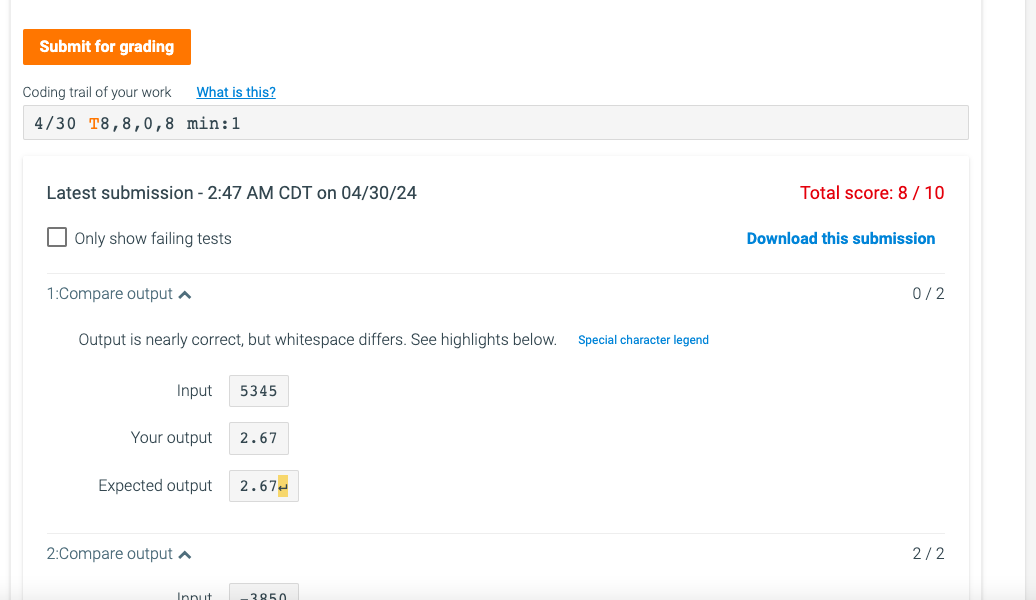
Only show failing tests
:Compare output
:Compare output
Output is nearly correct, but whitespace differs. See highlights below.
Special character legend
Input
Your output
Expected output
here is my code
import java.util.Scanner;
public class LabProgram
Method to convert steps to miles
public static double stepsToMilesint steps throws Exception
if steps
throw new ExceptionException: Negative step count entered.";
return steps ;
public static void mainString args
Scanner scnr new ScannerSystemin;
int steps scnrnextInt; Read the number of steps from the user
try
Call the stepsToMiles method and output the result
System.out.printff stepsToMilessteps;
catch Exception e
Output the exception message if negative steps are entered
System.out.printlnegetMessage;
scnrclose; Close the scanner
Step by Step Solution
There are 3 Steps involved in it
1 Expert Approved Answer
Step: 1 Unlock

Question Has Been Solved by an Expert!
Get step-by-step solutions from verified subject matter experts
Step: 2 Unlock
Step: 3 Unlock
 Study Help