



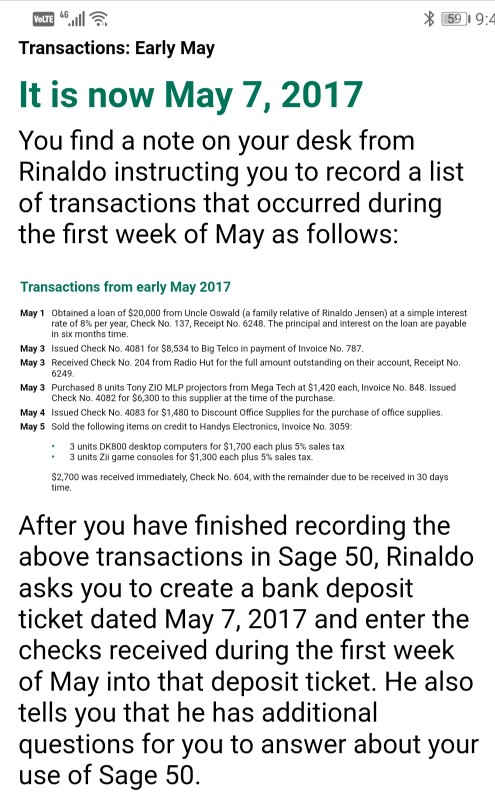
Question: 1 2 3 4 5 VoLTE * 59 9:4 Transactions: Early May It is now May 7, 2017 You find a note on your desk
1
2 3
4
5
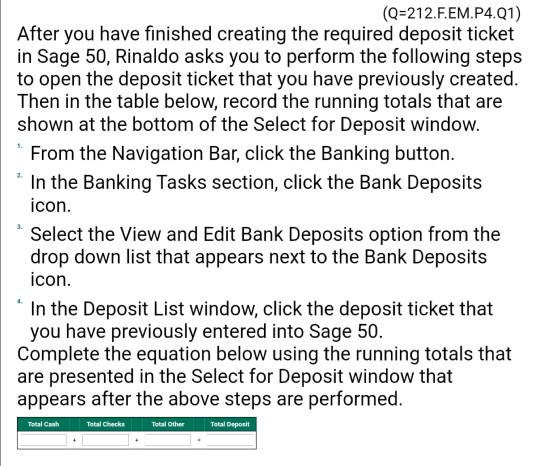
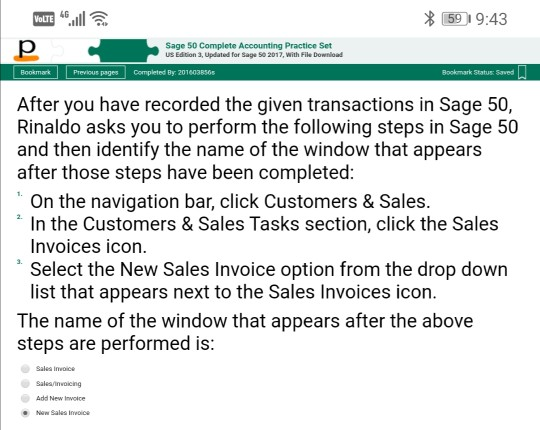
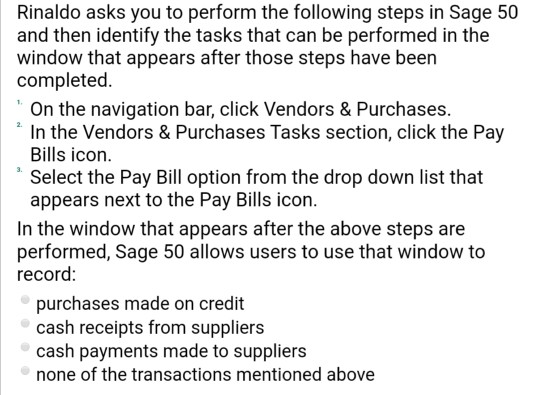
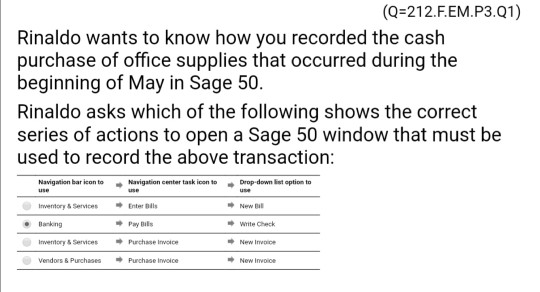
VoLTE * 59 9:4 Transactions: Early May It is now May 7, 2017 You find a note on your desk from Rinaldo instructing you to record a list of transactions that occurred during the first week of May as follows: Transactions from early May 2017 May 1 Obtained a loan of $20,000 from Uncle Oswald (a family relative of Rinaldo Jensen) at a simple interest rate of 8% per year, Check No. 137, Receipt No. 6248. The principal and interest on the loan are payable in six months time. May 3 Issued Check No. 4081 for $8,534 to Big Telco in payment of Invoice No. 787 May 3 Received Check No. 204 from Radio Hut for the full amount outstanding on their account, Receipt No. 6249 May 3 Purchased 8 units Tony ZIO MLP projectors from Mega Tech at $1.420 each, Invoice No. 848. Issued Check No. 4082 for $6,300 to this supplier at the time of the purchase. May 4 Issued Check No. 4083 for $1,480 to Discount Office Supplies for the purchase of office supplies May 5 Sold the following items on credit to Handys Electronics, Invoice No. 3059 3 units DKB00 desktop computers for $1,700 each plus 5% sales tax 3 units Zii game consoles for $1,300 each plus 5% sales tax $2,700 was received immediately, Check No. 604, with the remainder due to be received in 30 days time After you have finished recording the above transactions in Sage 50, Rinaldo asks you to create a bank deposit ticket dated May 7, 2017 and enter the checks received during the first week of May into that deposit ticket. He also tells you that he has additional questions for you to answer about your use of Sage 50. VoLTE * 59 19:43 Sage 50 Complete Accounting Practice Set US Edition 3, Updated for Sage 50 2017, With File Download Bookmark Previous pages Completed By:2016030565 Bookmark Status: Saved After you have recorded the given transactions in Sage 50, Rinaldo asks you to perform the following steps in Sage 50 and then identify the name of the window that appears after those steps have been completed: "On the navigation bar, click Customers & Sales. * In the Customers & Sales Tasks section, click the Sales Invoices icon. Select the New Sales Invoice option from the drop down list that appears next to the Sales Invoices icon. The name of the window that appears after the above steps are performed is: Sales indice Sales/invoicing Add New Invoice New Sales Inc Rinaldo asks you to perform the following steps in Sage 50 and then identify the tasks that can be performed in the window that appears after those steps have been completed "On the navigation bar, click Vendors & Purchases. "In the Vendors & Purchases Tasks section, click the Pay Bills icon. Select the Pay Bill option from the drop down list that appears next to the Pay Bills icon. In the window that appears after the above steps are performed, Sage 50 allows users to use that window to record: purchases made on credit cash receipts from suppliers cash payments made to suppliers none of the transactions mentioned above (Q=212.F.EM.P3.01) Rinaldo wants to know how you recorded the cash purchase of office supplies that occurred during the beginning of May in Sage 50. Rinaldo asks which of the following shows the correct series of actions to open a Sage 50 window that must be used to record the above transaction: Navigation bar on to Navigation center tank icon to Dropdown let option to New Baking Pay is write Check Inventory Services Purchase invice New Invoice Vendors Purchase Purchase invoice New Invoice (Q=212.E.EM.P4,Q1) After you have finished creating the required deposit ticket in Sage 50, Rinaldo asks you to perform the following steps to open the deposit ticket that you have previously created. Then in the table below, record the running totals that are shown at the bottom of the Select for Deposit window. From the Navigation Bar, click the Banking button. In the Banking Tasks section, click the Bank Deposits icon. "Select the view and Edit Bank Deposits option from the drop down list that appears next to the Bank Deposits icon. In the Deposit List window, click the deposit ticket that you have previously entered into Sage 50. Complete the equation below using the running totals that are presented in the Select for Deposit window that appears after the above steps are performed. Total Cash Total Checks Total Other Total Deposit VoLTE * 59 9:4 Transactions: Early May It is now May 7, 2017 You find a note on your desk from Rinaldo instructing you to record a list of transactions that occurred during the first week of May as follows: Transactions from early May 2017 May 1 Obtained a loan of $20,000 from Uncle Oswald (a family relative of Rinaldo Jensen) at a simple interest rate of 8% per year, Check No. 137, Receipt No. 6248. The principal and interest on the loan are payable in six months time. May 3 Issued Check No. 4081 for $8,534 to Big Telco in payment of Invoice No. 787 May 3 Received Check No. 204 from Radio Hut for the full amount outstanding on their account, Receipt No. 6249 May 3 Purchased 8 units Tony ZIO MLP projectors from Mega Tech at $1.420 each, Invoice No. 848. Issued Check No. 4082 for $6,300 to this supplier at the time of the purchase. May 4 Issued Check No. 4083 for $1,480 to Discount Office Supplies for the purchase of office supplies May 5 Sold the following items on credit to Handys Electronics, Invoice No. 3059 3 units DKB00 desktop computers for $1,700 each plus 5% sales tax 3 units Zii game consoles for $1,300 each plus 5% sales tax $2,700 was received immediately, Check No. 604, with the remainder due to be received in 30 days time After you have finished recording the above transactions in Sage 50, Rinaldo asks you to create a bank deposit ticket dated May 7, 2017 and enter the checks received during the first week of May into that deposit ticket. He also tells you that he has additional questions for you to answer about your use of Sage 50. VoLTE * 59 19:43 Sage 50 Complete Accounting Practice Set US Edition 3, Updated for Sage 50 2017, With File Download Bookmark Previous pages Completed By:2016030565 Bookmark Status: Saved After you have recorded the given transactions in Sage 50, Rinaldo asks you to perform the following steps in Sage 50 and then identify the name of the window that appears after those steps have been completed: "On the navigation bar, click Customers & Sales. * In the Customers & Sales Tasks section, click the Sales Invoices icon. Select the New Sales Invoice option from the drop down list that appears next to the Sales Invoices icon. The name of the window that appears after the above steps are performed is: Sales indice Sales/invoicing Add New Invoice New Sales Inc Rinaldo asks you to perform the following steps in Sage 50 and then identify the tasks that can be performed in the window that appears after those steps have been completed "On the navigation bar, click Vendors & Purchases. "In the Vendors & Purchases Tasks section, click the Pay Bills icon. Select the Pay Bill option from the drop down list that appears next to the Pay Bills icon. In the window that appears after the above steps are performed, Sage 50 allows users to use that window to record: purchases made on credit cash receipts from suppliers cash payments made to suppliers none of the transactions mentioned above (Q=212.F.EM.P3.01) Rinaldo wants to know how you recorded the cash purchase of office supplies that occurred during the beginning of May in Sage 50. Rinaldo asks which of the following shows the correct series of actions to open a Sage 50 window that must be used to record the above transaction: Navigation bar on to Navigation center tank icon to Dropdown let option to New Baking Pay is write Check Inventory Services Purchase invice New Invoice Vendors Purchase Purchase invoice New Invoice (Q=212.E.EM.P4,Q1) After you have finished creating the required deposit ticket in Sage 50, Rinaldo asks you to perform the following steps to open the deposit ticket that you have previously created. Then in the table below, record the running totals that are shown at the bottom of the Select for Deposit window. From the Navigation Bar, click the Banking button. In the Banking Tasks section, click the Bank Deposits icon. "Select the view and Edit Bank Deposits option from the drop down list that appears next to the Bank Deposits icon. In the Deposit List window, click the deposit ticket that you have previously entered into Sage 50. Complete the equation below using the running totals that are presented in the Select for Deposit window that appears after the above steps are performed. Total Cash Total Checks Total Other Total Deposit
Step by Step Solution
There are 3 Steps involved in it

Get step-by-step solutions from verified subject matter experts