







Question: 1) 2 points. In this exercise, you create MRP views for your raw material, Wood Kit. The following screen shows the result after performing the
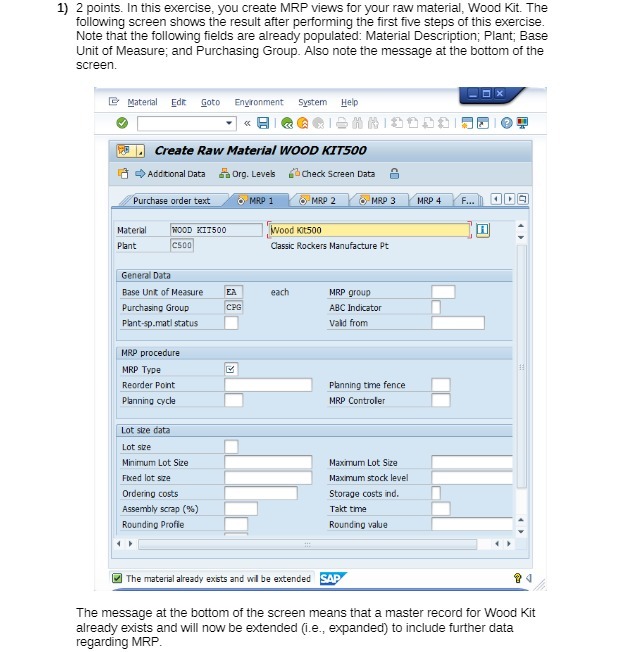
1) 2 points. In this exercise, you create MRP views for your raw material, Wood Kit. The following screen shows the result after performing the first five steps of this exercise. Note that the following fields are already populated: Material Description; Plant; Base Unit of Measure; and Purchasing Group. Also note the message at the bottom of the screen. Material Edit Goto Environment System Help Create Raw Material WOOD KIT500 Additional Data Org. Levels Check Screen Data Purchase order text O' MAP 1 6 MAP 2 O MAP 3 MRP 4 F... 0 09 Material WOOD KIT500 Wood Kit500 Plant Classic Rockers Manufacture Pt General Data Base Unit of Measure EA each MRP group Purchasing Group CPG ABC Indicator Plant-sp_math status Vald from MRP procedure MRP Type Reorder Point Planning time fence Planning cycle MRP Controller Lot ske data Lot ske Minimum Lot Size Maximum Lot Size Fixed lot size Maximum stock level Ordering costs Storage costs ind. Assembly scrap (%) Takt time Rounding Profile Rounding value The material already exists and wil be extended SAP The message at the bottom of the screen means that a master record for Wood Kit already exists and will now be extended (i.e., expanded) to include further data regarding MRP
Step by Step Solution
There are 3 Steps involved in it

Get step-by-step solutions from verified subject matter experts
 Study Help