



Question: 1. Add a script tag in the head section of as07.html to use main.js . (Dont forget the defer attribute!) 2. Create a variable that
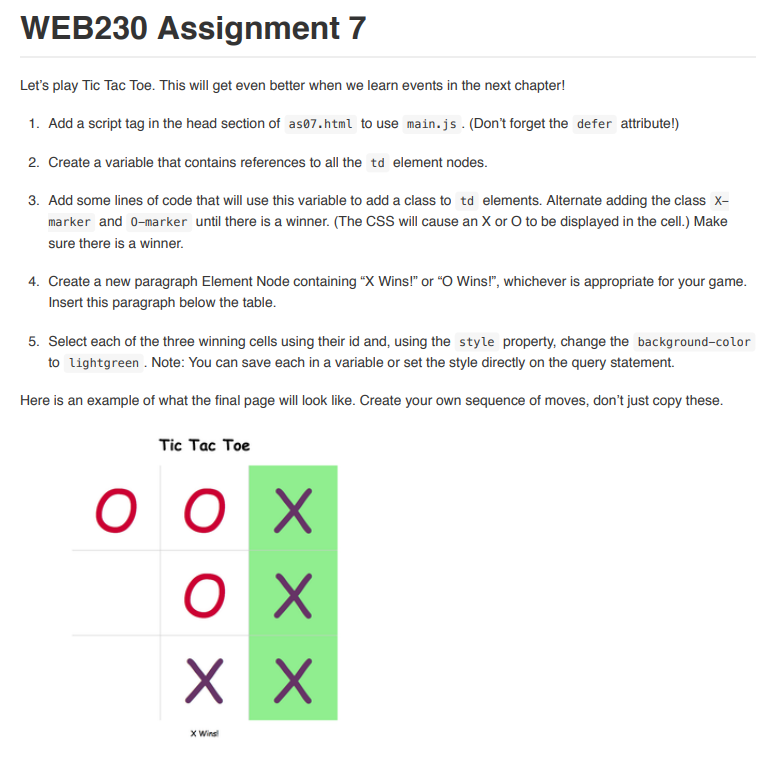
1. Add a script tag in the head section of as07.html to use main.js . (Dont forget the defer attribute!) 2. Create a variable that contains references to all the td element nodes. 3. Add some lines of code that will use this variable to add a class to td elements. Alternate adding the class Xmarker and O-marker until there is a winner. (The CSS will cause an X or O to be displayed in the cell.) Make sure there is a winner. 4. Create a new paragraph Element Node containing X Wins! or O Wins!, whichever is appropriate for your game. Insert this paragraph below the table. 5. Select each of the three winning cells using their id and, using the style property, change the background-color to lightgreen . Note: You can save each in a variable or set the style directly on the query statement. Here is an example of what the final page will look like. Create your own sequence of moves, dont just copy these
Tic Tac Toe
WEB230 Assignment 7 Let's play Tic Tac Toe. This will get even better when we learn events in the next chapter! 1. Add a script tag in the head section of as07.html to use main.js . (Don't forget the defer attribute!) 2. Create a variable that contains references to all the td element nodes. 3. Add some lines of code that will use this variable to add a class to td elements. Alternate adding the class X- marker and 0-marker until there is a winner. (The CSS will cause an X or O to be displayed in the cell.) Make sure there is a winner. 4. Create a new paragraph Element Node containing "X Wins!" or "O Wins!", whichever is appropriate for your game. 5. Select each of the three winning cells using their id and, using the style to lightgreen . Note: You can save each in a variable or set the style directly on the query statement. property, change the background-color Here is an example of what the final page will look like. Create your own sequence of moves, don't just copy these. Tic Tac Toe WEB230 Assignment 7 Let's play Tic Tac Toe. This will get even better when we learn events in the next chapter! 1. Add a script tag in the head section of as07.html to use main.js . (Don't forget the defer attribute!) 2. Create a variable that contains references to all the td element nodes. 3. Add some lines of code that will use this variable to add a class to td elements. Alternate adding the class X- marker and 0-marker until there is a winner. (The CSS will cause an X or O to be displayed in the cell.) Make sure there is a winner. 4. Create a new paragraph Element Node containing "X Wins!" or "O Wins!", whichever is appropriate for your game. 5. Select each of the three winning cells using their id and, using the style to lightgreen . Note: You can save each in a variable or set the style directly on the query statement. property, change the background-color Here is an example of what the final page will look like. Create your own sequence of moves, don't just copy these. Tic Tac Toe
Step by Step Solution
There are 3 Steps involved in it

Get step-by-step solutions from verified subject matter experts