







Question: 1 Alpha Corporation Information 2 3 CODE 4 OH 5 6 5 7 8 SGA 9 OH 10 11 OH 12 SGA 13 14 15
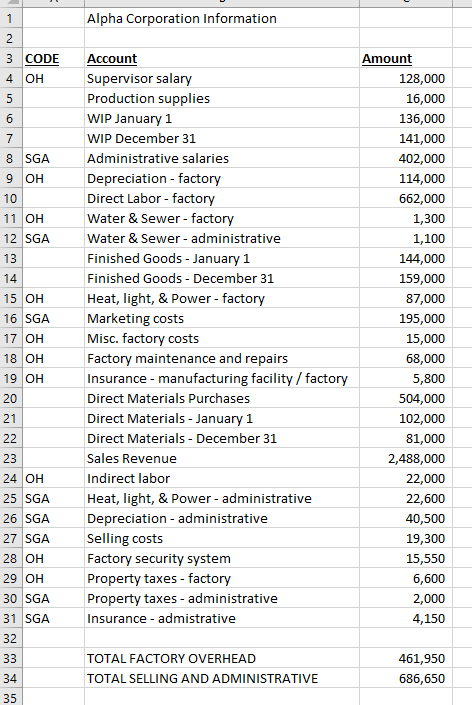
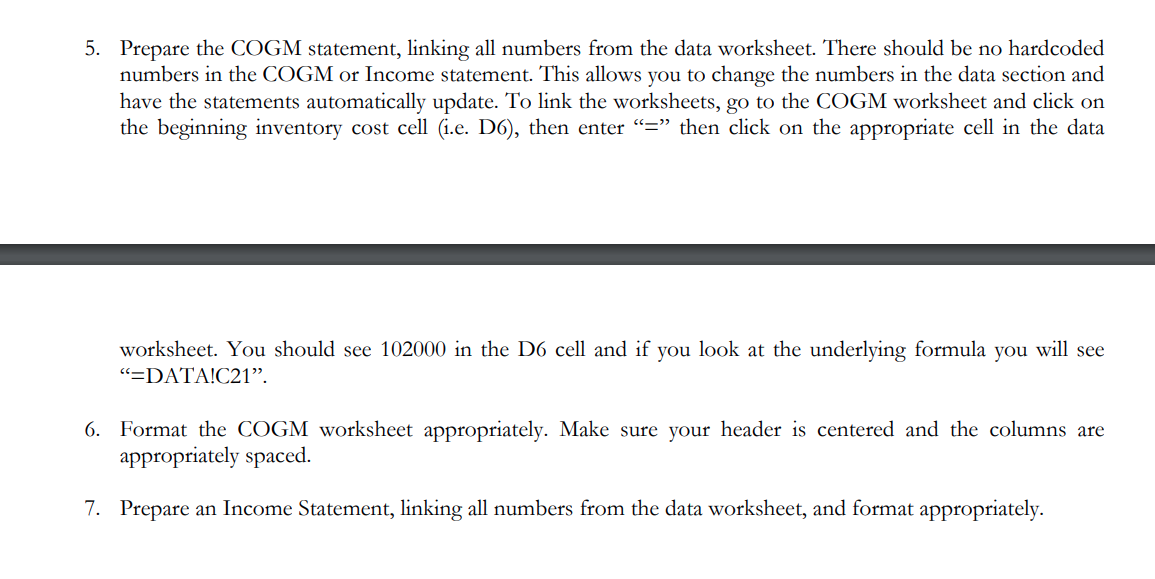
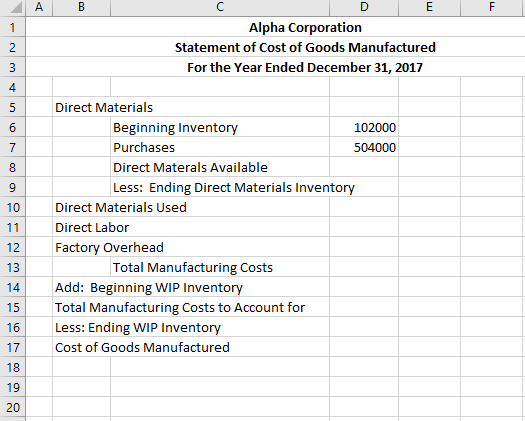
1 Alpha Corporation Information 2 3 CODE 4 OH 5 6 5 7 8 SGA 9 OH 10 11 OH 12 SGA 13 14 15 OH 16 SGA 17 OH 18 OH 19 OH Account Supervisor salary Production supplies WIP January 1 WIP December 31 Administrative salaries Depreciation - factory Direct Labor - factory Water & Sewer - factory Water & Sewer - administrative Finished Goods - January 1 Finished Goods - December 31 Heat, light, & Power - factory Marketing costs Misc. factory costs Factory maintenance and repairs Insurance - manufacturing facility / factory Direct Materials Purchases Direct Materials - January 1 Direct Materials - December 31 Sales Revenue Indirect labor Heat, light, & Power - administrative Depreciation - administrative Selling costs Factory security system Property taxes - factory Property taxes - administrative Insurance - admistrative Amount 128,000 16,000 136,000 141,000 402,000 114,000 662,000 1,300 1,100 144,000 159,000 87,000 195,000 15,000 68,000 5,800 504,000 102,000 81,000 2,488,000 22,000 22,600 40,500 19,300 15,550 6,600 2,000 4,150 20 21 22 23 24 OH 25 SGA 26 SGA 27 SGA 28 OH 29 OH 30 SGA 31 SGA 32 33 TOTAL FACTORY OVERHEAD TOTAL SELLING AND ADMINISTRATIVE 461,950 686,650 34 35 5. Prepare the COGM statement, linking all numbers from the data worksheet. There should be no hardcoded numbers in the COGM or Income statement. This allows you to change the numbers in the data section and have the statements automatically update. To link the worksheets, go to the COGM worksheet and click on the beginning inventory cost cell (i.e. D6), then enter = then click on the appropriate cell in the data will see worksheet. You should see 102000 in the D6 cell and if you look at the underlying formula you =DATA!C21. 6. Format the COGM worksheet appropriately. Make sure your header is centered and the columns are appropriately spaced. 7. Prepare an Income Statement, linking all numbers from the data worksheet, and format appropriately. A B D E F 1 2. 3 Alpha Corporation Statement of Cost of Goods Manufactured For the Year Ended December 31, 2017 4 5 5 6 7 on 9 9 10 11 Direct Materials Beginning Inventory 102000 Purchases 504000 Direct Materals Available Less: Ending Direct Materials Inventory Direct Materials Used Direct Labor Factory Overhead Total Manufacturing Costs Add: Beginning WIP Inventory Total Manufacturing Costs to Account for Less: Ending WIP Inventory Cost of Goods Manufactured 12 min 16 17 18 19 20 A B D E F 1 Income Statement 2 3 4 5 5 6 7 00 9 10 11 12 13 14 15 16 17 18 19 20 21 22 23 24 25 26 27 28 29 30 31 32
Step by Step Solution
There are 3 Steps involved in it

Get step-by-step solutions from verified subject matter experts
 Study Help