







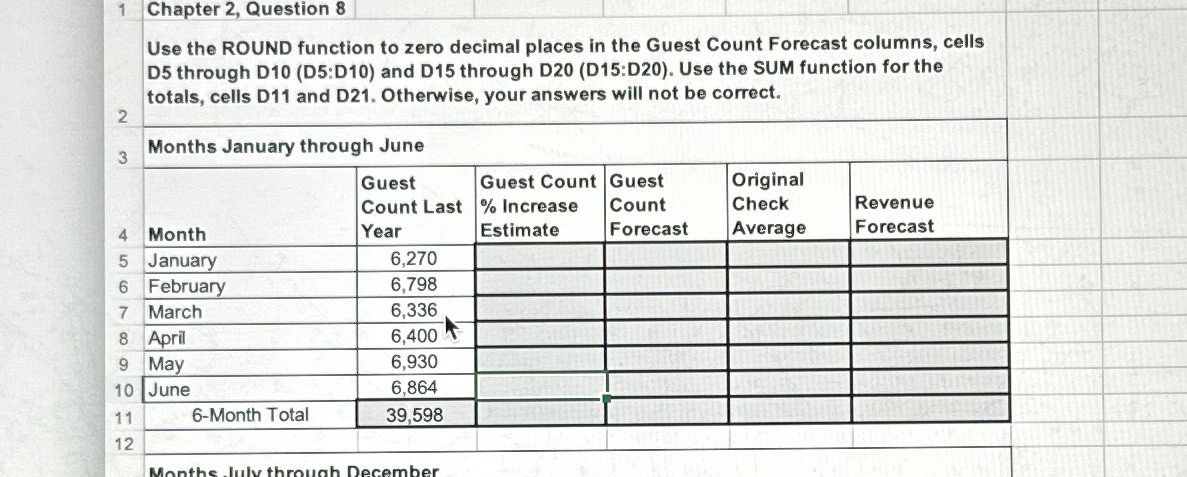
Question: 1 Chapter 2 , Question 8 Use the ROUND function to zero decimal places in the Guest Count Forecast columns, cells D 5 through D
Chapter Question
Use the ROUND function to zero decimal places in the Guest Count Forecast columns, cells D through DD:D and D through DD:D Use the SUM function for the totals, cells D and D Otherwise, your answers will not be correct.
Months January through June
tabletableGuestCount LastYeartableGuest Count IncreaseEstimatetableGuestCountForecasttableOriginalCheckAveragetableRevenueForecastJanuaryFebruaryMarchAprilMayJune
Step by Step Solution
There are 3 Steps involved in it
1 Expert Approved Answer
Step: 1 Unlock

Question Has Been Solved by an Expert!
Get step-by-step solutions from verified subject matter experts
Step: 2 Unlock
Step: 3 Unlock
 Study Help