







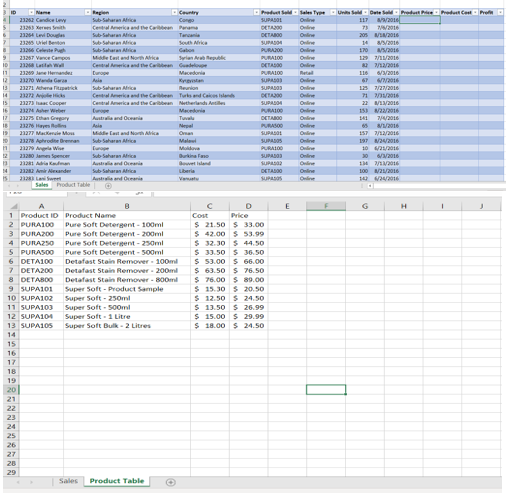
Question: 1 . Click the sales sheet. Format the data set as a table. Choose a style from the styles gallery. 2 . Create the following
Click the sales sheet. Format the data set as a table. Choose a style from the styles gallery.
Create the following calculated columns.
a In I and J use a VLOOKUP function that will look up the Product Price and Product Cost based on the Product Sold column which lists an ID number. Hint: The Product Table sheet lists the Price and Cost If any error messages appear, check the Range Lookup.
b In K use a formula to calculate Profit. Hint: Profit Product PriceProduct CostUnits Sold
Format columns I, J and K as currency with two decimal places.
Make a copy of the Sales sheet and rename it Online Sales by Date. Place this sheet to the right of the Sales sheet. Answer the following question by filtering the data accordingly.
a What was the total Profit for Online Sales?
b Sort the results by Date Sold AZ
Step by Step Solution
There are 3 Steps involved in it
1 Expert Approved Answer
Step: 1 Unlock

Question Has Been Solved by an Expert!
Get step-by-step solutions from verified subject matter experts
Step: 2 Unlock
Step: 3 Unlock
 Study Help