







Question: 1) Complete the following programming assignment: Design & implement a class called Point that represents a location in the Cartesian plane. Include (at a minimum)
1)
- Complete the following programming assignment:
- Design & implement a class called Point that represents a location in the Cartesian plane.
- Include (at a minimum) the following methods:
- setX(double x), setY(double y), setPoint(double x, double y) - set the coordinates of the point.
- shiftX(double n), shiftY(double n) - shift a point by a given amount along one of the axes.
- distance(Point p2) - finds the distance to point p2.
- rotate(double angle) - rotates the point by a specified angle around the origin. The formula for rotation is as follows:
x=xcos()ysin()
y=xsin()+ycos()
Any other methods you believe to be necessary.
- Your code should work with the driver class provided (Project1.java).
- Use the driver with no code modifications to test your class for the correct results.
- Use the informal UML below to complete your Point class.
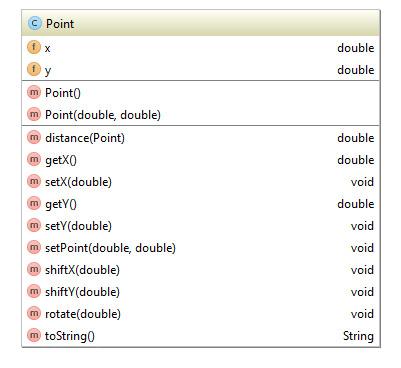
Expected Output
Once you get your Point class working, when you run the driver, you should see something similar to the following:
Project 1 : Point Tester Point 1: Point{x = 3.0, y = 1.0} Point 2: Point{x = 6.0, y = 5.0} Distance: 5.0 Rotated a 1.5707963267948966: Point{x = -0.9999999999999998, y = -0.9999999999999997} Shifted b 4.47213595499958 away from original position: Point{x = 10.0, y = 3.0}2/ Write unit tests for your Point class.
Typically, with classes like these, we don't write unit tests for getter/setter pairs, so lets skip those. (That'll be the rule for all of the projects.) So the methods you'll need to write unit tests for (to get full points) are the following:
- shiftX
- shiftY
- rotate
- distance
Point fx double double double double void m Point m Point(double, double) m distance(Point) m getxo m setX(double) m getYO m setY(double) m setPoint(double double) m shiftX(double) m shiftY(double) m rotate(double) m toStringo double void void void void void String
Step by Step Solution
There are 3 Steps involved in it

Get step-by-step solutions from verified subject matter experts
 Study Help