





Question: 1. Convert the following loose HTML5 format into XML format. Mention the required changes as comments. Then write the code in the answer. to show
 1. Convert the following loose HTML5 format into XML format. Mention

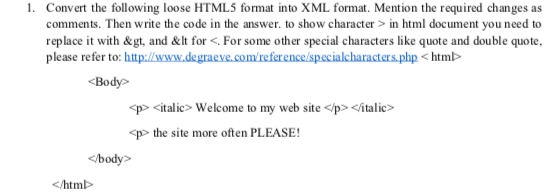
1. Convert the following loose HTML5 format into XML format. Mention the required changes as comments. Then write the code in the answer. to show character > in html document you need to replace it with&gt, and&It for . For some other special characters like quote and double quote, please refer to: http://www.degracve.com/reference/specialcharacters.phphtmb Body p italic> Welcome to my web site

italic> p the site more often PLEASE!

? htmb

Step by Step Solution

There are 3 Steps involved in it

1 Expert Approved Answer
Step: 1 Unlock blur-text-image

Question Has Been Solved by an Expert!

Get step-by-step solutions from verified subject matter experts

Step: 2 Unlock
Step: 3 Unlock

Students Have Also Explored These Related Databases Questions!