







Question: 1 . Create a Blazor Web Application called FinalA 2 4 with Individual Account authentication. We will configure the authentication to use the database used
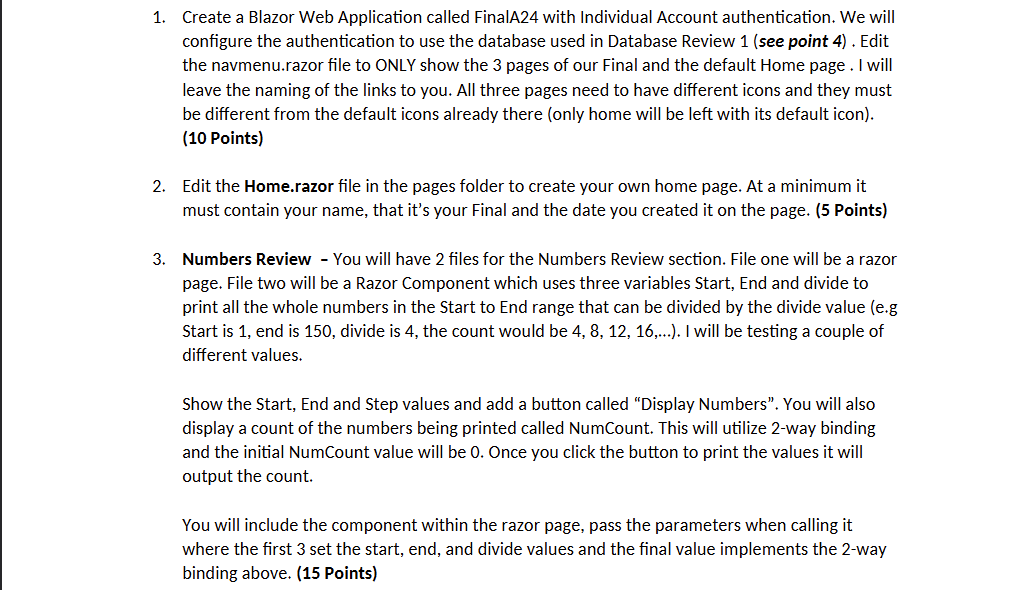
Create a Blazor Web Application called FinalA with Individual Account authentication. We will configure the authentication to use the database used in Database Review see point Edit the navmenu.razor file to ONLY show the pages of our Final and the default Home page I will leave the naming of the links to you. All three pages need to have different icons and they must be different from the default icons already there only home will be left with its default icon
Points
Edit the Home.razor file in the pages folder to create your own home page. At a minimum it must contain your name, that it's your Final and the date you created it on the page. Points
Numbers Review You will have files for the Numbers Review section. File one will be a razor page. File two will be a Razor Component which uses three variables Start, End and divide to print all the whole numbers in the Start to End range that can be divided by the divide value eg Start is end is divide is the count would be ldots I will be testing a couple of different values.
Show the Start, End and Step values and add a button called "Display Numbers". You will also display a count of the numbers being printed called NumCount. This will utilize way binding and the initial NumCount value will be Once you click the button to print the values it will output the count.
You will include the component within the razor page, pass the parameters when calling it where the first set the start, end, and divide values and the final value implements the way binding above. Points
Step by Step Solution
There are 3 Steps involved in it
1 Expert Approved Answer
Step: 1 Unlock

Question Has Been Solved by an Expert!
Get step-by-step solutions from verified subject matter experts
Step: 2 Unlock
Step: 3 Unlock
 Study Help