







Question: 1. Create a .bmp file, called myBMP.bmp that stores the 5x5 image shown in Figure 4. You will need to calculate the number of padding
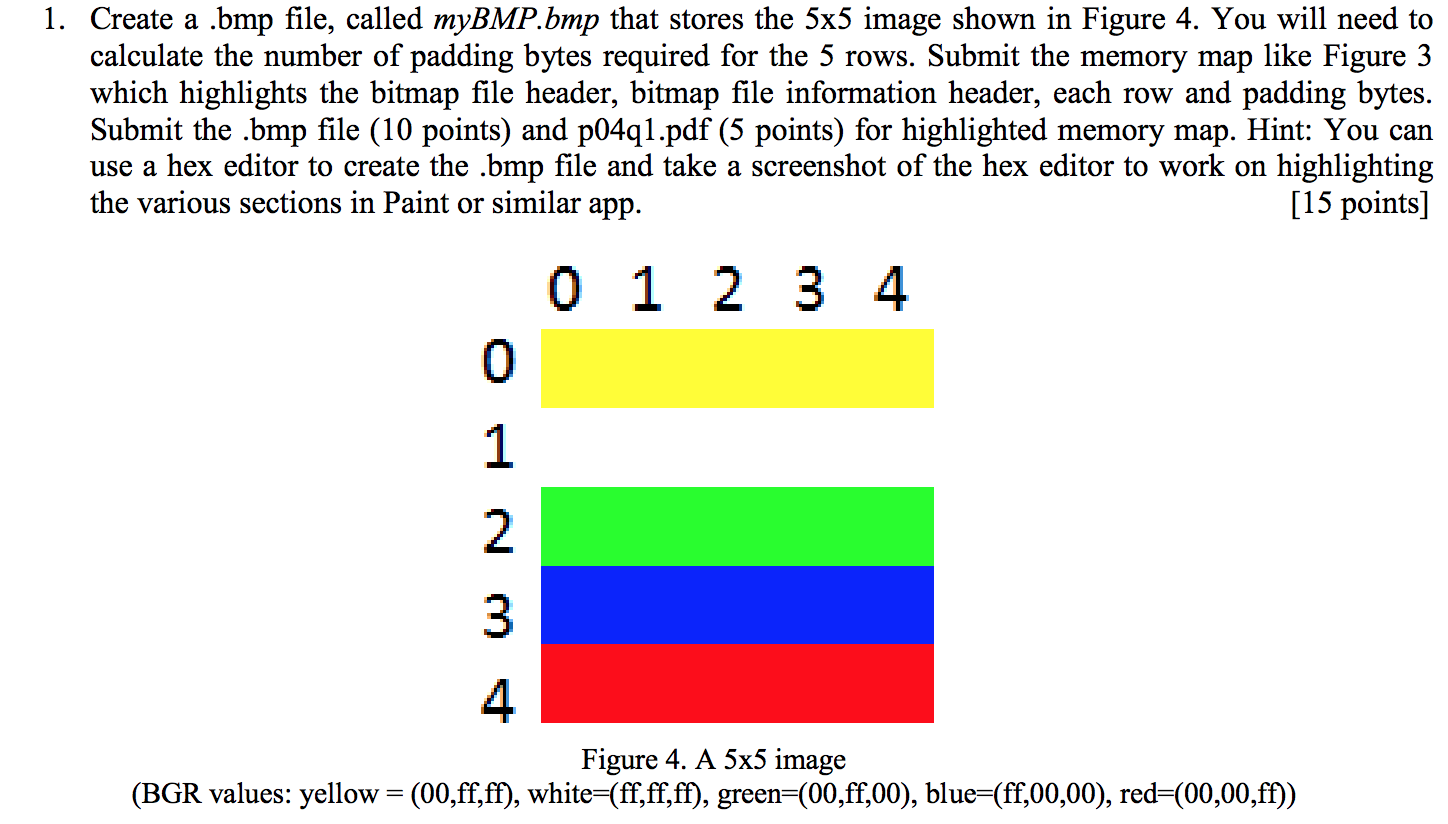
1. Create a .bmp file, called myBMP.bmp that stores the 5x5 image shown in Figure 4. You will need to calculate the number of padding bytes required for the 5 rows. Submit the memory map like Figure 3 which highlights the bitmap file header, bitmap file information header, each row and padding bytes. Submit the .bmp file (10 points) and p04q1.pdf (5 points) for highlighted memory map. Hint: You can use a hex editor to create the .bmp file and take a screenshot of the hex editor to work on highlighting [15 points] the various sections in Paint or similar app. 0 1 2 3 4 0 2 3 4 Figure 4. A 5x5 image (BGR values: yellow- (00,ff,ff), white -(ff,ff,ff), green-(00,ff,00), blue-(ff,00,00), red-(00,00,ff) 1. Create a .bmp file, called myBMP.bmp that stores the 5x5 image shown in Figure 4. You will need to calculate the number of padding bytes required for the 5 rows. Submit the memory map like Figure 3 which highlights the bitmap file header, bitmap file information header, each row and padding bytes. Submit the .bmp file (10 points) and p04q1.pdf (5 points) for highlighted memory map. Hint: You can use a hex editor to create the .bmp file and take a screenshot of the hex editor to work on highlighting [15 points] the various sections in Paint or similar app. 0 1 2 3 4 0 2 3 4 Figure 4. A 5x5 image (BGR values: yellow- (00,ff,ff), white -(ff,ff,ff), green-(00,ff,00), blue-(ff,00,00), red-(00,00,ff)
Step by Step Solution
There are 3 Steps involved in it

Get step-by-step solutions from verified subject matter experts
 Study Help