







Question: 1. Create a class called Member to store each row's data from the text file. All fields are Strings except for salary, which is an
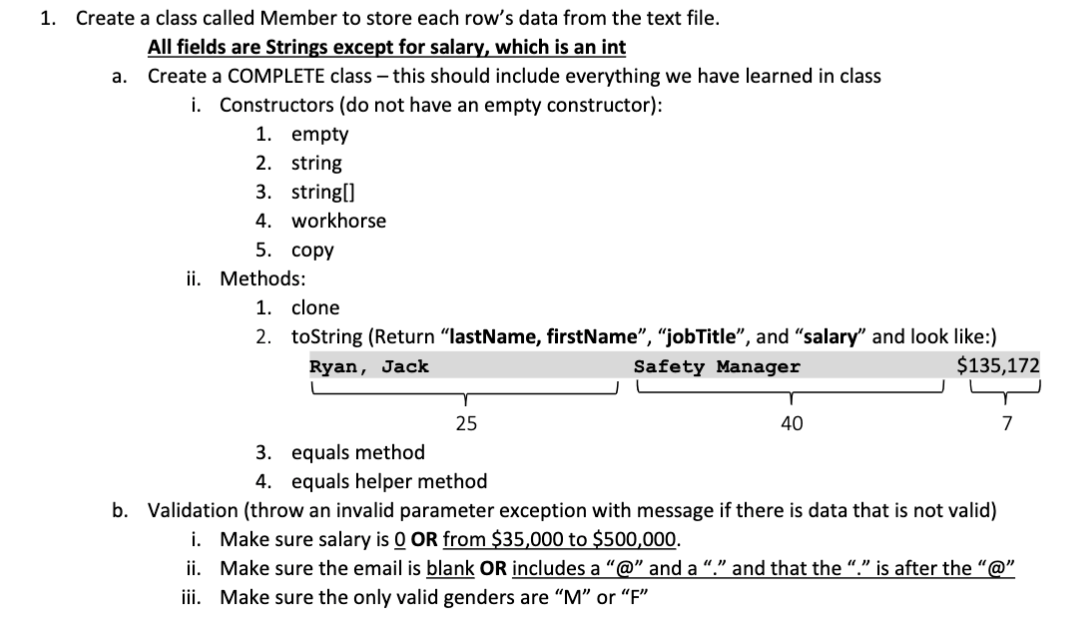
1. Create a class called Member to store each row's data from the text file. All fields are Strings except for salary, which is an int a. Create a COMPLETE class - this should include everything we have learned in class i. Constructors (do not have an empty constructor): 1. empty 2. string 3. string() 4. workhorse 5. copy ii. Methods: 1. clone 2. toString (Return "lastName, firstName, jobTitle", and "salary" and look like:) Ryan, Jack Safety Manager $135,172 25 40 7 3. equals method 4. equals helper method b. Validation (throw an invalid parameter exception with message if there is data that is not valid) i. Make sure salary is O OR from $35,000 to $500,000. ii. Make sure the email is blank OR includes a "@" and a "." and that the "." is after the "@" iii. Make sure the only valid genders are "M" or "F" 1. Create a class called Member to store each row's data from the text file. All fields are Strings except for salary, which is an int a. Create a COMPLETE class - this should include everything we have learned in class i. Constructors (do not have an empty constructor): 1. empty 2. string 3. string() 4. workhorse 5. copy ii. Methods: 1. clone 2. toString (Return "lastName, firstName, jobTitle", and "salary" and look like:) Ryan, Jack Safety Manager $135,172 25 40 7 3. equals method 4. equals helper method b. Validation (throw an invalid parameter exception with message if there is data that is not valid) i. Make sure salary is O OR from $35,000 to $500,000. ii. Make sure the email is blank OR includes a "@" and a "." and that the "." is after the "@" iii. Make sure the only valid genders are "M" or "F
Step by Step Solution
There are 3 Steps involved in it

Get step-by-step solutions from verified subject matter experts
 Study Help