





Question: 1. Create a database called HappyCruise lines. 2. Turn to page 65 in your book and create two tables based off the Ship Table and
1. Create a database called HappyCruise lines. 2.
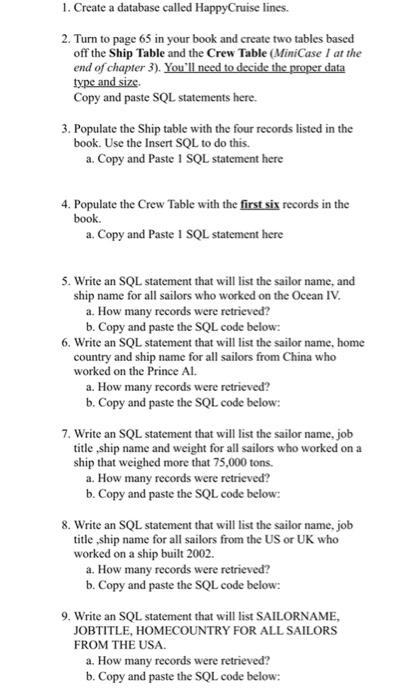
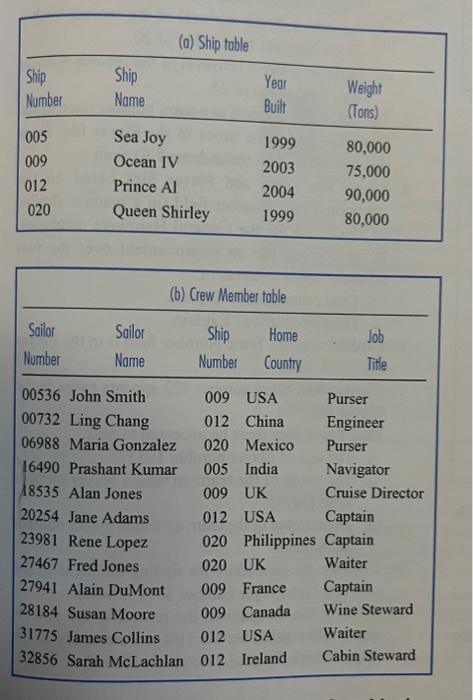
1. Create a database called HappyCruise lines. 2. Turn to page 65 in your book and create two tables based off the Ship Table and the Crew Table (MiniCase I at the end of chapter 3). You'll need to decide the proper data type and size. Copy and paste SQL statements here. 3. Populate the Ship table with the four records listed in the book. Use the Insert SQL to do this. a. Copy and Paste 1 SQL statement here 4. Populate the Crew Table with the first six records in the book. a. Copy and Paste 1 SQL statement here 5. Write an SQL statement that will list the sailor name, and ship name for all sailors who worked on the Ocean IV. a. How many records were retrieved? b. Copy and paste the SQL code below: 6. Write an SQL statement that will list the sailor name, home country and ship name for all sailors from China who worked on the Prince Al. a. How many records were retrieved? b. Copy and paste the SQL code below: 7. Write an SQL statement that will list the sailor name, job title, ship name and weight for all sailors who worked on a ship that weighed more that 75,000 tons. a. How many records were retrieved? b. Copy and paste the SQL code below: 8. Write an SQL statement that will list the sailor name, job title , ship name for all sailors from the US or UK who worked on a ship built 2002. a. How many records were retrieved? b. Copy and paste the SQL code below: 9. Write an SQL statement that will list SAILORNAME, JOBTITLE, HOMECOUNTRY FOR ALL SAILORS FROM THE USA. a. How many records were retrieved? b. Copy and paste the SQL code below: \begin{tabular}{|llll|} \hline \multicolumn{4}{c}{ (0) Ship toble } \\ \hline Ship & Ship & Yeor & Weight \\ Number & Name & Built & (Tons) \\ \hline 005 & Sea Joy & 1999 & 80,000 \\ 009 & Ocean IV & 2003 & 75,000 \\ 012 & Prince Al & 2004 & 90,000 \\ 020 & Queen Shirley & 1999 & 80,000 \\ \hline \end{tabular}

Step by Step Solution

There are 3 Steps involved in it

1 Expert Approved Answer
Step: 1 Unlock blur-text-image

Question Has Been Solved by an Expert!

Get step-by-step solutions from verified subject matter experts

Step: 2 Unlock
Step: 3 Unlock

Students Have Also Explored These Related General Management Questions!