







Question: 1) Create a Java Project. 2) Create a class named Package.java with data fields for weight in ounces, shipping method, and shipping cost. - The
1) Create a Java Project.
2) Create a class named Package.java with data fields for weight in ounces, shipping method, and shipping cost.
- The shipping method is a character: A for air, T for truck, or M for mail.
3) The Package class contains a constructor that requires arguments for weight and shipping method.
- The Package class also contains a Display() method. It displays values in 3 fields (weight, ship method and cost) rather than 4.
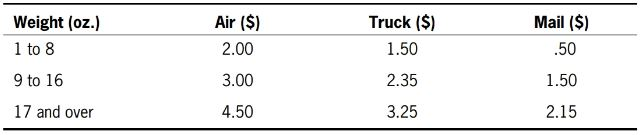
- The constructor calls a calculateCost() method that determines the shipping cost, based on the following table:
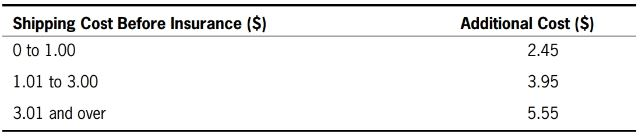
4) Create a subclass named InsuredPackage that adds an insurance cost to the shipping cost, based on the following table:
5) Write an application named UsePackage that instantiates at least three objects of each type (Package and InsuredPackage) using a variety of weights and shipping method codes.
- Use the shipping types with the weights seen in the output below.
Output:
Packages:
The package weighs 4 ounces. Ship method A Cost $2.00
The package weighs 10 ounces. Ship method T Cost $2.35
The package weighs 20 ounces. Ship method M Cost $2.15
Insured packages:
The package weighs 4 ounces. Ship method A Cost $5.95
The package weighs 10 ounces. Ship method T Cost $6.30
The package weighs 20 ounces. Ship method M Cost $6.10
Weight (oz.) 1 to 8 9 to 16 17 and over Air (S) 2.00 3.00 4.50 Truck (S) 1.50 2.35 3.25 Mail ($) .50 1.50 2.15
Step by Step Solution
There are 3 Steps involved in it

Get step-by-step solutions from verified subject matter experts
 Study Help