







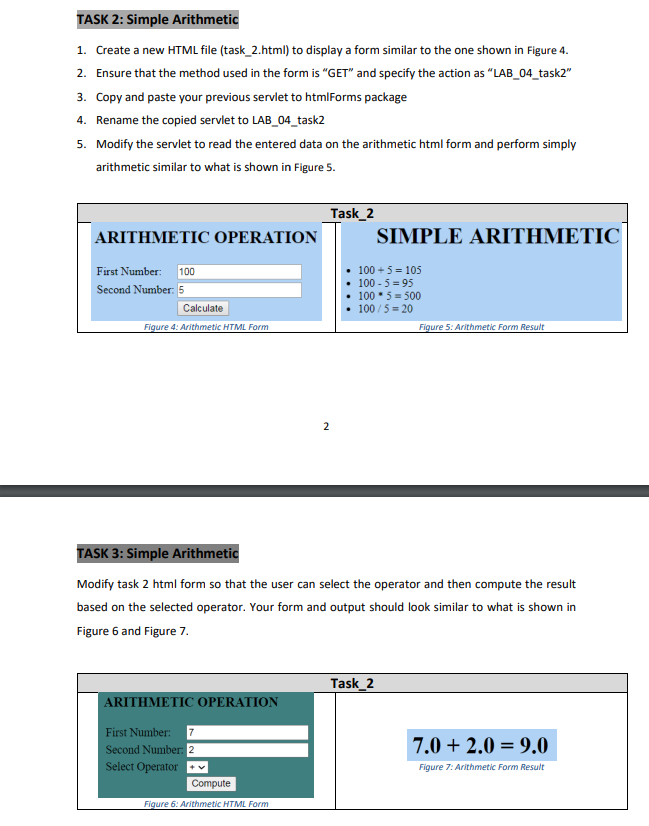
Question: 1 . Create a new HTML file ( task _ 2 . html ) to display a form similar to the one shown in Figure
Create a new HTML file taskhtml to display a form similar to the one shown in Figure
Ensure that the method used in the form is GET and specify the action as LABtask
Copy and paste your previous servlet to htmlForms package
Rename the copied servlet to LABtask
Modify the servlet to read the entered data on the arithmetic html form and perform simply arithmetic similar to what is shown in Figur
Modify task html form so that the user can select the operator and then compute the result
based on the selected operator. Your form and output should look similar to what is shown in
Figure and Figure
Step by Step Solution
There are 3 Steps involved in it
1 Expert Approved Answer
Step: 1 Unlock

Question Has Been Solved by an Expert!
Get step-by-step solutions from verified subject matter experts
Step: 2 Unlock
Step: 3 Unlock
 Study Help