







Question: 1. Create a new Java project using the IDE of your choice. Call the project and main class 2. The class GreetingGenerator java should contain
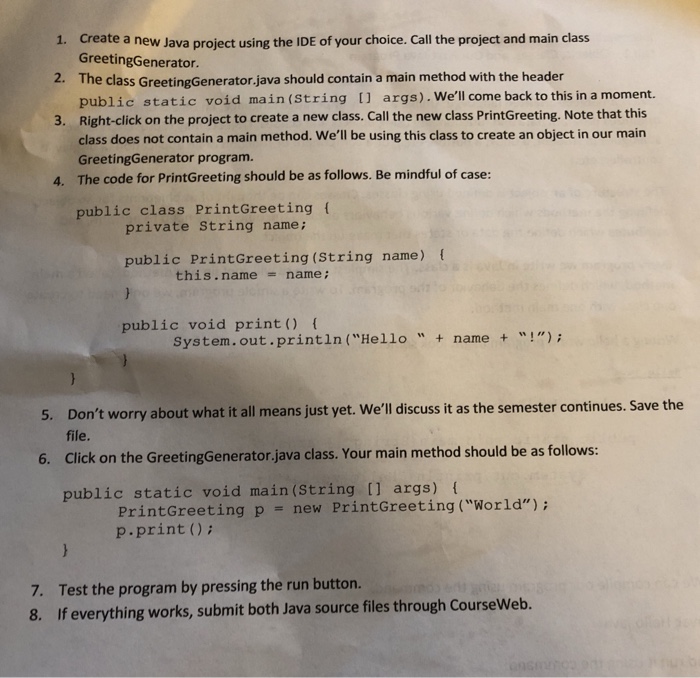
1. Create a new Java project using the IDE of your choice. Call the project and main class 2. The class GreetingGenerator java should contain a main method with the header 3. Right-click on the projet to create a new class. Call the new class PrintGreeting. Note that this GreetingGenerator. public static void main(String args). We'll come back to this in a moment. class does not contain a main method. We'll be using this class to create an object in our main GreetingGenerator program. The code for PrintGreeting should be as follows. Be mindful of case: 4. public class PrintGreeting f private String name; public PrintGreeting (String name) ( this. name name ; = public void print) ( system.out.println ("Hello "+name"!"); 5. Don't worry about what it all means just yet. W'll discuss it as the semester continues. Save the file. 6. Click on the GreetingGenerator,java class. Your main method should be as follows: public static void main (String [1 args) PrintGreeting ("World"); PrintGreeting p p.print () new 7. Test the program by pressing the run button. 8. If everything works, submit both Java source files through CourseWeb
Step by Step Solution
There are 3 Steps involved in it

Get step-by-step solutions from verified subject matter experts
 Study Help