







Question: 1. Create a new Microsoft Word document and write your full name at the top of the document. 2. Log into your Teradata account and
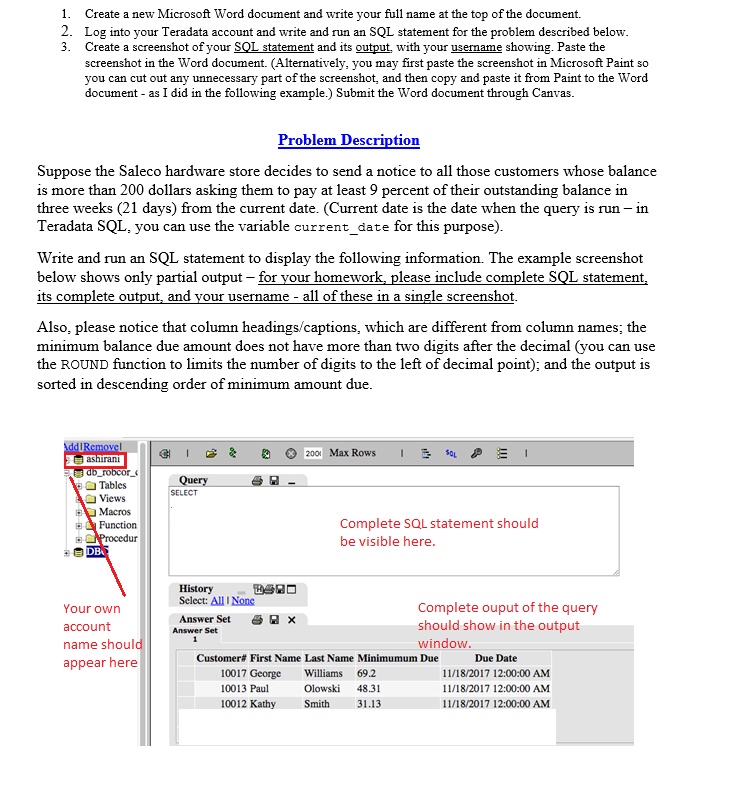
1. Create a new Microsoft Word document and write your full name at the top of the document. 2. Log into your Teradata account and write and run an SQL statement for the problem described below 3. Create a screenshot of your SQL statement and its output with your usename showing. Paste the screenshot in the Word document. (Alternatively, you may first paste the screenshot in Microsoft Paint so you can cut out any unnecessary part of the screenshot, and then copy and paste it from Paint to the Word document - as I did in the following example.) Submit the Word document through Canvas Problem Description Suppose the Saleco hardware store decides to send a notice to all those customers whose balance is more than 200 dollars asking them to pay at least 9 percent of their outstanding balance in three weeks (21 days) from the current date. (Current date is the date when the query is run- in Teradata SQL, you can use the variable current_date for this purpose) Write and run an SQL statement to display the following information. The example screenshot below shows only partial output - for your homework, please include complete SQL statement, its complete output, and your username all of these in a single screenshot Also, please notice that column headings/captions, which are different from column names, the minimum balance due amount does not have more than two digits after the decimal (you can use the ROUND function to limits the number of digits to the left of decimal point); and the output is sorted in descending order of minimum amount due Tables Views Macros Function SELECT Complete SQL statement should be visible here History Select: All I None Your own account name shoul appear here Complete ouput of the query should show in the output window. Answer Set Answer Set Customer# First Name Last Name Minim umum Due 10017 George Williams 69.2 10013 Paul 10012 Kathy Smith31.13 Due Date 11/18/2017 12:00:00 AM 11/18/2017 12:00:00 AM 11/18/2017 12:00:00 AM Olowski 48.31
Step by Step Solution
There are 3 Steps involved in it

Get step-by-step solutions from verified subject matter experts
 Study Help