







Question: 1. Create a project (a) start eclipse, File -> New -> Java Project. Name it Underwater. 2. Create package for all future files in
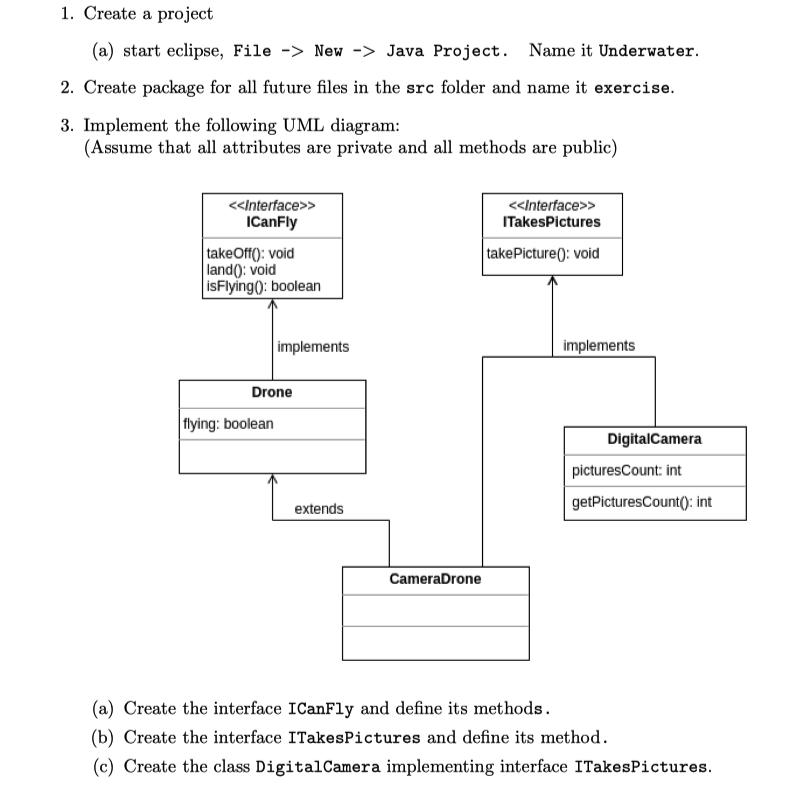
1. Create a project (a) start eclipse, File -> New -> Java Project. Name it Underwater. 2. Create package for all future files in the src folder and name it exercise. 3. Implement the following UML diagram: (Assume that all attributes are private and all methods are public) < > ICanFly takeOff(): void land(): void isFlying(): boolean implements Drone flying: boolean extends CameraDrone < > ITakesPictures takePicture(): void implements Digital Camera picturesCount: int getPicturesCount(): int (a) Create the interface ICanFly and define its methods. (b) Create the interface ITakes Pictures and define its method. (c) Create the class Digital Camera implementing interface ITakesPictures.
Step by Step Solution
3.54 Rating (157 Votes )
There are 3 Steps involved in it
a Java code for interface ICanFly package exercise public in... View full answer

Get step-by-step solutions from verified subject matter experts
 Study Help