







Question: 1. Create a relational schema in ERD-Plus. 2. The Entity-Relation diagram below is a conceptual model of an apartment rental company. 3. Map the given
1. Create a relational schema in ERD-Plus.
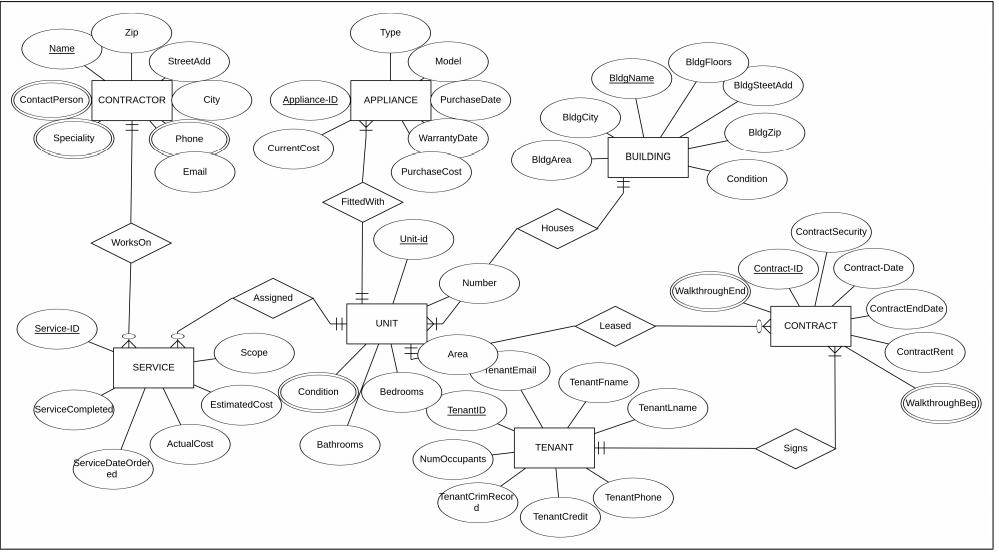
2. The Entity-Relation diagram below is a conceptual model of an apartment rental company.
3. Map the given E-R diagram to a Relational model using ERD-Plus.
4. Use all standard conventions.
5. Establish associations between the tables by inserting appropriate “Foreign Keys.”
6. Make sure that the relational model meets all the criteria of a valid Relational Model.
Name Contact Person Speciality Service-ID Zip CONTRACTOR WorksOn ServiceCompleted StreetAdd SERVICE ServiceDateOrder ed City Phone Email ActualCost CurrentCost Appliance-ID Assigned Scope EstimatedCost Condition Type APPLIANCE FittedWith Bathrooms WarrantyDate Unit-id Model PurchaseCost Purchase Date F UNIT At Bedrooms Number Area TenantEmail TenantID NumOccupants TenantCrimRecor d BidgCity BldgArea Houses BldgName TenantCredit BUILDING Leased TenantFname TENANT ||+ BldgFloors TenantPhone TenantLname BldgSteetAdd BldgZip Condition (WalkthroughEnd) ContractSecurity Contract-ID CONTRACT Signs Contract-Date ContractEndDate ContractRent (WalkthroughBeg)
Step by Step Solution
3.48 Rating (171 Votes )
There are 3 Steps involved in it
ER diagram The ER model is to represent the structure of data by using entities and attributes and their relations ER diagram considers entities in the realworld and relating with them It is a graphic... View full answer

Get step-by-step solutions from verified subject matter experts
 Study Help