







Question: 1. Create a table UserPermissions (provide create and insert statements code) (5 points for the correct code of the procedure and 3 points for testing
1. Create a table UserPermissions (provide create and insert statements code) (5 points
for the correct code of the procedure and 3 points for testing your function; one
point per test case). Do not modify table or column names.


2. Write a PL/SQL stored procedure that takes username as input and returns number of documents that user has permissions to view. If username is not in the table, your procedure should return: "no documents for USERNAME".The number of documents has to be displayed as a word instead of using digits.To convert number to words read http://viralpatel.net/blogs/convert-number-into-words-oracle-sql-query/ . Include code that can be copied and ran, and screenshots of the results. Do not forget to test "user not found" case.
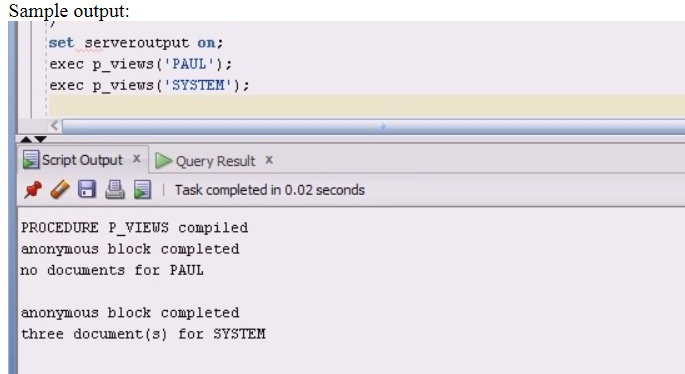
Document Policy Menu W2 Permissions UserName SYSTEM JDOW USAM SYSTEM W2 Form 1040 Policy JDOW USAM JDOW SYSTEM W2 Sample output: set serveroutput on; exec p_views('PAUL'); exec p_views('SYSTEM'); Script Output * O U Query Result x Task completed in 0.02 seconds PROCEDURE P_VIEWS compiled anonymous block completed no documents for PAUL anonymous block completed three document(s) for SYSTEM Document Policy Menu W2 Permissions UserName SYSTEM JDOW USAM SYSTEM W2 Form 1040 Policy JDOW USAM JDOW SYSTEM W2 Sample output: set serveroutput on; exec p_views('PAUL'); exec p_views('SYSTEM'); Script Output * O U Query Result x Task completed in 0.02 seconds PROCEDURE P_VIEWS compiled anonymous block completed no documents for PAUL anonymous block completed three document(s) for SYSTEM
Step by Step Solution
There are 3 Steps involved in it

Get step-by-step solutions from verified subject matter experts
 Study Help