







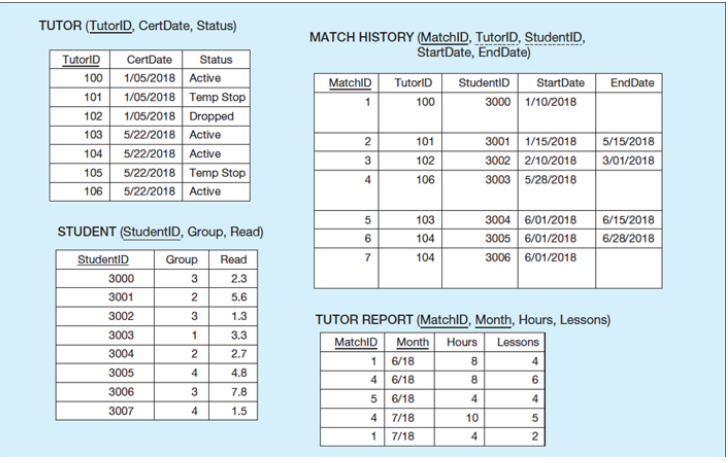
Question: 1 . Create an ERD model based on this figure 2 . Create another table called SUBJECT that reflects that a tutor can tutor more
Create an ERD model based on this figure Create another table called SUBJECT that reflects that a tutor can tutor more than one subject. This may require you to add a SubjectID column in the Match History table. Also, include a domain constraint to indicate that the only subject names allowed are Reading, Math, and ESL. Update your ERD model to include the Subject table Implement your ERD model in SQLite Write a query to identify all students who have been matched with a tutor whose status is Temp Stop or Dropped. Save your view as Query Count the number of lessons by the tutor status. Save your view as Query Which tutors did not submit the report in June? Save your view as QueryTUTOR TutorID CertDate, Status
tableTutoriDCertDate,StatusActiveTemp StopDroppedActiveActiveTemp StopActive
STUDENT StudentID Group, Read
tableStudentIDGroup,Read
MATCH HISTORY MatchID TutorID, StudentID, StartDate, EndDate
tableMatchIDTutorID,StudentID,StartDate,EndDate
Step by Step Solution
There are 3 Steps involved in it
1 Expert Approved Answer
Step: 1 Unlock

Question Has Been Solved by an Expert!
Get step-by-step solutions from verified subject matter experts
Step: 2 Unlock
Step: 3 Unlock
 Study Help