







Question: 1. Create an Order Entry web page form as shown above. Specifications: At the top of the first half of the form (Order header area):
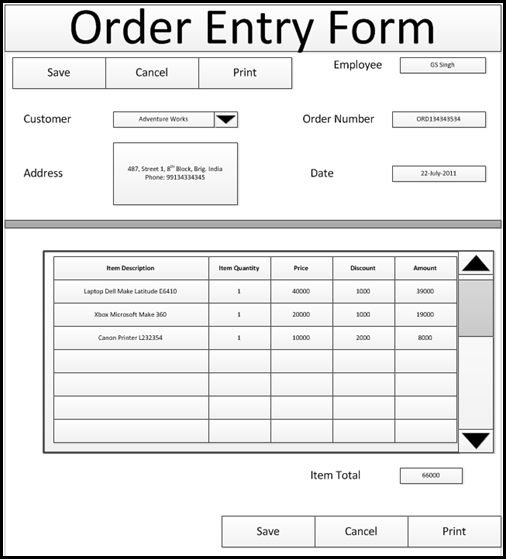
1. Create an Order Entry web page form as shown above.
Specifications:
At the top of the first half of the form (Order header area):
Buttons: Save, Cancel Print at the top and bottom of form
Text fields: Employee, Order Number, Date & Address
Drop down list: Customer
At the bottom half of the form (Order detail):
A table with 5 columns and at least 5 rows.
The table header fields are:
Item Description, Item Quantity, Price, Discount & Amount. All these fields are text fields.
2. Modify your project's external CSS file (project.css) to configure the form areas as needed.
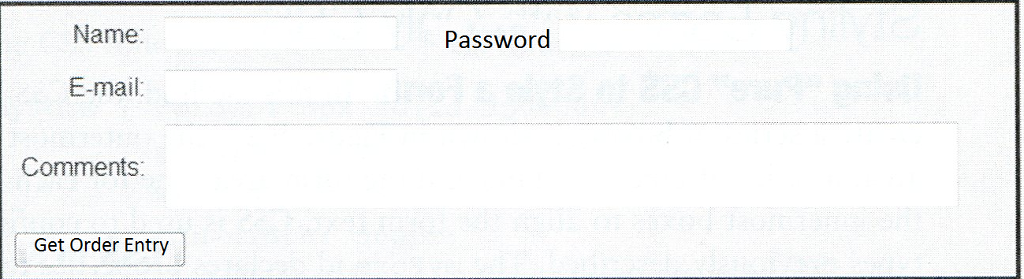
3. Add a login screen as shown in the attachment: Login Screen.
4. Only allow the Order Entry screen to display if a valid userID, Password is entered
5. The login userID is: CMIN216 The Password is: html5
6. Return an appropriate error if the user does not enter all fields.
7. Check for a valid email entry
8. The
tag should post method and action attributes to invoke server-side processing. Configure the action attribute to send the form data to http://webdevfoundations.net/scripts/formdemo.asp (Links to an external site.)
Name: Password E-mail Comments: Get Order Entry
Step by Step Solution
There are 3 Steps involved in it

Get step-by-step solutions from verified subject matter experts
 Study Help