







Question: 1) Create Scatter Plots in Minitab 2) Calculate Correlation in Minitab 3) Create Fitted Line Plots and Residual Plots 4) Perform Regression Analysis in Minitab
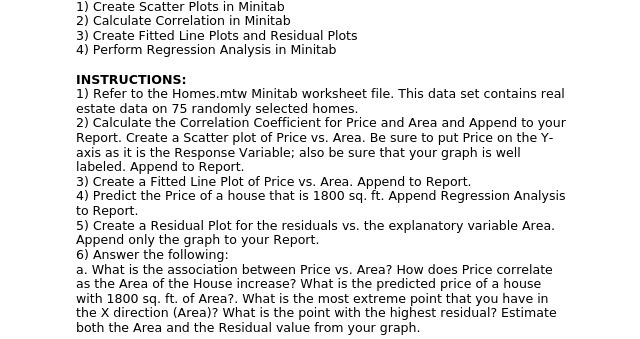
1) Create Scatter Plots in Minitab 2) Calculate Correlation in Minitab 3) Create Fitted Line Plots and Residual Plots 4) Perform Regression Analysis in Minitab INSTRUCTIONS: 1) Refer to the Homes.mtw Minitab worksheet file. This data set contains real estate data on 75 randomly selected homes. 2) Calculate the Correlation Coefficient for Price and Area and Append to your Report. Create a Scatter plot of Price vs. Area. Be sure to put Price on the Y- axis as it is the Response Variable; also be sure that your graph is well labeled. Append to Report. 3) Create a Fitted Line Plot of Price vs. Area. Append to Report. 4) Predict the Price of a house that is 1800 sq. ft. Append Regression Analysis to Report. 5) Create a Residual Plot for the residuals vs. the explanatory variable Area. Append only the graph to your Report. 6) Answer the following: a. What is the association between Price vs. Area? How does Price correlate as the Area of the House increase? What is the predicted price of a house with 1800 sq. ft. of Area?. What is the most extreme point that you have in the X direction (Area)? What is the point with the highest residual? Estimate both the Area and the Residual value from your graph
Step by Step Solution
There are 3 Steps involved in it

Get step-by-step solutions from verified subject matter experts
 Study Help