







Question: 1 Create the MY_DEPT table based on the following table instance chart. Confirm that the table is created. Column Name Key Type Nulls/Unique FK
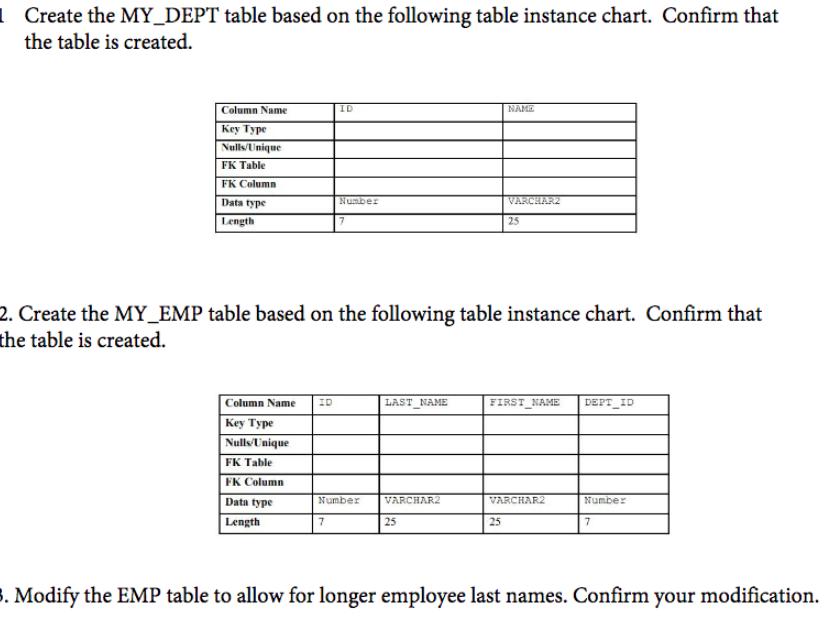
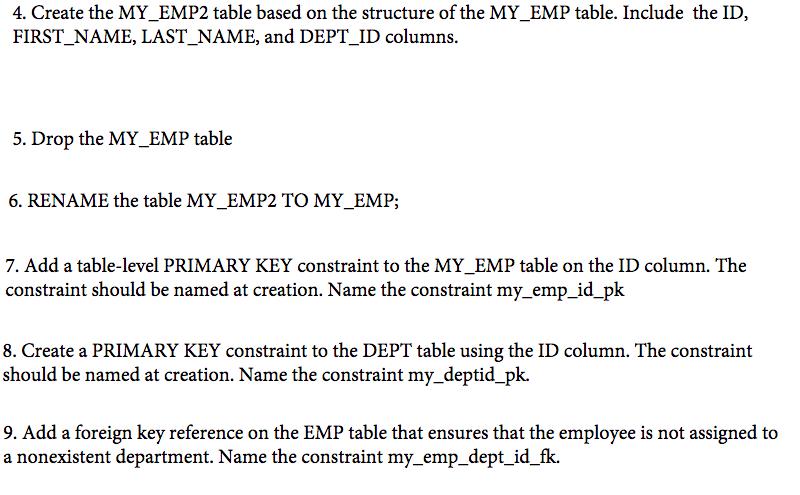
1 Create the MY_DEPT table based on the following table instance chart. Confirm that the table is created. Column Name Key Type Nulls/Unique FK Table FK Column Data type Length Column Name ID Key Type Nulls/Unique FK Table FK Column Data type Length ID Number 7 7 Number 2. Create the MY_EMP table based on the following table instance chart. Confirm that the table is created. LAST_NAME VARCHAR2 25 NAME VARCHAR2 25 25 FIRST NAME DEPT ID VARCHAR2 Number 7 3. Modify the EMP table to allow for longer employee last names. Confirm your modification. 4. Create the MY_EMP2 table based on the structure of the MY_EMP table. Include the ID, FIRST NAME, LAST_NAME, and DEPT_ID columns. 5. Drop the MY_EMP table 6. RENAME the table MY EMP2 TO MY_EMP; 7. Add a table-level PRIMARY KEY constraint to the MY_EMP table on the ID column. The constraint should be named at creation. Name the constraint my_emp_id_pk 8. Create a PRIMARY KEY constraint to the DEPT table using the ID column. The constraint should be named at creation. Name the constraint my_deptid_pk. 9. Add a foreign key reference on the EMP table that ensures that the employee is not assigned to a nonexistent department. Name the constraint my_emp_dept_id_fk. 1 Create the MY_DEPT table based on the following table instance chart. Confirm that the table is created. Column Name Key Type Nulls/Unique FK Table FK Column Data type Length Column Name ID Key Type Nulls/Unique FK Table FK Column Data type Length ID Number 7 7 Number 2. Create the MY EMP table based on the following table instance chart. Confirm that the table is created. LAST NAME VARCHAR2 25 NAME VARCHAR2 25 25 FIRST NAME DEPT ID VARCHAR2 Number 7 3. Modify the EMP table to allow for longer employee last names. Confirm your modification. 4. Create the MY_EMP2 table based on the structure of the MY_EMP table. Include the ID, FIRST NAME, LAST_NAME, and DEPT_ID columns. 5. Drop the MY_EMP table 6. RENAME the table MY EMP2 TO MY_EMP; 7. Add a table-level PRIMARY KEY constraint to the MY_EMP table on the ID column. The constraint should be named at creation. Name the constraint my_emp_id_pk 8. Create a PRIMARY KEY constraint to the DEPT table using the ID column. The constraint should be named at creation. Name the constraint my_deptid_pk. 9. Add a foreign key reference on the EMP table that ensures that the employee is not assigned to a nonexistent department. Name the constraint my_emp_dept_id_fk.
Step by Step Solution
3.41 Rating (157 Votes )
There are 3 Steps involved in it
Sure I can provide you with the SQL statements that will perform the actions specified in the instru... View full answer

Get step-by-step solutions from verified subject matter experts
 Study Help