







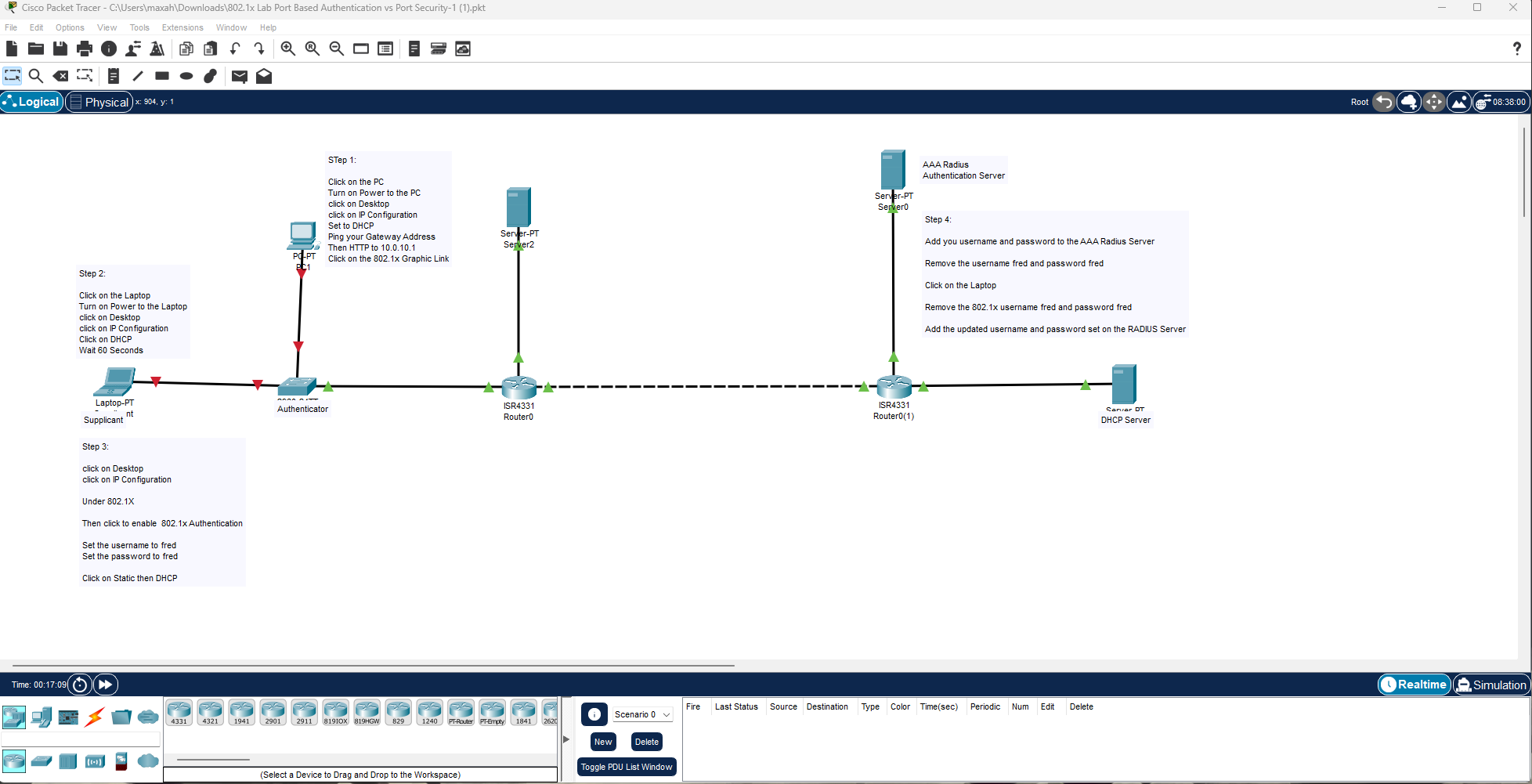
Question: 1. Ensure the workstation your using has version 8.2 Packet Tracer, if not download from Net Acad. 2. Open Packet Tracer file above and follow
1. Ensure the workstation your using has version 8.2 Packet Tracer, if not download from Net Acad.
2. Open Packet Tracer file above and follow steps.
3. Initially you will not be able to get to the web server until the laptop is properly authenticated.
4. Notice that the switchport connecting the laptop, does not turn green until the laptop is authenticated.
5. Upload the completed packet tracer file when done.
ste 3. under 8021x Then click to enable 802.1 Authentication Set the username to fred Set the password to fred Set the password to fred Click on Static then DHCP
Step by Step Solution
There are 3 Steps involved in it
1 Expert Approved Answer
Step: 1 Unlock

Question Has Been Solved by an Expert!
Get step-by-step solutions from verified subject matter experts
Step: 2 Unlock
Step: 3 Unlock
 Study Help