







Question: 1. Enter and the following Falcon code: .CODE CLR R3 ! R3 is LIST index CLR AC ADD #LIST (R3+] SAVE @#RESULT HALT .DATA :
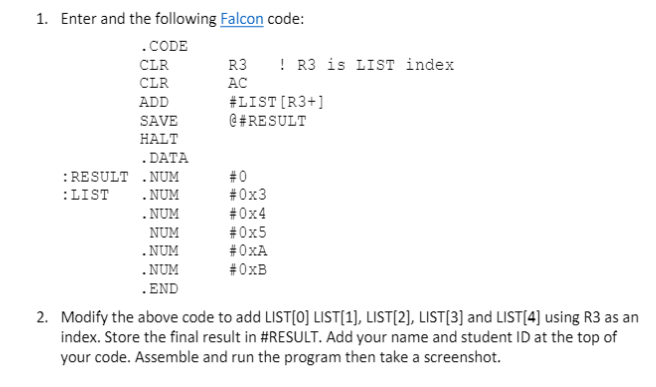
1. Enter and the following Falcon code: .CODE CLR R3 ! R3 is LIST index CLR AC ADD #LIST (R3+] SAVE @#RESULT HALT .DATA : RESULT .NUM #0 :LIST .NUM #0x3 .NUM #0x4 NUM #0x5 .NUM #OXA .NUM #OxB . END 2. Modify the above code to add LIST[O] LIST[1], LIST[2], LIST[3] and LIST[4] using R3 as an index. Store the final result in #RESULT. Add your name and student ID at the top of your code. Assemble and run the program then take a screenshot. 1. Enter and the following Falcon code: .CODE CLR R3 ! R3 is LIST index CLR AC ADD #LIST (R3+] SAVE @#RESULT HALT .DATA : RESULT .NUM #0 :LIST .NUM #0x3 .NUM #0x4 NUM #0x5 .NUM #OXA .NUM #OxB . END 2. Modify the above code to add LIST[O] LIST[1], LIST[2], LIST[3] and LIST[4] using R3 as an index. Store the final result in #RESULT. Add your name and student ID at the top of your code. Assemble and run the program then take a screenshot
Step by Step Solution
There are 3 Steps involved in it

Get step-by-step solutions from verified subject matter experts
 Study Help