







Question: 1. Exercise: Currency Converter Currency Converter This program will allow a user to convert US Dollars into one of three specific currencies. The program should
1. Exercise: Currency Converter
Currency Converter
This program will allow a user to convert US Dollars into one of three specific currencies.
The program should ask the user for two pieces of input:
- The amount of US Dollars (USD) to convert
- The target currency
Currency Conversions
Your program will allow conversion into one of three currencies. Use the following values for the conversion rates.
1 USD equals:
- 0.77 British Pounds (GBP)
- 0.92 Euro (EUR)
- 6.98 Chinese Yuan (CNY)
Running Your Program
To run your program, you can type python3 code/currency_converter.py in the Terminal window. For a shortcut, click this button:
RUN CURRENCY CONVERTER
Program Structure
Your program should consist of FOUR functions:
- usd_to_gbp()
- usd_to_eur()
- usd_to_cny()
- main()
** ALL of the logic of the program should occur in one of these functions! **
Use the following flowchart to help you envision the flow of the program.
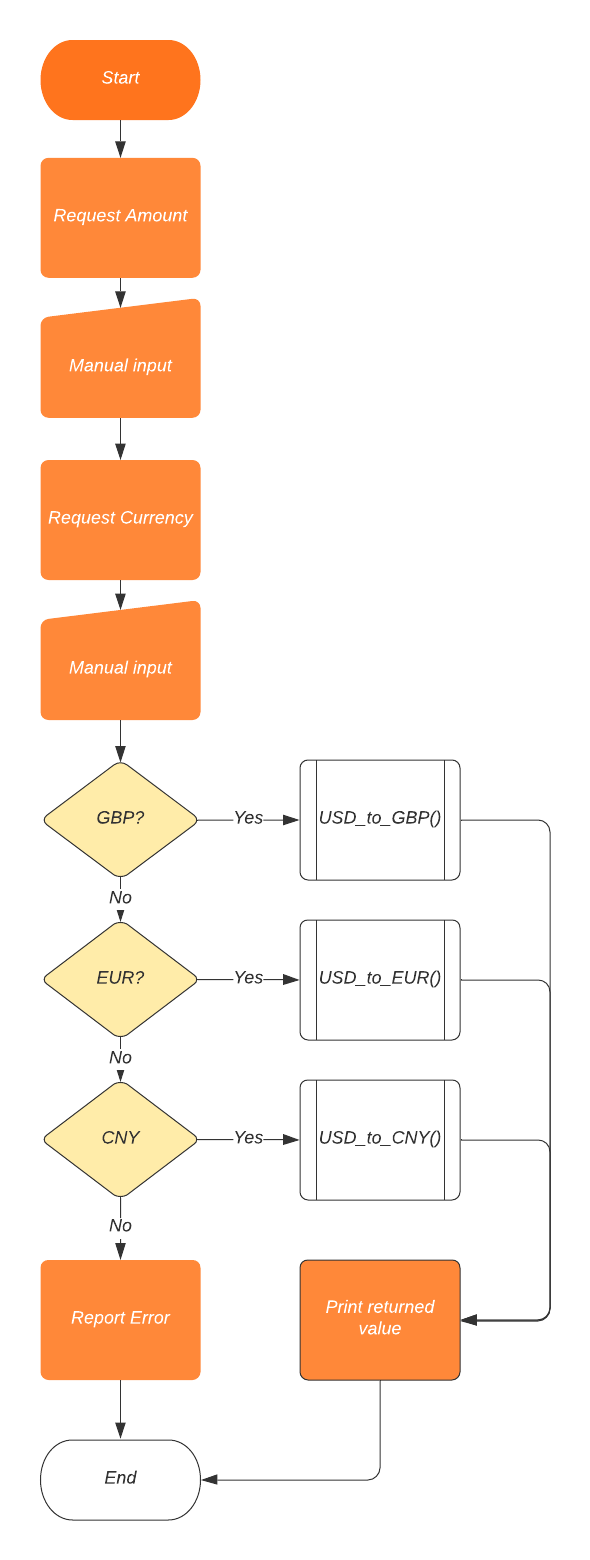
For this exercise, do not worry about rounding numbers or formatting currency!!
GitHub
When your program is complete, you should use the Terminal to save your code to GitHub@IU.
Rubric
- 10 points: Program functions 100% correctly
- 5-9 points: Program runs with some correct functionality
- 0-4 points: Program does not run. Score based on work completed in source code file
Program Submission
You MUST complete the form below to submit your project. Your code will be graded in Codio and the grade will be transferred to the Canvas gradebook.
Project Assessment
Are you ready to submit your project for grading?
Note: Choose any answer and click Check it!. Your project will be manually graded and a score assigned.
MARK AS COMPLETED Once you have answered the question, you MUST click on the Mark as Completed button at the bottom of this page!
Yes I am!
Yes indeed!
Step by Step Solution
There are 3 Steps involved in it

Get step-by-step solutions from verified subject matter experts
 Study Help