







Question: 1 final int BUTTON_W = 50; 2 final int BUTTON_H = 30; 3 int buttonX[] = { 50, 125, 200, 50, 125, 200 }; 4
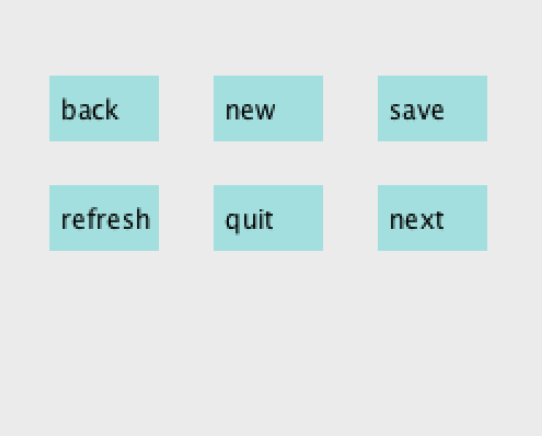
1 final int BUTTON_W = 50;
2 final int BUTTON_H = 30;
3 int buttonX[] = { 50, 125, 200, 50, 125, 200 };
4 int buttonY[] = { 50, 50, 50, 100, 100, 100 };
5 String buttonText[] = {"back", "new", "save", "refresh", "quit", "next"};
6
7 void setup() {
8 size(250, 200);
9 noStroke();
10 background(235);
11 rectMode(CENTER);
12
13 for (int i = 0; i
14 fill(175, 220, 220);
15 rect(buttonX[i], buttonY[i], BUTTON_W, BUTTON_H);
16 fill(0);
17 text(buttonText[i], buttonX[i]-20, buttonY[i]+5);
18 }
19 }
20
21 void draw() {
22 }
NOTE: The text() function in Processing places a given string (the first parameter) on the screen at the X and Y positions given by the second and third parameters. For example, text (Here, 10, 10); will print the word Here starting 10 pixels to the right of the left side of the display and 10 pixels down from the top of the display.
Now, suppose you wanted to write additional code so that after a button is clicked, your program displays the text of the button followed by the word clicked. Below is some code that attempts to do this, but it has some problems:
24 void mouseClicked() {
25 String displayText = ""; // assume click outside of buttons
26 boolean clickedOnButton = false // assume click outside of buttons
27
28 for (int i = 0; i
29 if (mouseX > buttonX[i] - BUTTON_W/2.0
30 && mouseX
31 && mouseY > buttonY[i] - BUTTON_H/2.0
32 && mouseY
33
34 displayText == buttonText[i];
35 clickedOnButton = true;
36 }
37 }
38
39 if (clickedOnButton) {
40 text(displayText + clicked, 50, 150)
41 }
42 }
1) Is there something wrong with line 40?
| a)Yes, it will be fine the first time it's run but after that it will look funny. | ||||||||||||||||||||||||||
| b)Yes, it will run off the right side of the display | ||||||||||||||||||||||||||
| c)Yes, it will extend below the bottom of the display | ||||||||||||||||||||||||||
| d)No, it's fine 2) Why isnt there still anything in draw()?
|
back new save refresh quit next
Step by Step Solution
There are 3 Steps involved in it

Get step-by-step solutions from verified subject matter experts
 Study Help