







Question: 1. Format the data in A10:L13 as an Excel Table with headers. Create named ranges from the table data, using the headings in A10:L10. 2.
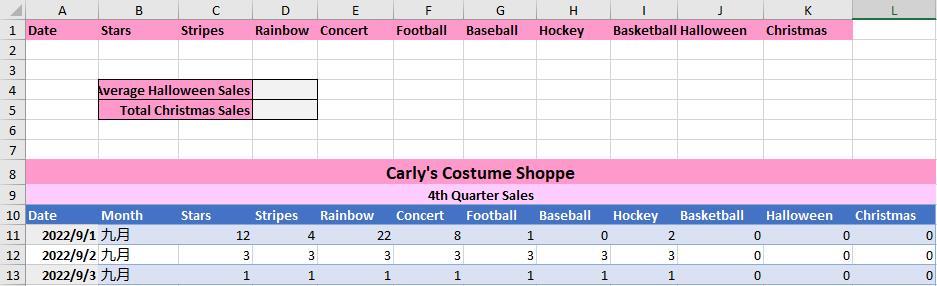
1. Format the data in A10:L13 as an Excel Table with headers. Create named ranges from the table data, using the headings in A10:L10.
2. Create an advanced filter to find all purchases in the table that take place after September 1, 2022 (>9/01/2022). Enter the appropriate criteria in cell A2 and filter the data in place.
Please explain the solution step by step, thanks!
Step by Step Solution
There are 3 Steps involved in it
1 Expert Approved Answer
Step: 1 Unlock

Question Has Been Solved by an Expert!
Get step-by-step solutions from verified subject matter experts
Step: 2 Unlock
Step: 3 Unlock
 Study Help