







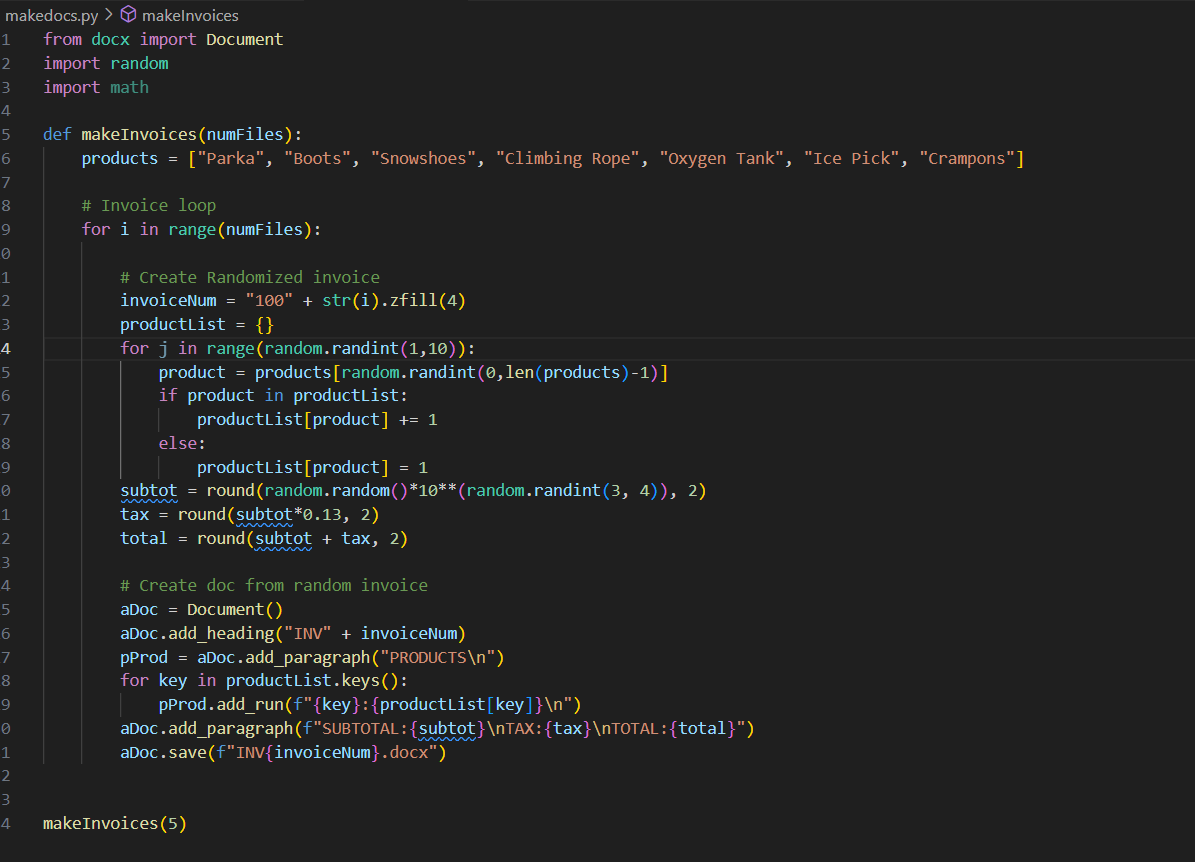
Question: 1 from docx import Documentimport math products = [ Parka , Boots, Snowshoes, Climbing Rope, Oxygen Tank, Ice Pick, Crampons ] for i
from docx import Documentimport math products Parka "Boots", "Snowshoes", "Climbing Rope", "Oxygen Tank", "Ice Pick", "Crampons" for i in rangenumFiles: invoiceNum strizfill for j in rangerandomrandint: if product in productList: else: subtot roundrandomrandomrandomrandint total roundsubtot tax, aDoc Document pProd aDoc.addparagraphPRODUCTS
pProd.addrunfkey:productListkey
aDoc.savefINVinvoiceNumdocX" the file makedocs.py holds a script that when run will create a set of randomized invoices in the form of word documents. your task is to create a python script that processes all docx files created into a single spreadsheet that has a row for each invoice and columns for: invoice id total number of products purchased, subtotal, tax, and total. the file aexxslx contains an example spreadsheet. read documents extract data write spreadsheets please i want answer of this question in an easy way without using pandas with full file paths for my reference if you want you can upload images too
Step by Step Solution
There are 3 Steps involved in it
1 Expert Approved Answer
Step: 1 Unlock

Question Has Been Solved by an Expert!
Get step-by-step solutions from verified subject matter experts
Step: 2 Unlock
Step: 3 Unlock
 Study Help