





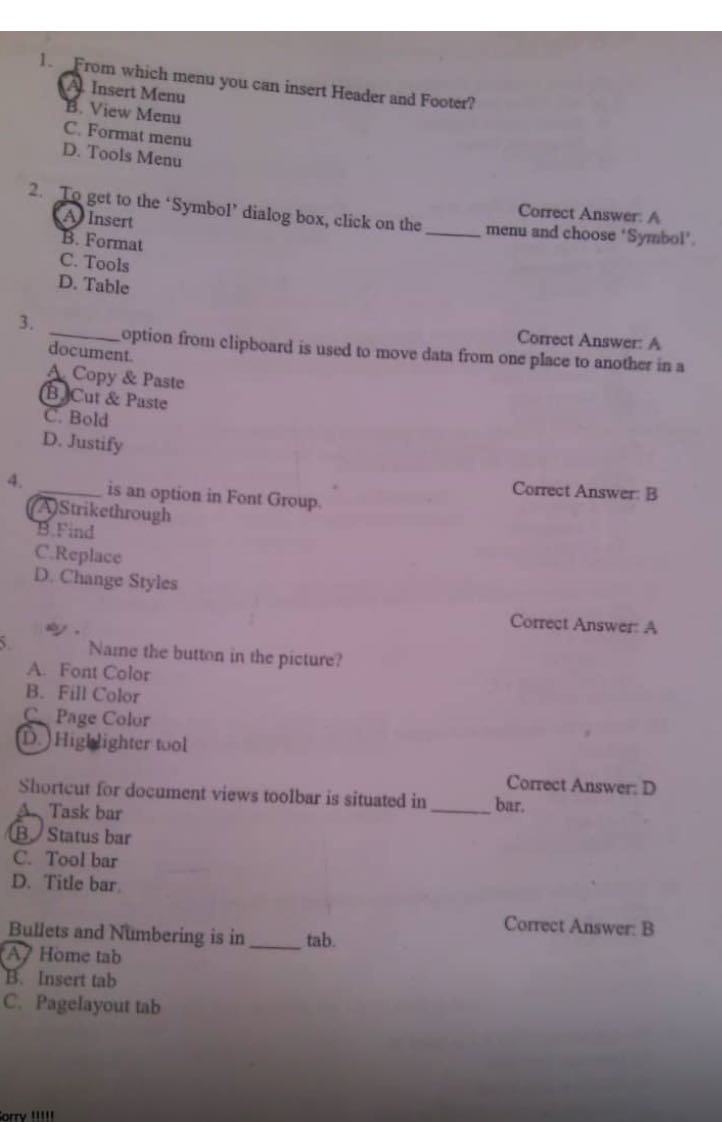
Question: 1. From which menu you can insert Header and Footer? Insert Menu B. View Menu C. Format menu D. Tools Menu 2. Correct Answer. A
1. From which menu you can insert Header and
1. From which menu you can insert Header and Footer? Insert Menu B. View Menu C. Format menu D. Tools Menu 2. Correct Answer. A To get to the 'Symbol' dialog box, click on the menu and choose ' Symbol'. Insert B. Format C. Tools D. Table Correct Answer: A 3 option from clipboard is used to move data from one place to another in a document A Copy & Paste B)Cut & Paste C. Bold D. Justify Correct Answer: B is an option in Font Group A Strikethrough B. Find C.Replace D. Change Styles Correct Answer: A Name the button in the picture? A. Font Color B. Fill Color Page Color D. Highlighter tool Correct Answer. D Shortcut for document views toolbar is situated in bar. Task bar B. Status bar C. Tool bar D. Title bar Correct Answer: B Bullets and Numbering is in tab A Home tab B. Insert tab C. Pagelayout tab

Step by Step Solution

There are 3 Steps involved in it

1 Expert Approved Answer
Step: 1 Unlock blur-text-image

Question Has Been Solved by an Expert!

Get step-by-step solutions from verified subject matter experts

Step: 2 Unlock
Step: 3 Unlock

Students Have Also Explored These Related Accounting Questions!