







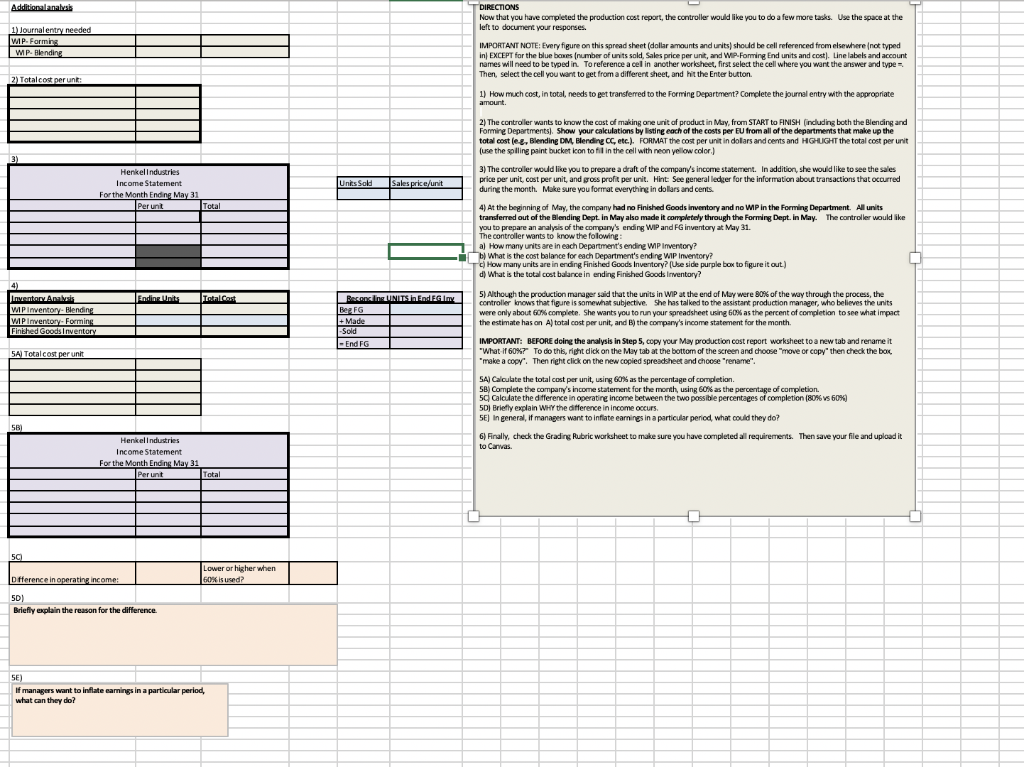
Question: 1) How much cost, in total, needs to get transferred to the Forming Department? Complete the journal entry with the appropriate amount. 2) The controller
1) How much cost, in total, needs to get transferred to the Forming Department? Complete the journal entry with the appropriate amount.
2) The controller wants to know the cost of making one unit of product in May, from START to FINISH (including both the Blending and Forming Departments). Show your calculations by listing each of the costs per EU from all of the departments that make up the total cost (e.g., Blending DM, Blending CC, etc.). FORMAT the cost per unit in dollars and cents and HIGHLIGHT the total cost per unit (use the spilling paint bucket icon to fill in the cell with neon yellow color.)
3) The controller would like you to prepare a draft of the company's income statement. In addition, she would like to see the sales price per unit, cost per unit, and gross profit per unit. Hint: See general ledger for the information about transactions that occurred during the month. Make sure you format everything in dollars and cents.
4) At the beginning of May, the company had no Finished Goods inventory and no WIP in the Forming Department. All units transferred out of the Blending Dept. in May also made it completely through the Forming Dept. in May. The controller would like you to prepare an analysis of the company's ending WIP and FG inventory at May 31.
The controller wants to know the following :
a) How many units are in each Department's ending WIP Inventory?
b) What is the cost balance for each Department's ending WIP Inventory?
c) How many units are in ending Finished Goods Inventory? (Use side purple box to figure it out.)
d) What is the total cost balance in ending Finished Goods Inventory?
5) Although the production manager said that the units in WIP at the end of May were 80% of the way through the process, the controller knows that figure is somewhat subjective. She has talked to the assistant production manager, who believes the units were only about 60% complete. She wants you to run your spreadsheet using 60% as the percent of completion to see what impact the estimate has on A) total cost per unit, and B) the company's income statement for the month.
IMPORTANT: BEFORE doing the analysis in Step 5, copy your May production cost report worksheet to a new tab and rename it "What-if 60%?" To do this, right click on the May tab at the bottom of the screen and choose "move or copy" then check the box, "make a copy". Then right click on the new copied spreadsheet and choose "rename".
5A) Calculate the total cost per unit, using 60% as the percentage of completion.
5B) Complete the company's income statement for the month, using 60% as the percentage of completion.
5C) Calculate the difference in operating income between the two possible percentages of completion (80% vs 60%)
5D) Briefly explain WHY the difference in income occurs.
5E) In general, if managers want to inflate earnings in a particular period, what could they do?
6) Finally, check the Grading Rubric worksheet to make sure you have completed all requirements. Then save your file and upload it to Canvas.
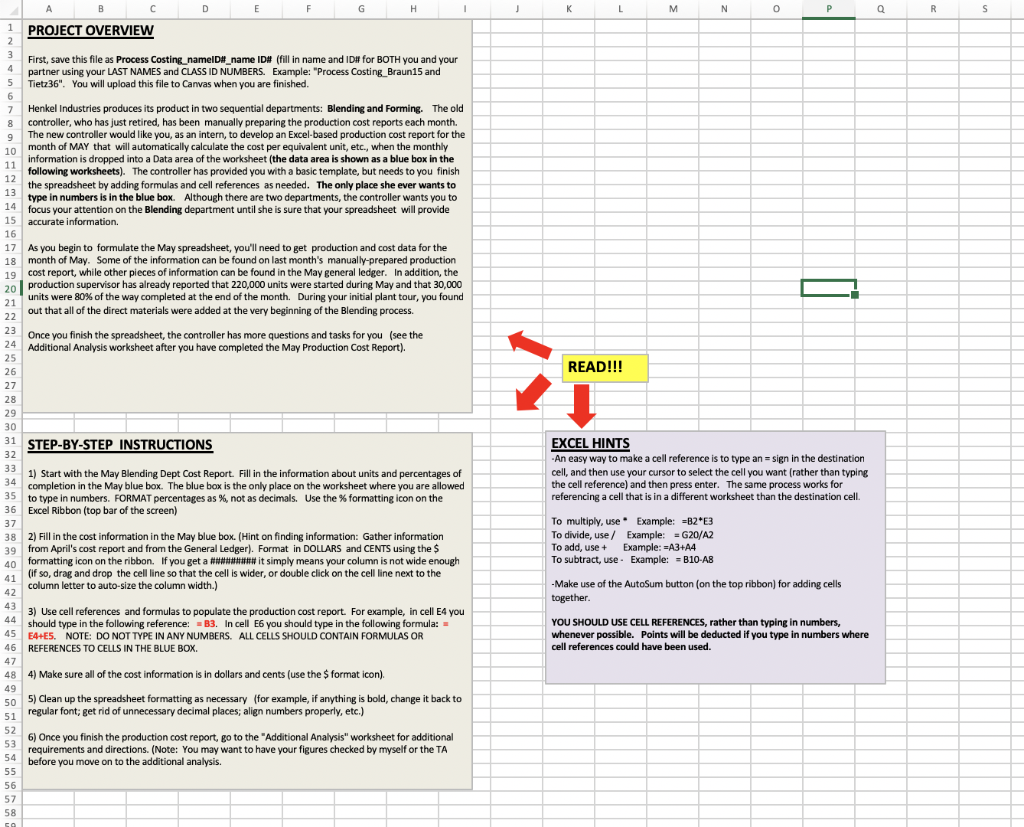
Additionalanalysis T DIRECTIONS Now that you have completed the production cost report, the controller would like you to do a few more tasks. Use the space at the left to document your responses 1) Journal entry needed IMP-Formin: IwP. Blending IMPORTANT NOTE: Every figure on this spread sheet (dollar amounts and units) should be cell referenced from elsewhere inot typed in) EXCEPT for the blue boxes number of units sold, Sales price per unit, and WIP Forming End units and cost). Line labels and account names will need to be typed in. To reference a cel in another worksheet, first select the cell where you want the answer and type Then, select the cell you want to get from a different sheet, and hit the Enter button 2) Totalcost perunt: 1) How much cost, in total, needs to get transferred to the Forming Department? Complete the journal entry with the appropriate amount. 2) The controller wants to know the cost of making one unit of product in May, from START to FINISH (including both the Blending and Forming Departments). Show your calculations by listing each of the costs per EU from all of the departments that make up the total cost lee, Blending DM, Blending oc, etc.). FORMAT the cost per unit in dollars and cents and HGHUGHT the total cost per unit (use the spilling paint bucket konto fill in the cell with neon yellow color) Henkelindustries Income Statement For the Month Endine May 31 Perunt 3) The controller would like you to prepare a draft of the company's income statement. In addition, she would like to see the sales price per unit, cost per unit, and gross profit per unit. Hint See general ledger for the information about transactions that occurred during the month. Make sure you format everything in dollars and cents Total 4) At the beginning of May, the company had no Finished Goods inventory and no WP in the Forming Department. All units transferred out of the Blending Dept. In May also made it completely through the Forming Dept. in May. The controller would like you to prepare an analysis of the company's ending WIP and FG inventory at May 31. The controller wants to know the folowing: a) How many units are in each Department's endine WIP Inventory? What is the cost balance for each Department's ending WIP Inventory? How many units are in ending Finished Goods Inventory? Use side purple box to figure it out) d) What is the total cost balance in ending Finished Goods Inventory? Ending Units Inventor Analysis WPinventory. Blendine WIP Inventory Forming Finched Goods Inventory Recensing UNITS in Ende.my Bez FG + Made Sold 1-End FG 5) Although the production manager said that the units in WIP at the end of May were 80% of the way through the process, the controller knows that figure is somewhat subjective. She has talked to the assistant production manager, who believes the units were only about 60% complete. She wants you to run your spreadsheet using Gox as the percent of completion to see what impact the estimate has on A) total cost per unit, and the company's income statement for the month. 5A Total cost per unit IMPORTANT: BEFORE doing the analysis in Step 5. Copy your May production cost report worksheet to a new tab and rename it "What if 60%7" To do this right dick on the Miy tab at the bottom of the screen and choose "move or copy then check the box make a copy. Then rieht click on the new copied spreadsheet and choose "rename". SA Calculate the total cost per unit, using 60% as the percentage of completion. SB) Complete the company's income statement for the month, using 60% as the percentage of completion. 5 Calculate the difference in operating Income between the two possible percentages of completion (80% vs 60% 50 Brietly explain WHY the difference in income occurs. 5E) In general, if managers want to inflate earnings in a particular period, what could they do? 6) Finally, check the Grading Rubric worksheet to make sure you have completed all requirements. Then save your file and upload it to Canvas Henkelindustries Income Statement For the Month Ending May 31 Perunt 5C) Lower or higher when 60% is used? Dfference in operating income: 501 Briefly explain the reason for the difference. of managers want to inflate earnings in a particular period, what can they do? RS PROJECT OVERVIEW First, save this file as Process Costing, namel _name ID# (fill in name and ID for BOTH you and your partner using your LAST NAMES and CLASS ID NUMBERS. Example: "Process Costing Braun15 and Tiet236". You will upload this file to Canvas when you are finished. 7 Henkel Industries produces its product in two sequential departments: Blending and Forming. The old controller, who has just retired, has been manually preparing the production cost reports each month. The new controller would like you, as an intern, to develop an Excel-based production cost report for the month of MAY that will automatically calculate the cost per equivalent unit, etc., when the monthly information is dropped into a Data area of the worksheet (the data area is shown as a blue box in the following worksheets). The controller has provided you with a basic template, but needs to you finish the spreadsheet by adding formulas and cell references as needed. The only place she ever wants to type in numbers is in the blue box. Although there are two departments, the controller wants you to focus your attention on the Blending department until she is sure that your spreadsheet will provide accurate information 17 19 As you begin to formulate the May spreadsheet, you'll need to get production and cost data for the month of May. Some of the information can be found on last month's manually prepared production cost report, while other pieces of information can be found in the May general ledger. In addition, the production supervisor has already reported that 220,000 units were started during May and that 30,000 units were 80% of the way completed at the end of the month. During your initial plant tour, you found out that all of the direct materials were added at the very beginning of the Blending process 21 22 Once you finish the spreadsheet, the controller has more questions and tasks for you (see the Additional Analysis worksheet after you have completed the May Production Cost Report) 25 READ!!! STEP-BY-STEP INSTRUCTIONS 1) Start with the May Blending Dept Cost Report. Fill in the information about units and percentages of completion in the May blue box. The blue box is the only place on the worksheet where you are allowed to type in numbers. FORMAT percentages as %, not as decimals. Use the % formatting icon on the Excel Ribbon (top bar of the screen) EXCEL HINTS An easy way to make a cell reference is to type an - sign in the destination cell, and then use your cursor to select the cell you want (rather than typing the cell reference) and then press enter. The same process works for referencing a cell that is in a different worksheet than the destination cell. 36 37 38 To multiply, use Example: =B2E3 To divide, use / Example: = G20/A2 To add, use + Example: =A3 A4 To subtract, use - Example: =B10 AB 2) Fill in the cost information in the May blue box. (Hint on finding information: Gather information from April's cost report and from the General Ledger). Format in DOLLARS and CENTS using the $ formatting icon on the ribbon. If you get a n ew it simply means your column is not wide enough (if so, drag and drop the cell line so that the cell is wider, or double click on the cell line next to the column letter to auto-size the column width.) 39 40 - Make use of the AutoSum button on the top ribbon) for adding cells together. 3) Use cell references and formulas to populate the production cost report. For example, in cell E4 you should type in the following reference: B3. In cell E6 you should type in the following formula: E4-E5. NOTE: DO NOT TYPE IN ANY NUMBERS. ALL CELLS SHOULD CONTAIN FORMULAS OR REFERENCES TO CELLS IN THE BLUE BOX. YOU SHOULD USE CELL REFERENCES, rather than typing in numbers, whenever possible. Points will be deducted if you type in numbers where cell references could have been used. 4) Make sure all of the cost information is in dollars and cents (use the format icon) 5) Clean up the spreadsheet formatting as necessary for example, if anything is bold, change it back to regular font, get rid of unnecessary decimal places; align numbers properly, etc.) 6) Once you finish the production cost report, go to the "Additional Analysis" worksheet for additional requirements and directions. (Note: You may want to have your figures checked by myself or the TA before you move on to the additional analysis. Additionalanalysis T DIRECTIONS Now that you have completed the production cost report, the controller would like you to do a few more tasks. Use the space at the left to document your responses 1) Journal entry needed IMP-Formin: IwP. Blending IMPORTANT NOTE: Every figure on this spread sheet (dollar amounts and units) should be cell referenced from elsewhere inot typed in) EXCEPT for the blue boxes number of units sold, Sales price per unit, and WIP Forming End units and cost). Line labels and account names will need to be typed in. To reference a cel in another worksheet, first select the cell where you want the answer and type Then, select the cell you want to get from a different sheet, and hit the Enter button 2) Totalcost perunt: 1) How much cost, in total, needs to get transferred to the Forming Department? Complete the journal entry with the appropriate amount. 2) The controller wants to know the cost of making one unit of product in May, from START to FINISH (including both the Blending and Forming Departments). Show your calculations by listing each of the costs per EU from all of the departments that make up the total cost lee, Blending DM, Blending oc, etc.). FORMAT the cost per unit in dollars and cents and HGHUGHT the total cost per unit (use the spilling paint bucket konto fill in the cell with neon yellow color) Henkelindustries Income Statement For the Month Endine May 31 Perunt 3) The controller would like you to prepare a draft of the company's income statement. In addition, she would like to see the sales price per unit, cost per unit, and gross profit per unit. Hint See general ledger for the information about transactions that occurred during the month. Make sure you format everything in dollars and cents Total 4) At the beginning of May, the company had no Finished Goods inventory and no WP in the Forming Department. All units transferred out of the Blending Dept. In May also made it completely through the Forming Dept. in May. The controller would like you to prepare an analysis of the company's ending WIP and FG inventory at May 31. The controller wants to know the folowing: a) How many units are in each Department's endine WIP Inventory? What is the cost balance for each Department's ending WIP Inventory? How many units are in ending Finished Goods Inventory? Use side purple box to figure it out) d) What is the total cost balance in ending Finished Goods Inventory? Ending Units Inventor Analysis WPinventory. Blendine WIP Inventory Forming Finched Goods Inventory Recensing UNITS in Ende.my Bez FG + Made Sold 1-End FG 5) Although the production manager said that the units in WIP at the end of May were 80% of the way through the process, the controller knows that figure is somewhat subjective. She has talked to the assistant production manager, who believes the units were only about 60% complete. She wants you to run your spreadsheet using Gox as the percent of completion to see what impact the estimate has on A) total cost per unit, and the company's income statement for the month. 5A Total cost per unit IMPORTANT: BEFORE doing the analysis in Step 5. Copy your May production cost report worksheet to a new tab and rename it "What if 60%7" To do this right dick on the Miy tab at the bottom of the screen and choose "move or copy then check the box make a copy. Then rieht click on the new copied spreadsheet and choose "rename". SA Calculate the total cost per unit, using 60% as the percentage of completion. SB) Complete the company's income statement for the month, using 60% as the percentage of completion. 5 Calculate the difference in operating Income between the two possible percentages of completion (80% vs 60% 50 Brietly explain WHY the difference in income occurs. 5E) In general, if managers want to inflate earnings in a particular period, what could they do? 6) Finally, check the Grading Rubric worksheet to make sure you have completed all requirements. Then save your file and upload it to Canvas Henkelindustries Income Statement For the Month Ending May 31 Perunt 5C) Lower or higher when 60% is used? Dfference in operating income: 501 Briefly explain the reason for the difference. of managers want to inflate earnings in a particular period, what can they do? RS PROJECT OVERVIEW First, save this file as Process Costing, namel _name ID# (fill in name and ID for BOTH you and your partner using your LAST NAMES and CLASS ID NUMBERS. Example: "Process Costing Braun15 and Tiet236". You will upload this file to Canvas when you are finished. 7 Henkel Industries produces its product in two sequential departments: Blending and Forming. The old controller, who has just retired, has been manually preparing the production cost reports each month. The new controller would like you, as an intern, to develop an Excel-based production cost report for the month of MAY that will automatically calculate the cost per equivalent unit, etc., when the monthly information is dropped into a Data area of the worksheet (the data area is shown as a blue box in the following worksheets). The controller has provided you with a basic template, but needs to you finish the spreadsheet by adding formulas and cell references as needed. The only place she ever wants to type in numbers is in the blue box. Although there are two departments, the controller wants you to focus your attention on the Blending department until she is sure that your spreadsheet will provide accurate information 17 19 As you begin to formulate the May spreadsheet, you'll need to get production and cost data for the month of May. Some of the information can be found on last month's manually prepared production cost report, while other pieces of information can be found in the May general ledger. In addition, the production supervisor has already reported that 220,000 units were started during May and that 30,000 units were 80% of the way completed at the end of the month. During your initial plant tour, you found out that all of the direct materials were added at the very beginning of the Blending process 21 22 Once you finish the spreadsheet, the controller has more questions and tasks for you (see the Additional Analysis worksheet after you have completed the May Production Cost Report) 25 READ!!! STEP-BY-STEP INSTRUCTIONS 1) Start with the May Blending Dept Cost Report. Fill in the information about units and percentages of completion in the May blue box. The blue box is the only place on the worksheet where you are allowed to type in numbers. FORMAT percentages as %, not as decimals. Use the % formatting icon on the Excel Ribbon (top bar of the screen) EXCEL HINTS An easy way to make a cell reference is to type an - sign in the destination cell, and then use your cursor to select the cell you want (rather than typing the cell reference) and then press enter. The same process works for referencing a cell that is in a different worksheet than the destination cell. 36 37 38 To multiply, use Example: =B2E3 To divide, use / Example: = G20/A2 To add, use + Example: =A3 A4 To subtract, use - Example: =B10 AB 2) Fill in the cost information in the May blue box. (Hint on finding information: Gather information from April's cost report and from the General Ledger). Format in DOLLARS and CENTS using the $ formatting icon on the ribbon. If you get a n ew it simply means your column is not wide enough (if so, drag and drop the cell line so that the cell is wider, or double click on the cell line next to the column letter to auto-size the column width.) 39 40 - Make use of the AutoSum button on the top ribbon) for adding cells together. 3) Use cell references and formulas to populate the production cost report. For example, in cell E4 you should type in the following reference: B3. In cell E6 you should type in the following formula: E4-E5. NOTE: DO NOT TYPE IN ANY NUMBERS. ALL CELLS SHOULD CONTAIN FORMULAS OR REFERENCES TO CELLS IN THE BLUE BOX. YOU SHOULD USE CELL REFERENCES, rather than typing in numbers, whenever possible. Points will be deducted if you type in numbers where cell references could have been used. 4) Make sure all of the cost information is in dollars and cents (use the format icon) 5) Clean up the spreadsheet formatting as necessary for example, if anything is bold, change it back to regular font, get rid of unnecessary decimal places; align numbers properly, etc.) 6) Once you finish the production cost report, go to the "Additional Analysis" worksheet for additional requirements and directions. (Note: You may want to have your figures checked by myself or the TA before you move on to the additional analysis
Step by Step Solution
There are 3 Steps involved in it

Get step-by-step solutions from verified subject matter experts
 Study Help