



Question: 1. I select cells Al through A20. How many cells have I selected? a. 19 b. 20 c. 21 d. None of them e. All
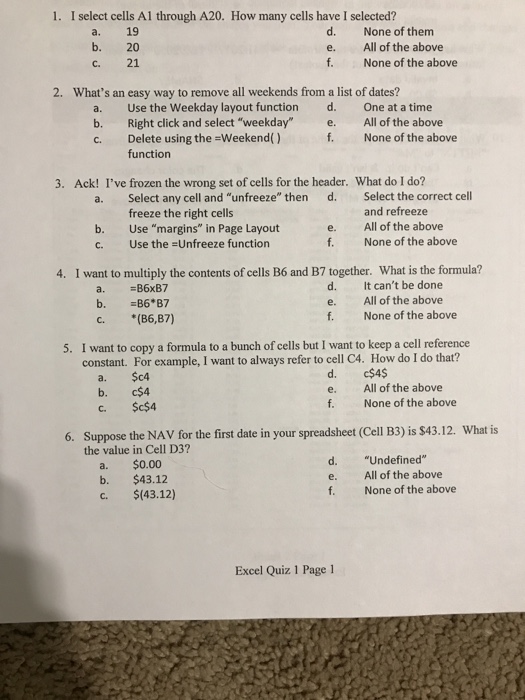
1. I select cells Al through A20. How many cells have I selected? a. 19 b. 20 c. 21 d. None of them e. All of the above f. None of the above 2. What's an easy way to remove all weekends from a list of dates? a. Use the Weekday layout function d. One at a time b. Right click and select "weekday" e. All of the above c. Delete using the-weekend( ) f. None of the above function 3. Ack! I've frozen the wrong set of cells for the header. What do I do? a. Select any cell and "unfreeze" then d. Select the correct cel freeze the right cells and refreeze b. Use "margins" in Page Layout c. Use the -Unfreeze function e. All of the above f. None of the above 4. I want to multiply the contents of cells B6 and B7 together. What is the formula? d It can't be done e. All of the above f. None of the above a. B6xB7 c. (86,87) I want to copy a formula to a bunch of cells but I want to keep a cell reference constant. For example, I want to always refer to cell C4. How do I do that? 5. a. $c4 b. c$4 c. $c$4 e. All of the above f. None of the above Suppose the NA V for the first date in your spreadsheet (Cell B3) is $43.12. What is the value in Cell D3? 6. a. $0.00 b. $43.12 C. $(43.12) d. "Undefined" e. All of the above f. None of the above Excel Quiz 1 Page 1
Step by Step Solution
There are 3 Steps involved in it

Get step-by-step solutions from verified subject matter experts