



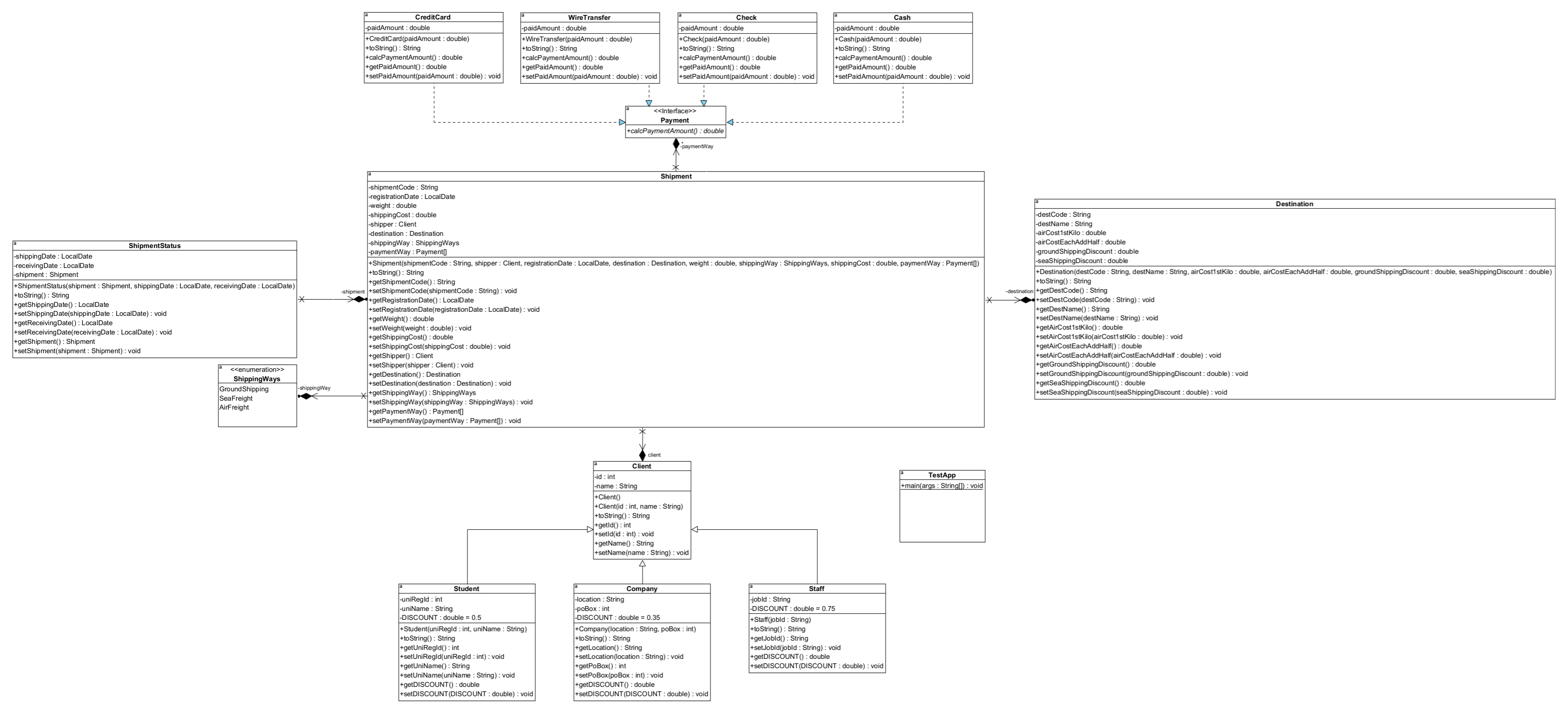
Question: 1 - Implement the UML class diagram illustrated in Figure 0 1 . 2 - Print the next menu once the program executed: Choose one
Implement the UML class diagram illustrated in Figure
Print the next menu once the program executed:
Choose one of the next options:
Add Client As per the constrains below
Add Destination As per the constrains below
Create new shipment As per the constrains below
Update an existing shipment As per the constrains below
SendingReceiving shipment As per the constrains below
Report List the existing clients As per the constrains below
Report List the destination details As per the constrains below
Report List the shipment details As per the constrains below
Report List the queued shipments As per the constrains below
Report List the client shipments As per the constrains below
Report List the income As per the constrains below
Report List the shipments not yet collected As per the constrains below
Save and Exit As per the constrains below
Constrains of Add Client:
Allow the user to add four different types of clients; as for the client id it has to be generated
automatically, starting by and keep incrementing the last digit for each new client. Save the
created clients in the clients Array List created in the class TestApp.
Constrains of Add Destination:
Destination code has to be generated automatically, starting by Des and keep incrementing
the last digit for each new destination. All the instance data members should be inserted for each
instance, as for the groundShippingDiscount and seaShippingDiscount, both representing a
percentage value.
Constrains of Create new shipment:
As for the shipment instance, give the user the chance to fill all the data members except the
payment way, as follows:
a Shipment code: to be generated automatically, starting by Ship and keep incrementing
the last digit for each new shipment.
b Registration date: should be todays date, filled automatically,
c Shipment weight: it has to be filled by the user.
d Shipment cost: it has to be calculated automatically as follows:
a If the weight is below one kilo gram, round it up to one kilo gram.
b If the weight is above one kilo gram, round it up to nearest half.
c Calculate the shipping cost as per the two data members in the destination class,
airCoststKil, and airCostEachAddHalf.
e ShipperDestination: has to be one of the existing clientsdestinations
f Shipping way: it has to be Air freight by default; in addition, give the user the chance to change
it to GroundSea shipping. moreover, if the shipping way changed from Air to Ground or Sea,
reflect this on the shipping cost by applying the discount giving as per the data members
groundShippingDiscount and seaShippingDiscount in the destination class.
g Payment way: The payment of the shipping cost could be:
a Postponed till later
b Paid in partial
c Paid in total
Moreover, the total payments should not exceed the shipping cost. Consider adding the
next additional fees for each payment way:
a CreditCard payment: Add of the paid amount on the paid amount.
b WireTransfer payment: Add QAR on the paid amount.
c Check payment: No additional fees will be applied for the check payment.
d Cash payment: No additional fees will be applied for the cash payment.
h Save the created shipment instance in the shipments Array List created in the class TestApp.
i Once the shipping cost paid in create an instance of the class shipmentStatus and
initialize the shipment data member by the instance paid in recently, in Qh; let the
shippingDate and receivingDate null; moreover, save the created shipmentStatus instance in
the shipmentsStatus Array List created in the class TestApp.PLEASE WRITE THE CODE IN JAVA OPTION
Step by Step Solution
There are 3 Steps involved in it
1 Expert Approved Answer
Step: 1 Unlock

Question Has Been Solved by an Expert!
Get step-by-step solutions from verified subject matter experts
Step: 2 Unlock
Step: 3 Unlock