







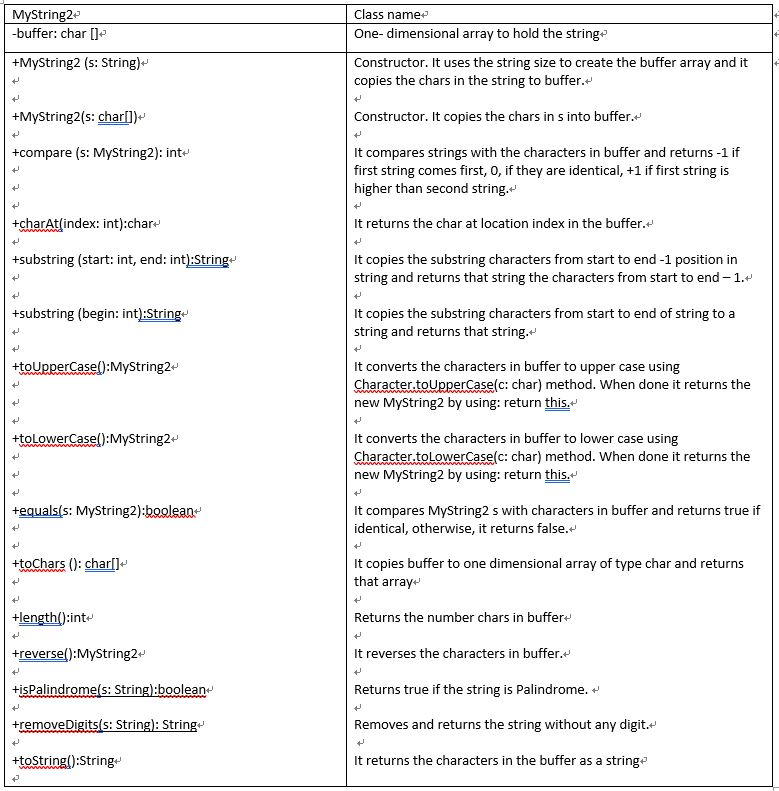
Question: 1. Implement your own String2 class named MyString2 as specified in the attached UML diagram . The String class is provided in the Java library
1. Implement your own String2 class named MyString2 as specified in the attached UML diagram . The String class is provided in the Java library (https://docs.oracle.com/javase/7/docs/api/java/lang/String.html ). Provide your own implementation for the methods listed in the attached MyString1UML diagram below. 2. Use the attached driver to invoke and test MyString2 methods. 3. Make sure your classes and methods are well documented, structured, aligned, and indented
Save sample input data and output results into a text file named mySampleRun2.txt
--------------------------------------------------------------------------------------------------------------------------------------------------
Tester (MyString2_Tester.java)
public class MyString2_Tester {
public static void main(String[] args) { // TODO Auto-generated method stub MyString2 ms1 = new MyString2 (new char[] {'C', 'S', ' ', '1', '3', '0', '2', ' ', 'B'}); MyString2 ms2 = new MyString2 ("Valdosta State University"); String s3 = "CS 1302A Spring 2019"; String s4 = "CS 1331 SC"; System.out.println(" 1.\tOriginal Char array: \t" + ms1.toString()); System.out.println(" 2.\tOriginal String: \t" + ms2.toString()); System.out.println(" 3.\tchar at entry 3 in Original Char array:\t" + ms1.charAt(3)); System.out.println(" 4.\tSize of Original String: \t" + ms2.length()); System.out.println(" 5.\tsubstring (0,3) in Original Char array:\t" + ms1.substring(0,3)); System.out.println(" 6.\tsubstring (2) in Original String: \t" + ms2.substring(2)); System.out.println(" 7.\tOriginal Char array in upper case: \t" + ms1.toUpperCase()); System.out.println(" 8.\tOriginal Char array in lower case: \t" + ms1.toLowerCase()); System.out.println(" 9.\tOriginal string in lower case: \t" + ms2.toLowerCase()); System.out.println(" 10.\tis string1 equals to string2: \t" + ms1.equals(ms2)); System.out.println(" 11.\tcompare string1 to string2: \t" + ms1.compare(ms2)); System.out.println(" 12.\tcompare string1 to string1: \t" + ms1.compare(ms1)); char[] temp = ms2.toChars(); System.out.println (" 13.\ttoChars ms2: \t" + String.valueOf(temp)); ms2.reverse(); System.out.println(" 14.\tms2 in reverse: \t" + ms2); System.out.println(" 15.\tis s3 Palindrom? \t" + MyString2.isPalindrome(s3)); System.out.println(" 16.\tis s4 Palindrom? \t" + MyString2.isPalindrome(s4)); System.out.println(" 17.\tOmit digits from s3 \t" + MyString2.removeDigits(s3)); } }
------------------------------------------------------------------------------------------------------------------
Sample Run:
1. Original Char array: CS 1302 B
2. Original String: Valdosta State University
3. char at entry 3 in Original Char array: 1
4. Size of Original String: 25
5. substring (0,3) in Original Char array: CS
6. substring (2) in Original String: ldosta State University
7. Original Char array in upper case: CS 1302 B
8. Original Char array in lower case: cs 1302 b
9. Original string in lower case: valdosta state university
10. is string1 equals to string2: false
11. compare string1 to string2: 1
12. compare string1 to string1: 0
13. toChars ms2: valdosta state university
14. ms2 in reverse: ytisrevinu etats atsodlav
15. is s3 Palindrom? false
16. is s4 Palindrom? true
17. Omit digits from s3 CS A Spring
MyString2 -buffer: char D +MyString2 (s: String) Class name One- dimensional array to hold the string- Constructor. It uses the string size to create the buffer array and it copies the chars in the string to buffer.. +MyString2(s: charl) Constructor. It copies the chars in s into buffer. +compare (s: MyString2): int It compares strings with the characters in buffer and returns -1 if first string comes first, o, if they are identical, +1 if first string is higher than second string.- +charAt index: int):char- It returns the char at location index in the buffer. +substring (start: int, end: int):String It copies the substring characters from start to end-1 position in string and returns that string the characters from start to end -1. +substring (begin: int String It copies the substring characters from start to end of string to a string and returns that string.- +toUpperCase():MyString2 It converts the characters in buffer to upper case using Character.toUpperCase(c: char) method. When done it returns the new MyString2 by using: return this ttolowerCase():MyString2 It converts the characters in buffer to lower case using Character.tolowerCase(c: char) method. When done it returns the new MyString2 by using: return this +equals(s: MyString2):boolean It compares MyString2 s with characters in buffer and returns true if identical, otherwise, it returns false. +toChars (): charll- It copies buffer to one dimensional array of type char and returns that array Hen Returns the number chars in buffer- +reverse():MyString2 +isPalindromes: Stringl:boolean +removeDigits s: String): String +toString):String It reverses the characters in buffer, Returns true if the string is Palindrome. + Removes and returns the string without any digit.+ It returns the characters in the buffer as a stringe
Step by Step Solution
There are 3 Steps involved in it

Get step-by-step solutions from verified subject matter experts
 Study Help