







Question: 1 . In Python.Pretend you work for an online email site. Your job is to develop a function called password with one input and one
In Python.Pretend you work for an online email site. Your job is to develop a function called
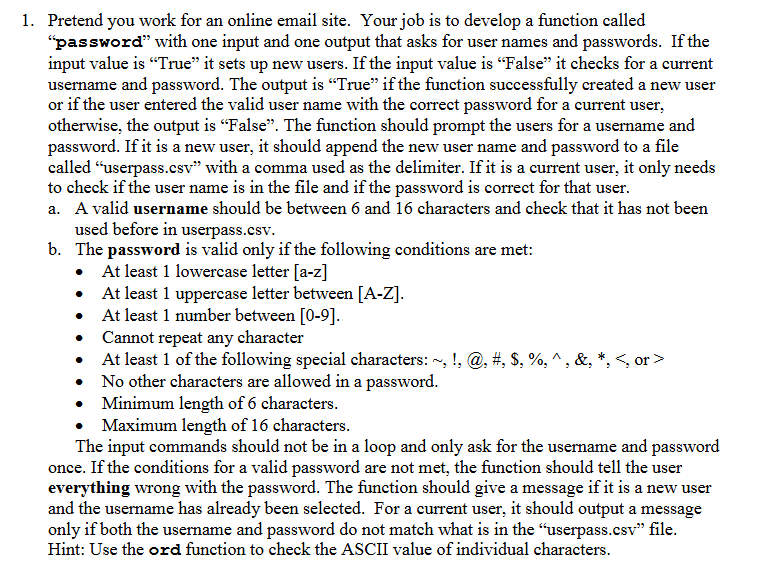
"password" with one input and one output that asks for user names and passwords. If the input value is "True" it sets up new users. If the input value is "False" it checks for a current username and password. The output is "True" if the function successfully created a new user or if the user entered the valid user name with the correct password for a current user, otherwise, the output is "False". The function should prompt the users for a username and password. If it is a new user, it should append the new user name and password to a file called "userpass.csv with a comma used as the delimiter. If it is a current user, it only needs to check if the user name is in the file and if the password is correct for that user.
a A valid username should be between and characters and check that it has not been used before in userpass.csv
b The password is valid only if the following conditions are met:
At least lowercase letter az
At least uppercase letter between AZ
At least number between
Cannot repeat any character
At least of the following special characters: sim @#$wedge& or
No other characters are allowed in a password.
Minimum length of characters.
Maximum length of characters.
The input commands should not be in a loop and only ask for the username and password once. If the conditions for a valid password are not met, the function should tell the user everything wrong with the password. The function should give a message if it is a new user and the username has already been selected. For a current user, it should output a message only if both the username and password do not match what is in the "userpass.csv file. Hint: Use the ord function to check the ASCII value of individual characters.
Step by Step Solution
There are 3 Steps involved in it
1 Expert Approved Answer
Step: 1 Unlock

Question Has Been Solved by an Expert!
Get step-by-step solutions from verified subject matter experts
Step: 2 Unlock
Step: 3 Unlock
 Study Help