







Question: 1. In the R Notebook, connect to the SQLite MediaDB.db Download MediaDB.dbdatabase and then load, using SQL SELECT, the invoice_items table into a data frame
1. In the R Notebook, connect to the SQLite MediaDB.db Download MediaDB.dbdatabase and then load, using SQL SELECT, the "invoice_items" table into a data frame called rs. Add a new column to rs for the extended price called ExtPrice that is Quantity times Price. Using R, what is the average extended price (rounded to 2 decimals)? Do not use {sql} chunks for this entire question. You must use all R code; to do the query use one of dbExecute(), dbGetQuery(), or dbSendQuery().
2. Using sqldf, write a SQL query against the data frame rs from the question above that finds the total amount for each invoice (i.e., the sum of the extended prices for the invoice_items in each invoice) and the number of items in the invoice. So, the result set contains rows that each have the invoice ID, the total, and the number of items.
3. Using R and the result from the prior question, create a scatter plot of the total number of items in an invoice (x axis) versus the total (y axis). Add proper axis labels.
4. Write and execute some combination of R code, loops in R, sqldf, dbWriteTable(), direct SQL ALTER and SQL UPDATE statements that applies a 10% discount to the total amount for each invoice if it has more than 5 items and stores that discounted amount in a new column in the invoices table called DiscPrice. This cannot be solved fully in sqldf nor fully with just a single UPDATE. You will need to use a combination of techniques and some creativity. Any approach will be acceptable.
5. Using a separate {r} chunk show that the update in (4) executed properly by displaying a part of the table.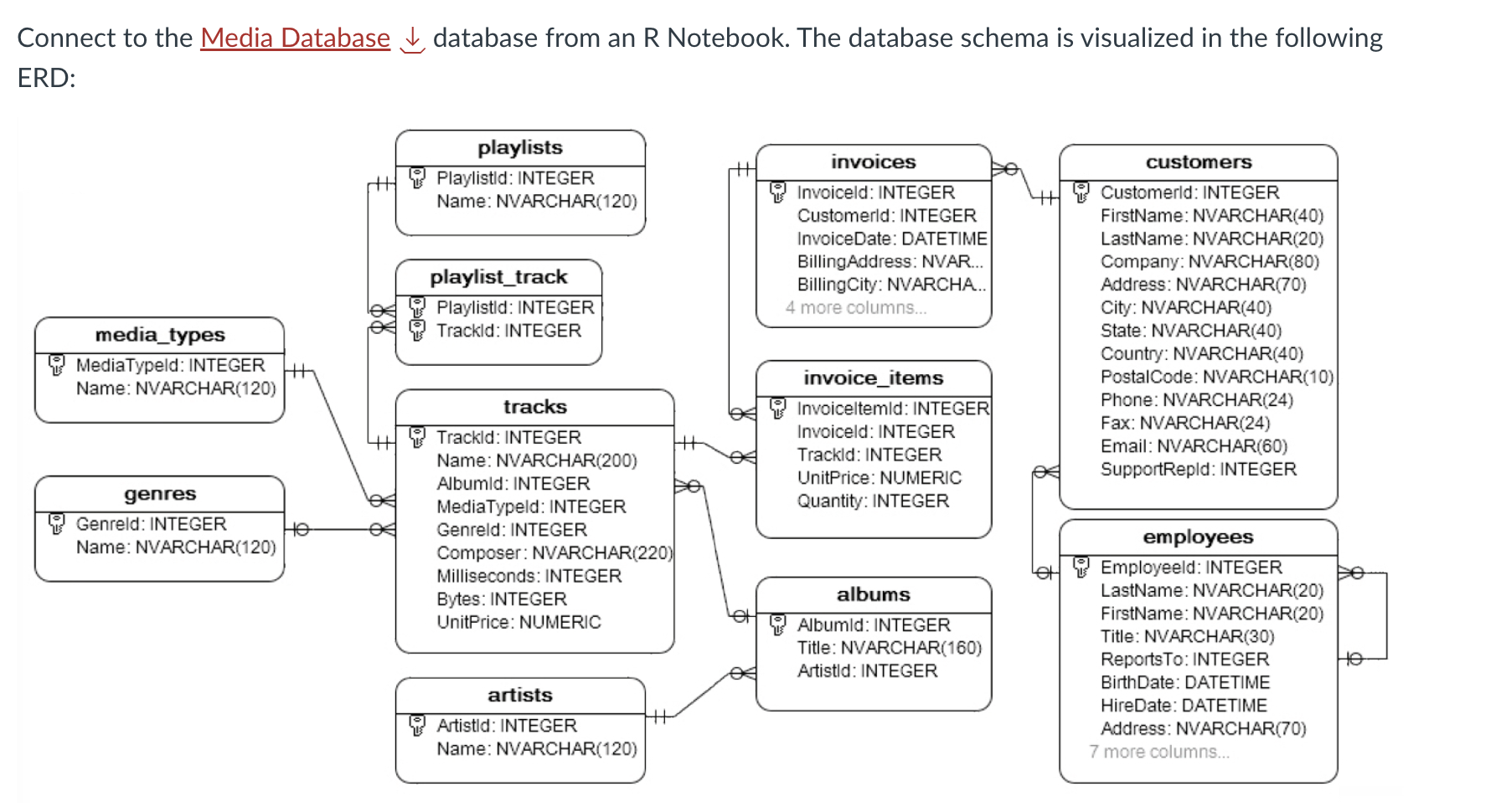
Connect to the Media Database database from an R Notebook. The database schema is visualized in the following ERD
Step by Step Solution
There are 3 Steps involved in it

Get step-by-step solutions from verified subject matter experts
 Study Help