







Question: 1. In your text, go through Chapter 3ST1 through ST5 (pages 104-105). Use the Excel file M2 Problem Set Excel that I provide and the
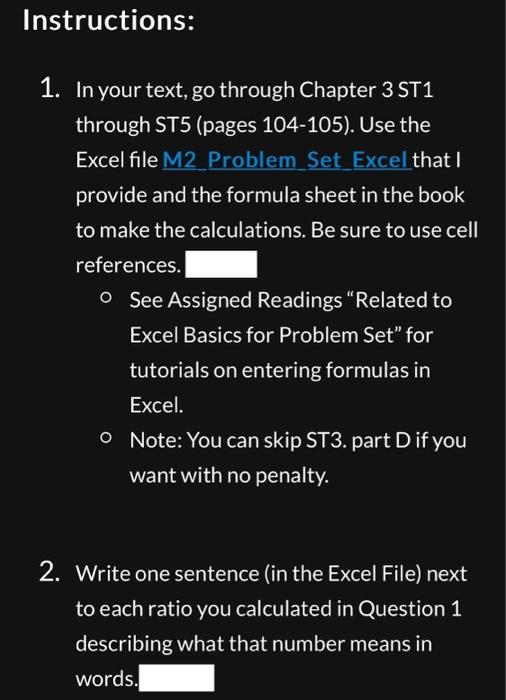
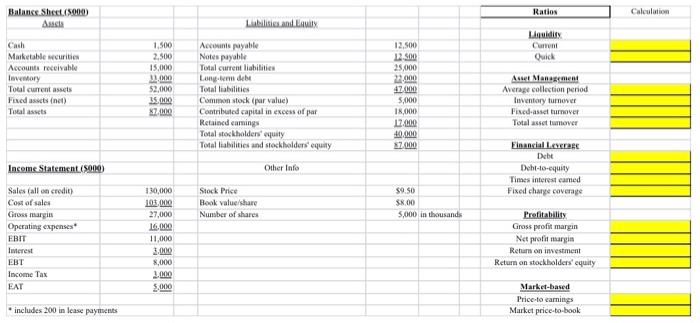
1. In your text, go through Chapter 3ST1 through ST5 (pages 104-105). Use the Excel file M2 Problem Set Excel that I provide and the formula sheet in the book to make the calculations. Be sure to use cell references. O See Assigned Readings "Related to Excel Basics for Problem Set" for tutorials on entering formulas in Excel. - Note: You can skip ST3. part D if you want with no penalty. 2. Write one sentence (in the Excel File) next to each ratio you calculated in Question 1 describing what that number means in words. 1. In your text, go through Chapter 3ST1 through ST5 (pages 104-105). Use the Excel file M2 Problem Set Excel that I provide and the formula sheet in the book to make the calculations. Be sure to use cell references. O See Assigned Readings "Related to Excel Basics for Problem Set" for tutorials on entering formulas in Excel. - Note: You can skip ST3. part D if you want with no penalty. 2. Write one sentence (in the Excel File) next to each ratio you calculated in Question 1 describing what that number means in words
Step by Step Solution
There are 3 Steps involved in it

Get step-by-step solutions from verified subject matter experts
 Study Help