







Question: 1. Insert newlines separating the store name and the welcome message. 2. Replace the store name. 3. Replace the welcome message. 4. Any shop with
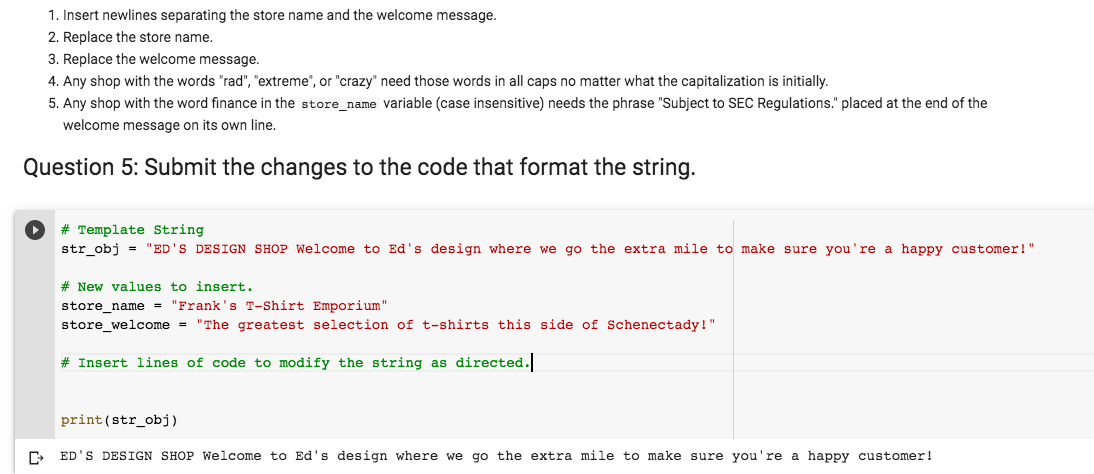
1. Insert newlines separating the store name and the welcome message. 2. Replace the store name. 3. Replace the welcome message. 4. Any shop with the words "rad", "extreme", or "crazy' need those words in all caps no matter what the capitalization is initially. 5. Any shop with the word finance in the store_name variable (case insensitive) needs the phrase "Subject to SEC Regulations." placed at the end of the welcome message on its own line. Question 5: Submit the changes to the code that format the string. # Template String str_obj = "ED'S DESIGN SHOP Welcome to Ed's design where we go the extra mile to make sure you're a happy customer!" # New values to insert. store_name = "Frank's T-Shirt Emporium" store_welcome = "The greatest selection of t-shirts this side of Schenectady!" # Insert lines of code to modify the string as directed. print (str_obj) F ED'S DESIGN SHOP Welcome to Ed's design where we go the extra mile to make sure you're a happy customer! 1. Insert newlines separating the store name and the welcome message. 2. Replace the store name. 3. Replace the welcome message. 4. Any shop with the words "rad", "extreme", or "crazy' need those words in all caps no matter what the capitalization is initially. 5. Any shop with the word finance in the store_name variable (case insensitive) needs the phrase "Subject to SEC Regulations." placed at the end of the welcome message on its own line. Question 5: Submit the changes to the code that format the string. # Template String str_obj = "ED'S DESIGN SHOP Welcome to Ed's design where we go the extra mile to make sure you're a happy customer!" # New values to insert. store_name = "Frank's T-Shirt Emporium" store_welcome = "The greatest selection of t-shirts this side of Schenectady!" # Insert lines of code to modify the string as directed. print (str_obj) F ED'S DESIGN SHOP Welcome to Ed's design where we go the extra mile to make sure you're a happy customer
Step by Step Solution
There are 3 Steps involved in it

Get step-by-step solutions from verified subject matter experts
 Study Help