







Question: 1 Instructions Read the problem description below. You will find the starting code for this assignment here or, if you are logged in to one
1 Instructions
-
Read the problem description below.
-
You will find the starting code for this assignment here or, if you are logged in to one of the CS Linux machines, at ~zeil/Assignments/cs361/prereq_courseSched/.
Get the files for this assignment. Compile the program as is to familiarize yourself with it. It will not compile correctly in its current form, as several Faculty functions are missing and need to be written. The error messages, however, may serve as partial hints about what need to be filled in.
-
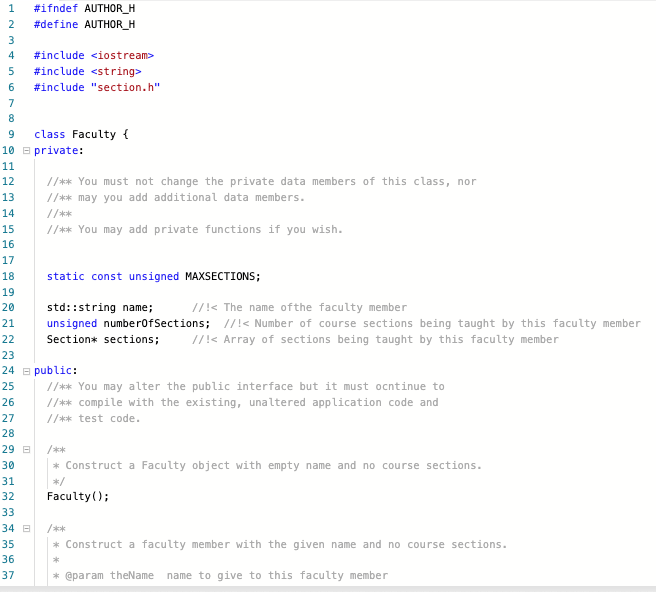
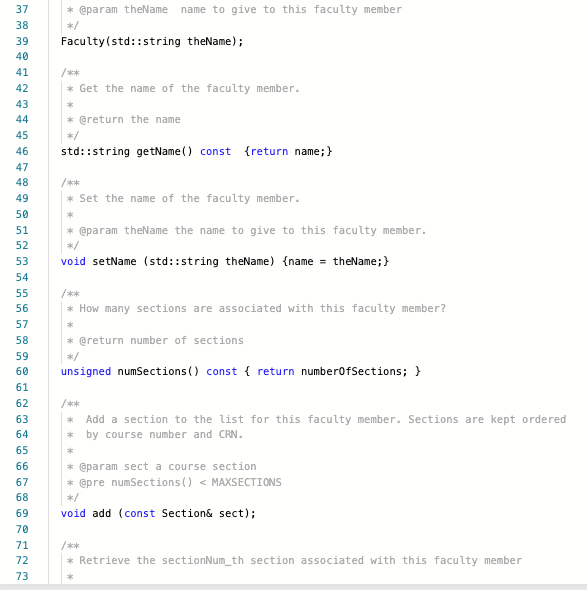
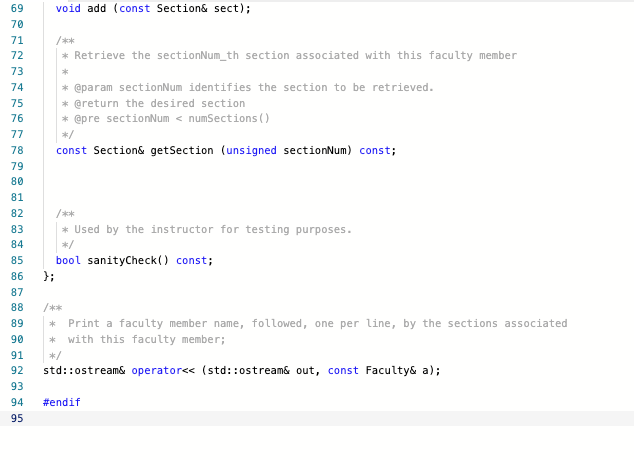
Your focus in this assignment will on the implementation of the Faculty class in files faculty.h and faculty.cpp. This class stores information about department faculty and the course sections they are teaching.
Although the immediate use of Faculty is in support of this printSchedule program, we anticipate the possibility that Faculty may be reused in other future projects, so we want to make sure that it is designed and implemented to facilitate that reuse.
You will only be submitting your modified versions of faculty.h and faculty.cpp. You should not change any other source code files that contribute to this project (except, possibly, to add debugging output for your own purposes), as you will only be submitting those two files and I will test what you have submitted in conjunction with the original versions of the the other files.
You should not change the private data members in faculty.h. (You may, if you wish, add additional private function members if doing so would aid you in completing the implementation.)
You may need to change some of the public functions in faculty.h, but keep in mind that the Faculty class must continue to compile with the other code in this program.
-
Your code will be evaluated both on its ability to function correctly within the printSchedule application and on its ability to pass the various unit tests provided.
-
In the test report, tests 05 test the printSchedule application. Tests numbered 621 check the unit tests on the Faculty class.
-
Each even-numbered test checks for correct behavior of the code.
-
Each odd-numbered test checks to see if that same behavior is correct and entails no memory leaks or other common pointer/memory handling problems.
-
-
-
When you are ready to submit, use the button below:
2 Problem Description
The CS Dept offers a lot of courses each semester. Complicating matters, many course offerings are divided into multiple sections for administrative purposes. A single course offering by a single faculty member can have as many as 14 different sections (not counting attached labs or recitations). With most faculty teaching multiple course offerings, keeping track of who is responsible for each section is a challenge.
This program is intended to read a list of course sections obtained from this schedule and to print a report listing the courses taught by each faculty member in the department.
2.1 Input
Although you are not responsible for writing the code to read the input, the input format is described here so that you may create your own data for testing.
Input for this program is presented in CSV (Comma-Separated Values) format, a common format for describing tabular data. CSV files can be edited in any spreadsheet program (e.g., excel), and are often used to exchange data between spreadsheets and other data sources.
A CSV file is a text file, with each line representing one row in a table or spreadsheet. The data within each line is deivided by commas (,) into the columns of the table or spreadsheet. For example, a row of three values might appear as
123,John Doe,470523
-
The data for a specific column may be enclosed in quotation marks ("). If so, the quotation marks are not considered to be part of the actual data value when inserted into the table/spreadsheet. E.g., the two rows
"123","John Doe","470523" 123,John Doe,470523
represent identical data.
-
If the data to be placed in a column is a string that itself contains commas, then that data must be enclosed in quotation marks. For example,
123,"Doe, John",470523
represents a row of three columns, as the second comma is part of a data field, not a separator.
-
If the data to be placed in a column is a string that contains commas and quotation marks, then the internal quotation marks are doubled:
123,"Doe, John, a.k.a. ""Jack"" ",470523
For this program, the input will contain eight columns in each row. The first row is a header (for convenience when editing input files) and after that, each row represents one section. For example,
CRN,SUBJ,CRSE,TITLE,CR HRS,TIME,DAYS,INSTRUCTOR 13785,CS,252,INTRO TO UNIX FOR PROGRAMMERS,1,HOURS ARR,,"ZEIL,S" 13863,CS,381,INTRO TO DISCRETE STRUCTURES,3,HOURS ARR,,"EL MESALAMI,A" 14084,CS,350,INTRO TO SOFTWARE ENGINEERING,3, 200-250PM,MWF,"ZEIL,S"
- CRN is a unique identifier for each section.
- SUBJ is the subject area part of the course name.
- CRSE is the specific course within that subject.
- TITLE is the long name for the course.
- CR is the number of credit hours for the section.
- TIME is the time of the day at which the section is taught.
- DAYS is the days (MTWRFS) on which the section is taught and can be empty.
- INSTRUCTOR is the name of the faculty member assigned to teach the course.
2.2 Output
Output consists of a report written to standard output showing the faculty members in alphabetic order by name.
For each faculty member, an indented list of sections is printed, one section per line. The sections are shown in order by course name (e.g., CS361). Sections with the same course name are ordered by CRN. Because the CRN for each section is unique, there will be no cases where two sections have the same course name and the same CRN.
After all sections have been listed, a line is printed announcing the number of sections taught by that faculty member.
A more detailed description of the output format is not provided here because you will not be responsible for the output format, only for parts of the calculations leading up to that output.
If you add debugging output to the code, you must remove or comment it out before submitting. Extra output will be flagged as incorrect.
2.3 Example
For example, given the input
CRN,SUBJ,CRSE,TITLE,CR HRS,TIME,DAYS,INSTRUCTOR 16477,CS,250,PROBLEM SOLVING & PROGRMNG II,4,HOURS ARR,,"EL MESALAMI,A" 21512,CS,250,PROBLEM SOLVING & PROGRMNG II,4,HOURS ARR,,"EL MESALAMI,A" 13785,CS,252,INTRO TO UNIX FOR PROGRAMMERS,1,HOURS ARR,,"ZEIL,S" 13809,CS,330,OBJECT ORIENT PROGRAM/DESIGN,3,HOURS ARR,,"KENNEDY,T" 20654,CS,330,OBJECT ORIENT PROGRAM/DESIGN,3,HOURS ARR,,"KENNEDY,T" 14084,CS,350,INTRO TO SOFTWARE ENGINEERING,3, 200- 250PM,MWF,"ZEIL,S" 13863,CS,381,INTRO TO DISCRETE STRUCTURES,3,HOURS ARR,,"EL MESALAMI,A" 13867,CS,382,INTRODUCTION TO JAVA,1,HOURS ARR,,"ZEIL,S" 15478,CS,410,PROFESSIONAL WORKFORCE DEV I,3,HOURS ARR,,"KENNEDY,T" 19559,CS,417,COMPUTATIONAL METH & SOFTWARE,3, 100- 215PM,TR,"KENNEDY,T" 15813,CS,471,OPERATING SYSTEMS,3,HOURS ARR,,"EL MESALAMI,A" 21722,CS,795,"TPCS:DEVOPS,CONTAINERS & CLOUD",3,1100-1215PM,MW,"ZEIL,S"
(available as schedule_short.csv in the assignment files, the output should be
EL MESALAMI,A 16477 CS250 PROBLEM SOLVING & PROGRMNG II 4 HOURS ARR 21512 CS250 PROBLEM SOLVING & PROGRMNG II 4 HOURS ARR 13863 CS381 INTRO TO DISCRETE STRUCTURES 3 HOURS ARR 15813 CS471 OPERATING SYSTEMS 3 HOURS ARR 4 sections KENNEDY,T 13809 CS330 OBJECT ORIENT PROGRAM/DESIGN 3 HOURS ARR 20654 CS330 OBJECT ORIENT PROGRAM/DESIGN 3 HOURS ARR 15478 CS410 PROFESSIONAL WORKFORCE DEV I 3 HOURS ARR 19559 CS417 COMPUTATIONAL METH & SOFTWARE 3 TR 100- 215PM 4 sections ZEIL,S 13785 CS252 INTRO TO UNIX FOR PROGRAMMERS 1 HOURS ARR 14084 CS350 INTRO TO SOFTWARE ENGINEERING 3 MWF 200- 250PM 13867 CS382 INTRODUCTION TO JAVA 1 HOURS ARR 21722 CS795 TPCS:DEVOPS,CONTAINERS & CLOUD 3 MW 1100-1215PM 4 sections
Larger examples are also found in .csv files among the provided assignment files. You should run my solution if you want to see the expected output for those.
2.4 Running the Program
2.4.1 System Tests
The printSchedule program takes its input from a file named in the command line or, if no file is named there, from standard in (cin).
It produces its output on standard out (cout).
For example, to run the program on the provided sample schedule_short.csv file, the command would be
./printSchedule schedule_short.csv
If you are working in Windows, use .\ instead of ./. Of course, if you have your files in different directories or use different names, you will need to adjust your paths in the above command accordingly.
To supply the file name when running within Eclipse, refer to the FAQ list.
2.4.2 Unit Tests
The unit tests will form a separate executable, named unittest. It can be run without parameters to run all tests on the Department, Faculty, and Section classes. (Note that some bugs in the Faculty code could cause Department tests to fail, because Department builds on the Faculty class.
You can, however, list one or more test names as parameters to run those tests only. For example, if you are failing the testFacConstructor test, run
./unittest testFacConstructor
to focus on just that one test. This can be very useful when debugging your code, because the unit tests are simpler and will get to your Faculty code a great deal more directly than the full application.
You can also abbreviate test names to run all tests beginning with a string. For example, all unit tests on the Faculty class have named starting with testFac, so
./unittest testFac
would run all Faculty unit tests but none of the tests on other classes.
3 Notes
-
This assignment should not require any skills/knowledge not covered in CS250/333 and CS252. But it does require a lot of the skills covered in those classes. If your memories are rusty, however, this is a good opportunity for review before we move on to new material.
-
You may find it a much more efficient use of your time to focus on passing the unit tests first and worry about system testing the full printSchedule application afterwards.
-
In this and all assignment in the course, you should be setting your compiler/IDE to the C++17 standard. (Most default to the much older C++98 standard.) Instructions on doing this are in Preparing and Submitting Programming Assignments and in the FAQ.
i need help with this Assignment in C++
faculty.h
faculty.cpp
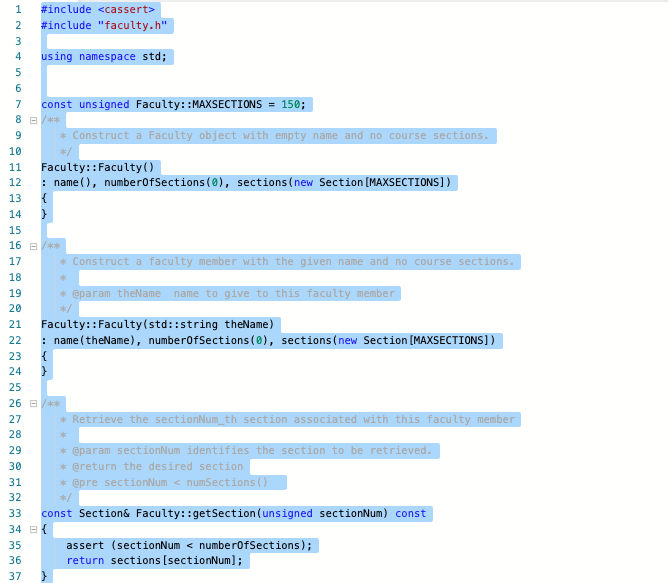
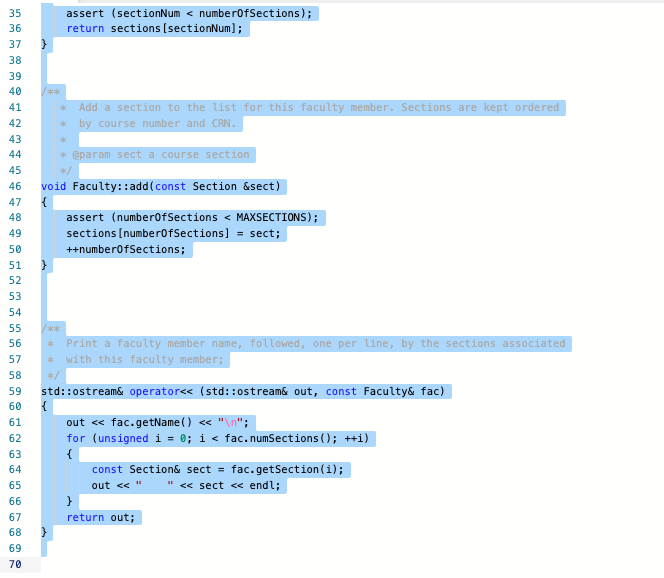
#ifndef AUTHOR_H #define AUTHOR_H 1 2 3 4 5 6 7 #include
Step by Step Solution
There are 3 Steps involved in it

Get step-by-step solutions from verified subject matter experts
 Study Help