







Question: 1 . Introduction Please use CMake ( and not qmake ) when setting up your assignment projects. Qt Designer should not be used to design
Introduction Please use CMake and not qmake when setting up your assignment projects. Qt Designer should not be used to design user interfaces, and you are expected to manually set up GUIs to ensure that you properly handle memory using Qts parent functionality. Good programming practices should be followed. words.child Follow standard naming conventions: class names start with a capital letter, variable and function names start with a lowercase letter, using camelCase for names made up of multiple Ensure consistent code layout and use of blank lines. Use forward class declarations in header files. Use initialiser lists in constructors. Have proper GUI management: setting cursor focus, sequential tabbing, clearing input widgets like text i nput fields being cleared and spin boxes being returned to some default value and enabling and disabling buttons as appropriate. Provide appropriate user feedback. Your code should build and run without any warnings.Questions
Question
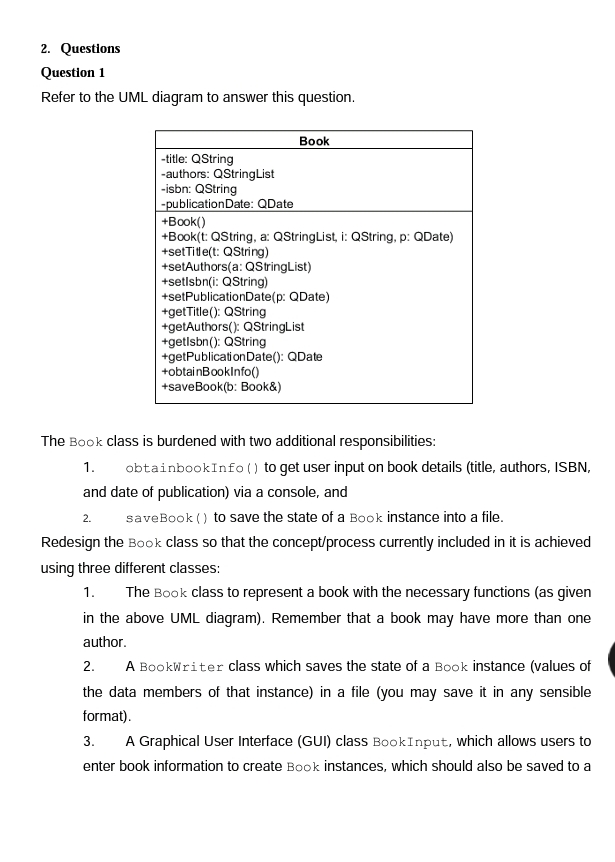
Refer to the UML diagram to answer this question.The Book class is burdened with two additional responsibilities:
obtainbookInfo to get user input on book details title authors, ISBN, and date of publication via a console, and
saveBook to save the state of a Book instance into a file.
Redesign the Book class so that the conceptprocess currently included in it is achieved using three different classes:
The Book class to represent a book with the necessary functions as given in the above UML diagram Remember that a book may have more than one author.
A BookWriter class which saves the state of a Book instance values of the data members of that instance in a file you may save it in any sensible format
A Graphical User Interface GUI class BookInput, which allows users to enter book information to create Book instances, which should also be saved to a
Step by Step Solution
There are 3 Steps involved in it
1 Expert Approved Answer
Step: 1 Unlock

Question Has Been Solved by an Expert!
Get step-by-step solutions from verified subject matter experts
Step: 2 Unlock
Step: 3 Unlock
 Study Help